I’m trying to start authenticating wifi connections using WPA2-Enterprise to an IdP we operate.
Since the only thing UniFi Network offers for external authentication is via a Radius server, I installed a FreeRadius that passes through the authentication to the IdP’s LDAP server.
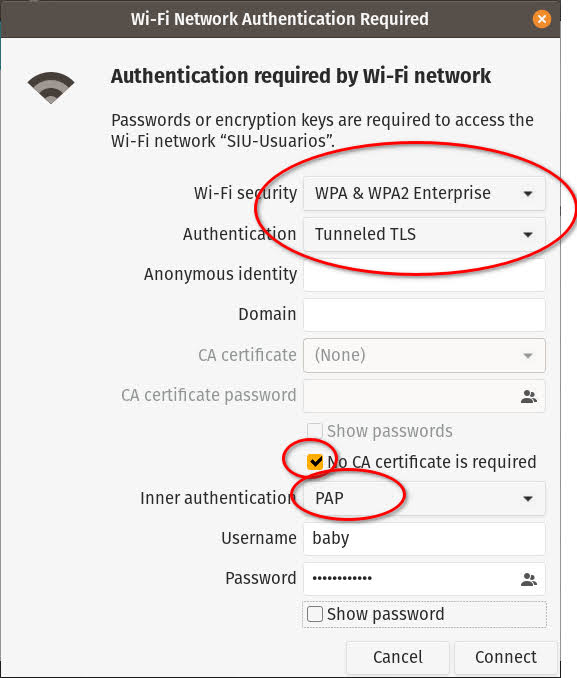
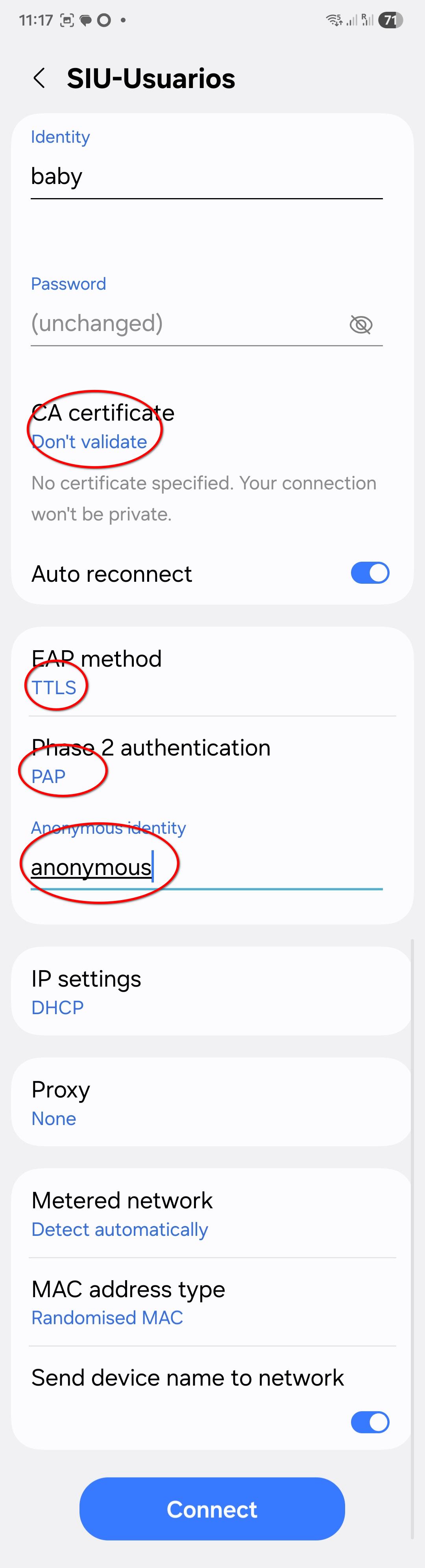
Since the LDAP server has the passwords encrypted with bcrypt the only way to allow this pass through is to use PAP (which happily sends passwords in cleartext) using a secure tunnel (EAP-TTLS).
I could easily configure my notebook (Pop! OS 22.04, similar to Ubuntu) to do this:
I am using wpa3-eap with Freeradius and dynamic vlans.
I don’t use LDAP my users and groups are in de radius database (MariaDB).
I am using EAP-TLS (EAP-PEAP is also working but not used).
Freeradius runs in a Debian lxc container on my proxmox server.
This week one of my Android phones upgraded to version 16 and stopped connecting to my wifi network. I had to change the Freeradius server eap config.
tls_max_version = “1.3”
to
tls_max_version = “1.2”
To make my older certificates working again.
CA and user certificates are created in pfSense certificate manager long time ago.
Also you cannot choose not to validate a CA certificate anymore in Android 16 and EAP-TLS.
I don’t know about TTLS i don’t use that.
Android 16 is more strict. Also with TLS ciphers. I could not set tls_max_version = “1.3” anymore and use TLS 1.2 ciphers. I had to change the setting to tls_max_version = “1.2”. Then i could logon to my wpa3-enterprise again.
Maybe this helps.
What is the error message when you’re connecting Android?
If it is a verification problem then something is not right with certificates.
Android 16 is more strict.
My problem was much simpler than that since I was allowing connections from the unifi network app server and not from the APs themselves.
I still have to adjust VLANs ACLs so that APs can talk to the radius server and start testing again.
I can’t do this until next week that I’ll be at the office and able to connect to the APs. I will start again using the notebook (which is much easier to debug) and then start with the phones.
My own phone is Android 16, so I’ll keep your information in mind.
Yeah, I know… but the controller has also an interface in the servers’ VLAN.
Ports are correctly tagged, but the L3 switch has to allow radius trafic between the “devices” VLAN and the “servers” VLAN.
Back in the office again. I was able to adjust the ACLs in my core switch so that the access points can receive radius replies from the server (I found that packages were going from the APs to the radius server but not the other way around).
I still have to debug authentication, but I logged in via ssh to the AP to be able to watch the logs and I noticed that the time is set to some three months ago.
How do you syncronize UniFi devices time? I’m running UniFi OS on a Debian VM on Proxmox. Should I install and run an NTP server on the VM?
I run Unfii network controller 10.4.57 in a LXC container, don’t run Unifi OS .
In my case i run a NTP server on my pfSense firewall/router system, it has a installable package for NTP server and this works very good and simple to set up.
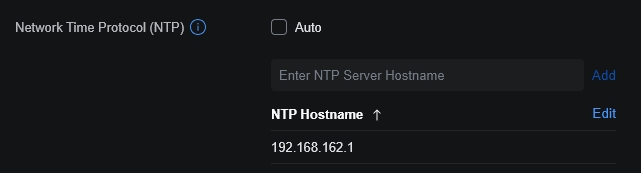
Unifi doesn’t seem to have a build in NTP server but has NTP client settings.
In your case i would look for a NTP (pool) server in your area and put that in your network controller NTP settings.
For example 0.ubnt.pool.ntp.org, 1.ubnt.pool.ntp.org or type in reliable regional pools like pool.ntp.org or time.google.com.
In settings > system you can configure a (pool) NTP server.
Make sure your network controller can reach this NTP server over UDP but also TCP port 123.
I noticed in the past NTP sometimes uses TCP too.