I’ve got a pfSense based Site to Site Wireguard VPN running between my house and my off-site workshop, and it works great.
With that said though, I am struggling to understand how applying firewall rules on each side of the tunnel work. When I first built this out, I set it up with “Allow All” rules on each side, and as expected it worked perfectly fine. Now that I want to lock traffic down a bit more I’m struggling to understand what I’m seeing via firewall rules.
For example, I have a self-hosted Bitwarden server on my home network. I don’t want to have every machine on my Workshop side to have access to the Bitwarden server, but my laptop and workstations certainly should have access to it.
So, I replaced the “Allow All” rule on my Home side with rules to limit Workshop networks and hosts access to services on my Home network (Bitwarden, DNS, Unifi Protect, etc.)

All of these rules, for the most part, work just fine, though there is a caveat that I don’t understand.
The alias “VPN_Remote_Networks” contains a list of my Workshop networks, and I use it as the Source to limit which networks on the Workshop side can connect to which services on the Home side. The various destination aliases work the same.. pretty basic stuff here.
What I’m struggling with is that none of this actually works unless I put my Wireguard peer network (10.50.1.0/30) in that “VPN_Remote_Networks” alias. Additionally, that “BitwardenClients” alias (FQDNs of machines that should have Bitwarden access) doesn’t work at all.
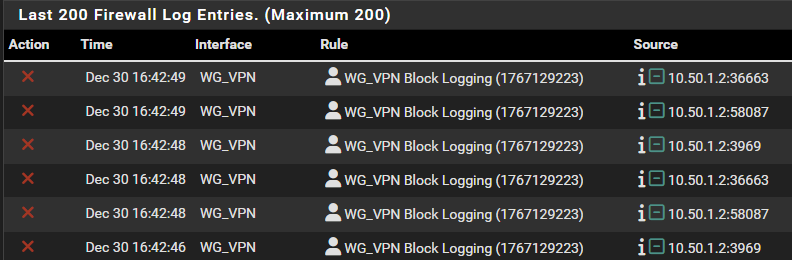
So I added a manually “Block Everything” rule at the bottom to log requests and found that when a Host on the Workshop attempts to connect to say, Bitwarden, I don’t get a log entry with the source as the IP address of the connecting Host, instead it is the Workshop’s Wireguard Peer address of 10.50.1.2.
All of this said, I know my firewall rules are probably not the best thought through and I’ll happily take some advice on that front. However, I think more importantly, I feel like I’m missing a fundamental aspect of how Wireguard and Firewalls are meant to work together in a situation like this.
Maybe I am naive thinking I can just make a network or host based rule (as the source) WITHOUT the Wireguard Peer Network and that it would be more transparent than what I’m seeing. It doesn’t seem terribly helpful to try to make a rule if everything on one side of the tunnel shows up as a single IP on the other side, no?
What am I missing?
