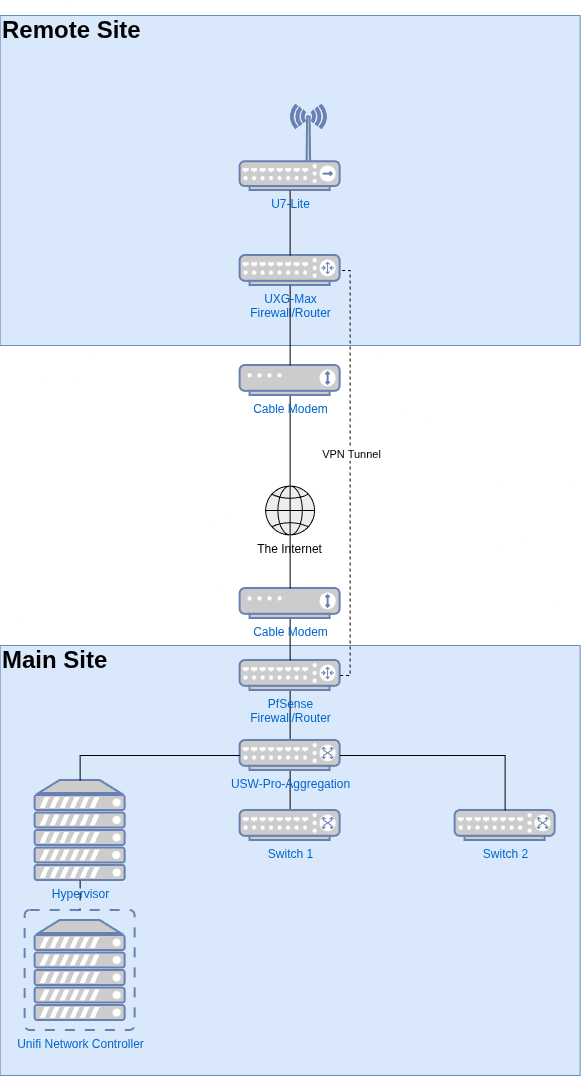
I am hoping to get feedback on the feasibility of this solution before I go buy hardware. I would also like to understand any caveats to this architecture.
Below is a diagram of my proposed architecture.
I have an existing site, the Main Site in the diagram. I use a PfSense firewall/router. It is also used for site to site VPN connections as the sort of central hub. The other remote sites use PfSense firewall/routers as well to great success.
I am interested in deploying a new site, you know… for my mother  . Due to cost and some other requirements, a UXG-MAX (NOT a UCG-Max) looks like the best fit over going with another PfSense deployment. However, I run lots of other unifi equipment at my other sites, but not routing equipment. My Network Controller is deployed as a VM at my Main Site.
If I configure a site-site VPN, hopefully wireguard, connection, can the UXG-MAX at the remote site be managed from the Main site Network Controller?
My research says yes, but not in a very clear fashion because most sites or forum posts confuse UXG-Max and UCG-Max, which does matter.
Will a site-site with Wireguard work, or do I need to do OpenVPN or something? Thoughts?
For site to site you will have to use IPSec or OpenVPN. One caveat out of the gate is if the controller cannot reach the UXG for any reason you cannot manage it. Personally I’d go with the UCG because of this limitation. Unless the controller is hosted outside of the main office. Maybe that limitation isn’t as important to you.
I agree with what @xMAXIMUSx says. Just to add, there is only one router (or failover HA pair) allowed per site in the Network Application - so if you haven’t made a separate “Site” in the controller for the remote network you’ll need to. Also, this wouldn’t be strictly required, but you should look into moving from the regular Network Application in your VM to the new Unifi OS Server setup. You can move to it with the same VM. The Network Application installed without Unifi OS Server is now legacy/deprecated and won’t move past Network version 10.x, 11.0 is already in early access and is Unifi OS only.
My plan was to use the same controller that I currently control all my sites with. I am not worried about HA. There is very little active change made to these networks, and they function just fine when a VPN link goes down today at my other sites. THis is fairly rare though. The UCG means a ‘different pain of glass’ so to speak.
Yes, i do have to upgrade to the Unifi OS server. That is another of my plans.
Yes, I would make this a separate site. That is what I do with all of my sites. HA is not a necessary thing for me at the moment, but good to know.
On the VPN topic, is it IPSec or OpenVPN because of Ubiquiti?
Yes, the wireguard portion is for teleport and for 3rd party VPN providers only.
And for Site Magic, so they do have Wireguard site to site but weirdly limit it behind the Site Manager orchestration and it only works with both ends having Unifi.
That is not true, you can use Wireguard for site to site, you just have to add in the routes manually.
Also not correct. Only the automation is limited to use Site Magic.
It’s not a native way which is why it’s not an option under site-to-site.
The “Site Manager orchestration” is the automation.
True that it’s not under their Site to Site but it works as one as long as you add in the routes.
Thank you all for the feedback here. I think it sounds like I definitely have several workable options for site to site VPN.
Basically, I just need to shove all of my mother’s network traffic from the network I will put the remote site’s streaming devices on thru the VPN. My hope is that those devices external IP addresses will look like the external IP address of the Main site. This would allow for trouble free (reduced) use of the same streaming accounts.
I did small scale tests of this using a client VPN connection.
Before I go buy UXG-Max, any other recommendations to accomplish the same thing?
Also, are there any good guides to moving from Unifi Network Controller to Unifi OS Server? On that note, I have been putting it off because I had to make a manual backend change to the default INFORM port a while ago. My ISP blocked the default. However, that was before I had all my sites set up with a site to site VPN. Now that I do, the port can be at default. I am worried about the import of the config. Thoughts? Maybe I should put that as a different topic.
@LTS_Tom Cheers! Your participation makes me feel special. Lol!
1 Like
Its actually pretty easy.
- Make sure your current network controller is as up to date as possible
- Download the backup
- Stand up your new Unifi Server OS
- Import backup.
Tip: After I have imported the config I made sure the IP address was the same as my old controller.
1 Like
In my case, I will have to SSH into each Unifi device to set the inform URL, right? My use of a non-standard port would need to be corrected, unless I change Unifi OS to do the same, right?
You can correct the port change on the existing controller first before doing the Unifi OS migration. You said you were using a nonstandard port due to your ISP, so that means you are doing a port forward to the controller, right? You can add an additional port forward on the correct port, forwarding to the one you’ve been using. Then you can either set-inform or use the server override in the controller to push it out to all the devices. Once the devices are now pointed to the normal port on your external IP, when you swap over to Unifi OS you just update your port forward.
That does sound easy if I did not mess with the network controller.
So, unfortunately port forwarding was not an option when I first deployed my first remote site. I was not using PfSense at the time. The router I was using did not port forward properly. You could not the incoming port had to be the same number on the internal network. I know that sounds crazy, but that router was a PoS. So, I changed the port on the network controller side in the config files and have been living with that ever since. Every new device had to be manually ssh’ed into to set inform. Frankly, I was too lazy to change it back when I brought PfSense and the VPN into the mix.
I am guessing that I should undo my network controller change. Then SSH into each device to fix the URL.
Thoughts?
Thoughts
This is correct. It’s the set-inform to the new IP.
Ok so you have the controller listening on something like 3000 instead of 3478, and so now in PFSense you have outside:3000 forwarded to inside:3000, you can make an additional port forward in PFSense for outside:3478 to inside:3000. Your old router may not have been happy with the ports being different but that’s not the case now. Doing this allows you to have time to move each client device one by one, instead of breaking them and having to repoint them after you change ports.
https://help.ui.com/hc/en-us/articles/34210126298775-Self-Hosting-UniFi
well documented to migrate to unifiOS, it’s pretty easy and will be quick will such a small number of devices.
Sounds like a UCG would be a simple solution for the purpose you need along with a ui.com account for management. Update your existing to a UnifiOS and connect it all with a ui.com and you still get a single place to manage remotely