I’m experiencing some strang behavior on Unifi setup, namely the link between basement and the 2nd floor.
- Basement
- USW Pro Max 16 PoE
- Port 18: 1G Uplink LWL to Internet Provider (VLAN 4)
- Port 17: 10G SFP+ from Unifi, connected to 2nd floor → USW Pro HD 24 PoE Port 27
- Port 16: UA Hub (VLAN 40)
- Port 15: USW Flex 2.5G 8 PoE on 1st floor Port 9, Copper (leaf link, Trunk all VLANs)
- Port 14: U6 Mesh WiFi AP (Trunk MGMT & Wifi VLANs)
- USW Pro Max 16 PoE
- Floor 1
- Port 1: UG LR (Trunk MGMT & Wifi VLANs)
- Port 2: Uplink DSL (Backup Internet Connection) (VLAN 178)
- Port 8: UA intercom Viewer (VLAN 40)
- USW Flex 2.5G 8 PoE → USW Pro Max 16 PoE Port 15 (Trunk all VLANs)
- Floor 2
- Port 14: Pfsense VLAN 1 MGMT
- Port 25: Pfsense Trunk A (some VLANs)
- Port 26: Pfsense Trunk B (other VLANs)
- Port 27: USW Pro HD 24 PoE → USW Pro Max 16 PoE Port 17 (Trunk all VLANs)
- Rest of Ports: client devices
So, basically there is no loop. Here’s the topology view from UCK G2+:
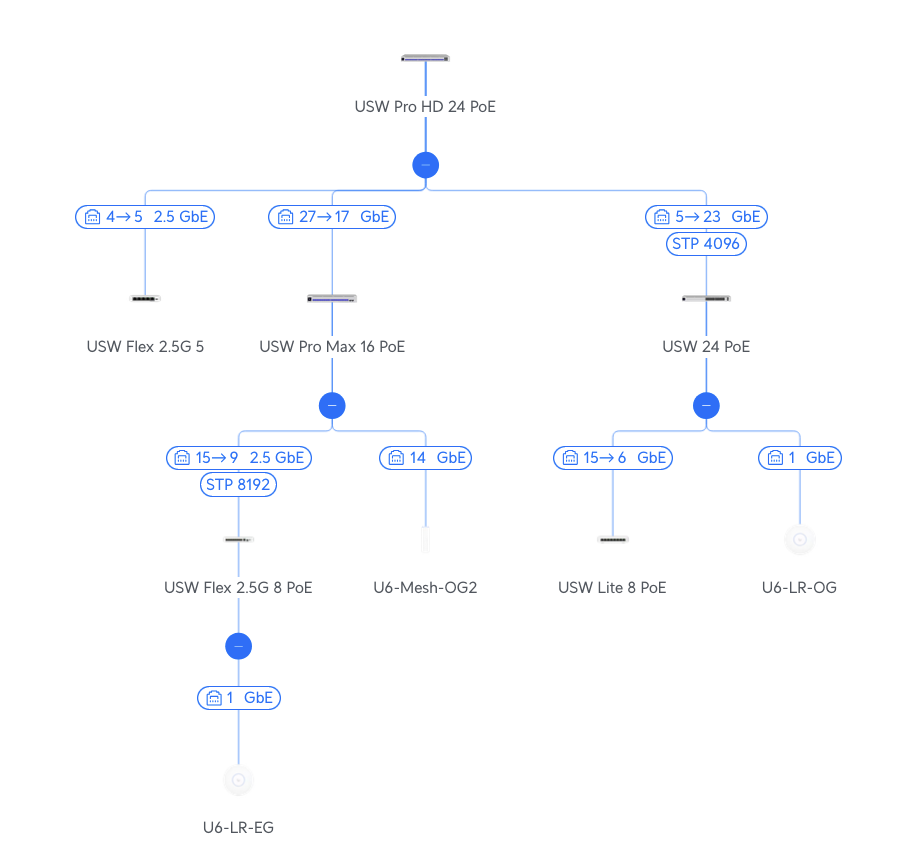
The problem is as already stated the link between basement and floor 2. Both SFP+ are Ubiquiti SFP+, namely those 10G Bidirectional Single-Mode Optical Module, Part-no: UACC-OM-SM-10G-S-2:

When set to 10G I get anomalies on that link and the AI Anomaly Score is between 70 and 100, depending if its the 16 port switch or the 24 port switch:
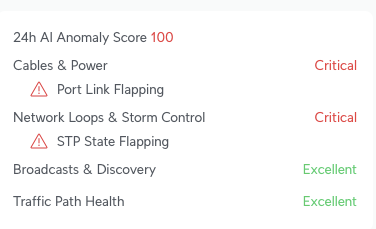
According to some UI articles/posts in their forum, I already disabled STP back and forth, but the Port Link Flapping persists on that link when it is set to 10G. When set to 1G the flapping seems to go away and there is no anomaly reported anymore after 24 hours.
I have no idea why this is, but two assumptions:
-
there is a damage to the cable itself that only manifests at higher speed, but is tolerable when using 1G
-
when set to 10G there SFP+ modules get even hotter (don’t see that in the Web UI, though)
Any suggestions how to get a stable 10G connection on that link or for further debugging?
My midterm solution would be to draw a new fiber (no single mode, but standard multi mode and matching SFP+ like UACC-OM-MM-10G-D) or maybe ask someone with a Fluke to come by for a quick cable test of that single mode cable.
But I’m open for other options… 