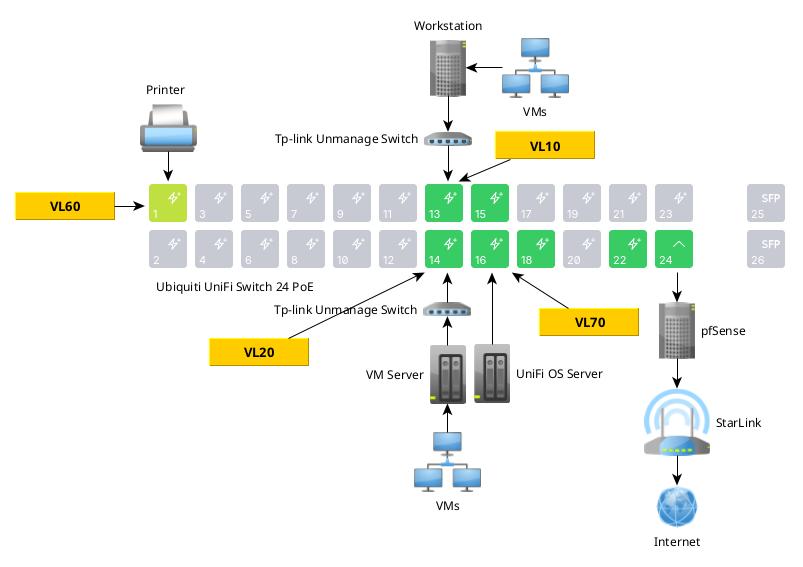
This is my home network and I want to use my Unifi Switch to managed the network along with pfSense. I have all VLANs defined in pfSense, My goal is to:
- VL60 to be available for selected ports like VL10 & 20.
- The HP printer on LV60 is to be blocked from accessing the internet. I bought years back, I canceled my subscription and found the HP is still contacting HP to see what ink cartridges I’m using. I no longer want it accessing the internet.
- Only selected networks like VL10, 20 have access to print on the HP.
- VL70 is my UniFi OS Server should be only accessed by VL10 & 20.
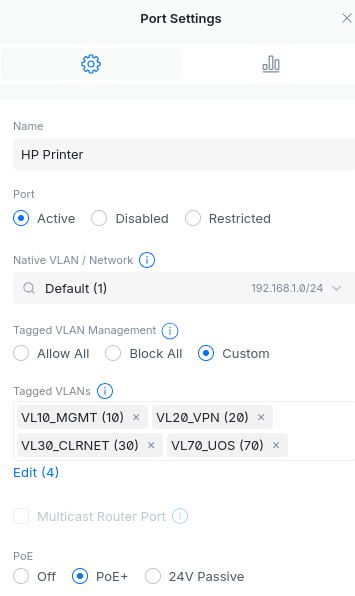
Should I be able to do this with the Port Settings / Tagged VLANs to accomplish this without using pfSense Firewall Rules if possible?
For one example, only allow these VLANs to print to the HP: