pfsense running DHCP 192.168.1.0/24 network with Internet access
Gateway 192.168.1.1
Network B
pfsense DHCP OFF, LAN IP 192.168.1.2 also with an external Internet connection.
These two networks are connected with Internet Provider as a single LAN through their network.
What to use DHCP from LAN A to hand out addresses to LAN B
Do I bridge together LAN1 and LAN2 on each firewall, then plug Business FIBER network from ISP into LAN2 of both firewalls? What firewall rules will I have to create?
Question two - I would like to have each network use their OWN Internet. Is this possible? So flat LAN for business and Internet out each of their ISP.
Fair enough. Each site has a Netgear 6100. I am thinking this should be a simple setup but I have never installed a two network system where they are connected via the ISP in the backend but still also have it’s own Internet connection. Both sites have a 100 meg connection to the internet and a 150 between them via the ISO.
What is needed it to have Site A handle the DHCP so we have one flat network but have each site handle their own Internet. I am confused on how to setup the gateways for each site and if any new rules need to be in place to handle this.
I’m confused on why you would want to set this up this way. You are asking for a bad time setting it up like this. If one of your sites goes then there is no way to get another DHCP lease and thus not about to get out to the internet unless you manually set one.
the proper way to do this is for each site to have their own subnet that is different from each other. Then setup a vpn tunnel (wireguard or IPSec) to the main site. We could go on and on about all the issue you are going to encounter if you try to set each site up as a flat network and DHCP at a main site.
Maybe it would be easier if you posted a diagram on how you want your network set up. Maybe I am not understanding what you are asking.
They was you suggest is how I had it installed for the last 5 years. (VPN/IPSEC) Now with a NEW ISP connection directly to each site that treats it like it is on the same local LAN no more VPN is needed. That is why I would like each site to have its own Internet exit and just talk between the ISP direct connection for simple items like mapped drives/printers/server folders and such.
A simple visual: (Site A will provide the DHCP)
Site A connected to the Internet
|
Connected with ISP Fiber
|
Site B connected to the Internet
Between the two sites is a direct connection of fiber that treats it like it is on the same network. I would like to consolidate two networks to one network for ease. In default setup, it will backhaul the Internet traffic out to the only gateway which is at site A for it’s Internet.
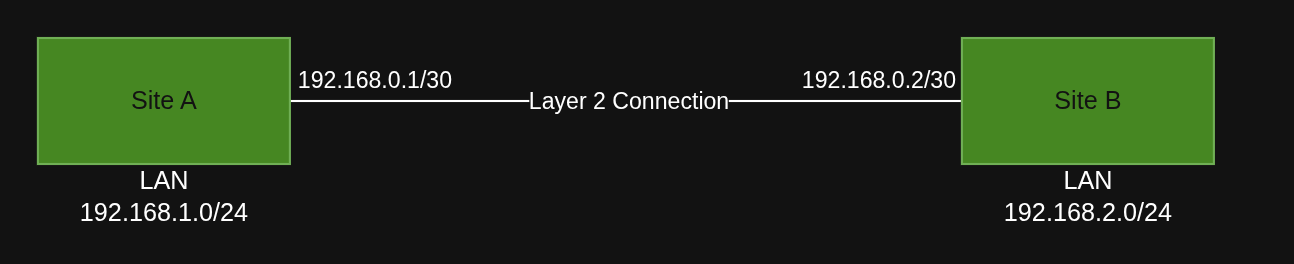
I see, so you have a layer 2 between sites. This is what I would do. I would still have separte subnets but if you need to reach resourses on site A then create a static route for it. Look at this diagram.
You’ll need to create the interface and connect it to pfsense. Then make sure to set the firewall rules properly. Then you should be all set. In this way the traffic at each site will go out its own internet.
This is the way. 2 subnets is the way to go. Bridging the LANs is not recommended. Having different subnets make it logically a better solution and will allow you to create rules for handling your LAN to LAN traffic the way you have stated and direct Internet traffic to each specific sites internet connection (split connections). Further gives you more specific DHCP setting control especially at the remote site, so if your DHCP server (vpn connection is offline) at least your endpoints can access internet and local resources (e.g. printers, local shares). Your bridging the physical remote lans together actually makes it more complicated.