I have been facing this issue for quite a while now, long enough where I have no clue what may have caused it (years…).
I can not keep an active SSH client open with my truenas machine, but what is way stranger, is the web besed shell you can open from truenas’s webUI also seems to hang and stop responding.
When SSHed in, after 30 seconds to a few minutes, I get a SSH hang and a:
Connection to server.name.here closed.
client_loop: send disconnect: Broken pipe
When in the webUI Shell, the screen just hangs and I can’t make inputs any longer.
I admit, earlier in my truenas/homelab career I likely copy/pasted some stuff into CLI, but I have no idea what any of that was. I was trying to get plex permissions working back on FreeNAS jails (was this called beehive maybe? It was literally a deacde ago). My truenas “works fine” and seemingly has for years and years. SMB and NFS performance always seems fine, the system itself is stable and has migrated to truenas scale years ago, etc. Things seem to work fine (except my timemachine backups really don’t like working, not sure if this is related, really not sure…).
To try and fix this a few months ago, I fully restarted from ground 0. I fresh installed Scale and imported my ZFS Array. I didn’t copy my config, I went through the relative pain (although, it was good to do it all again since it had been a decade…) of resetting up everything. Vlans, network adapters, users, shares, etc. Obviously the data on the array persisted, including my home directory. But this is where my linux ignorance comes in - I know enough to be dangerous these days, but I don’t understand how such an issue can persist such a nuclear option. I am in full believe my early year copy/past into CLI to try and alter permissions and stuff for jails or some other “thing I thought was smart” could have caused issues, but is this something that can persists OS wipes like this? I was “dumb” and installed oh my ZSH on my user account, but this same issue happens with root, and root is not modified in any way that I know of.
I had thought this could be networking related, but I can’t figure out how or what that would be. I run a pfsense network with unifi switching hardware, and no over VM/physical host has any such issues. Literally no other VM or machine has any weird SSH issue, or weird hiccup like this, and again, its only SSH and Shell via the webUI… it seems very specific to something internal to truenas.
I am at a total loss on how to fix this or what to even try and do to narrow in on possible issues.
If you are having issues with ssh and in the web gui then it is a network issue. If I were you I’d try replacing the physical Ethernet cable. If that doesn’t work then I’d add an intel card and see if it goes away.
If you run a continuous ping and there are timeouts, but if you ping something else on your network and there are not timeouts then the network issue is isolated to your truenas only.
I am pretty confident it is not a software issue that you made some change in truenas and now things are wonky. Especially since you have done a nuclear option and it is still having this problem.
I would say you need to post the contents of two files here (/etc/ssh/ssh_config and /etc/ssh/sshd_config) . I would go into the console and switch to root using “sudo su” then “cd /” and “find -name .ssh”. If you find any “.ssh” directories, you should post here the contents of any config files found. You may have set a “clientaliveinterval” variable somewhere
He could have made changes to ssh that got stored in his volumes. For example, if I search “find -name .ssh” on my setup, I find that I have created a directory in /mnt/pool1/synology/synology_1/homes/louie/.ssh when I set up Rsync as a destination for my Synology (which I knowingly made, so its cool). That would explain why the change carried over when he imported his pool.
To a bit of more detail, it’s definitely not a network cable since all other traffic is fine, but the additional detail is TrueNAS is virtualized under Proxmox, and Proxmox and all other hosts are perfectly fine, suggesting it is specific to either TrueNAS itself, or possibly some weird network issue/firewall config I can’t wrap my head around.
Also, since it happens with both SSH via terminal, and the webUI shell that you can open, it seems like its something internal to truenas to me anyways.
# This is the ssh client system-wide configuration file.  See
# ssh_config(5) for more information.  This file provides defaults for
# users, and the values can be changed in per-user configuration files
# or on the command line.

# Configuration data is parsed as follows:
#  1. command line options
#  2. user-specific file
#  3. system-wide file
# Any configuration value is only changed the first time it is set.
# Thus, host-specific definitions should be at the beginning of the
# configuration file, and defaults at the end.

# Site-wide defaults for some commonly used options.  For a comprehensive
# list of available options, their meanings and defaults, please see the
# ssh_config(5) man page.

Include /etc/ssh/ssh_config.d/*.conf

Host *
#   ForwardAgent no
#   ForwardX11 no
#   ForwardX11Trusted yes
#   PasswordAuthentication yes
#   HostbasedAuthentication no
#   GSSAPIAuthentication no
#   GSSAPIDelegateCredentials no
#   GSSAPIKeyExchange no
#   GSSAPITrustDNS no
#   BatchMode no
#   CheckHostIP yes
#   AddressFamily any
#   ConnectTimeout 0
#   StrictHostKeyChecking ask
#   IdentityFile ~/.ssh/id_rsa
#   IdentityFile ~/.ssh/id_dsa
#   IdentityFile ~/.ssh/id_ecdsa
#   IdentityFile ~/.ssh/id_ed25519
#   Port 22
#   Ciphers aes128-ctr,aes192-ctr,aes256-ctr,aes128-cbc,3des-cbc
#   MACs hmac-md5,hmac-sha1,umac-64@openssh.com
#   EscapeChar ~
#   Tunnel no
#   TunnelDevice any:any
#   PermitLocalCommand no
#   VisualHostKey no
#   ProxyCommand ssh -q -W %h:%p gateway.example.com
#   RekeyLimit 1G 1h
#   UserKnownHostsFile ~/.ssh/known_hosts.d/%k
    SendEnv LANG LC_*
    HashKnownHosts yes
    GSSAPIAuthentication yes
Subsystem	sftp	internal-sftp -l ERROR -f AUTH
Protocol 2
UseDNS no
ChallengeResponseAuthentication no
VersionAddendum none
Port 22
ListenAddress 127.0.0.1
ListenAddress 10.90.5.100
ListenAddress fe80::f8f1:99ff:feb4:64d0%ens18
PermitRootLogin without-password
AllowTcpForwarding no
Compression no
PasswordAuthentication no
PubkeyAuthentication yes

# These are forced to be enabled with 2FA
UsePAM yes
PrintMotd no
SetEnv LC_ALL=C.UTF-8

# These are aux params that MUST COME LAST
# in the config. User provided "Match" blocks,
# for example, need to come AFTER the UsePam
# line. Otherwise ssh service WILL NOT START.
ClientAliveInterval = 15
ClientAliveCountMax = 3
I do see other .ssh folders (for the various users I have), but none of them have config files, only authorized host files for example.
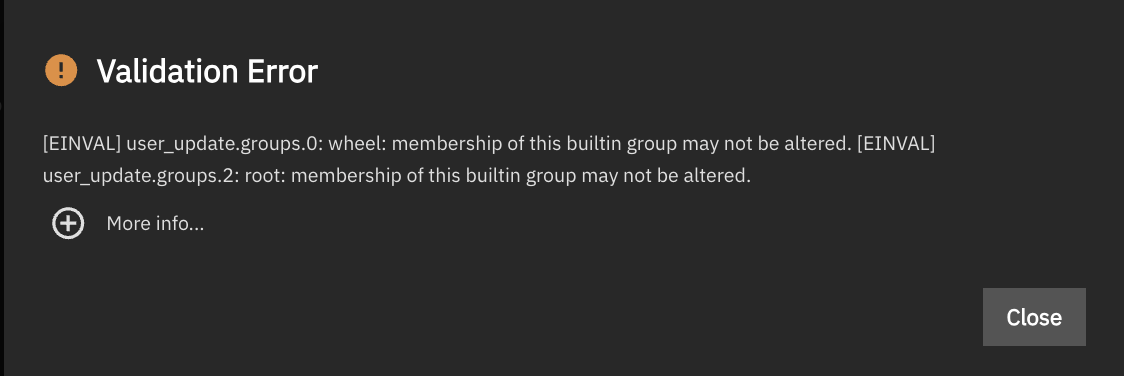
Nothing here looks “strange” to me, but something is very definitely wrong. It took so long just to get these files because I get “Broken pipe” after ~10 seconds when trying to SSH in… I had to add an old rsa key to my root user in truenas webUI so I could filezilla in and pull the files out (filezilla also hangs, but thankfully it doesn’t sever the connection during that hang). Also, not sure if this is related, but I went to try and add said rsa key to my truenas user account (instead of root), and I can’t even save the user config? I am getting this:~~
Traceback (most recent call last):
  File "/usr/lib/python3/dist-packages/middlewared/api/base/server/ws_handler/rpc.py", line 323, in process_method_call
    result = await method.call(app, params)
             ^^^^^^^^^^^^^^^^^^^^^^^^^^^^^^
  File "/usr/lib/python3/dist-packages/middlewared/api/base/server/method.py", line 52, in call
    result = await self.middleware.call_with_audit(self.name, self.serviceobj, methodobj, params, app)
             ^^^^^^^^^^^^^^^^^^^^^^^^^^^^^^^^^^^^^^^^^^^^^^^^^^^^^^^^^^^^^^^^^^^^^^^^^^^^^^^^^^^^^^^^^
  File "/usr/lib/python3/dist-packages/middlewared/main.py", line 911, in call_with_audit
    result = await self._call(method, serviceobj, methodobj, params, app=app,
             ^^^^^^^^^^^^^^^^^^^^^^^^^^^^^^^^^^^^^^^^^^^^^^^^^^^^^^^^^^^^^^^^
  File "/usr/lib/python3/dist-packages/middlewared/main.py", line 720, in _call
    return await methodobj(*prepared_call.args)
           ^^^^^^^^^^^^^^^^^^^^^^^^^^^^^^^^^^^^
  File "/usr/lib/python3/dist-packages/middlewared/service/crud_service.py", line 266, in update
    return await self.middleware._call(
           ^^^^^^^^^^^^^^^^^^^^^^^^^^^^
  File "/usr/lib/python3/dist-packages/middlewared/main.py", line 731, in _call
    return await self.run_in_executor(prepared_call.executor, methodobj, *prepared_call.args)
           ^^^^^^^^^^^^^^^^^^^^^^^^^^^^^^^^^^^^^^^^^^^^^^^^^^^^^^^^^^^^^^^^^^^^^^^^^^^^^^^^^^
  File "/usr/lib/python3/dist-packages/middlewared/main.py", line 624, in run_in_executor
    return await loop.run_in_executor(pool, functools.partial(method, *args, **kwargs))
           ^^^^^^^^^^^^^^^^^^^^^^^^^^^^^^^^^^^^^^^^^^^^^^^^^^^^^^^^^^^^^^^^^^^^^^^^^^^^
  File "/usr/lib/python3.11/concurrent/futures/thread.py", line 58, in run
    result = self.fn(*self.args, **self.kwargs)
             ^^^^^^^^^^^^^^^^^^^^^^^^^^^^^^^^^^
  File "/usr/lib/python3/dist-packages/middlewared/service/crud_service.py", line 294, in nf
    rv = func(*args, **kwargs)
         ^^^^^^^^^^^^^^^^^^^^^
  File "/usr/lib/python3/dist-packages/middlewared/api/base/decorator.py", line 101, in wrapped
    result = func(*args)
             ^^^^^^^^^^^
  File "/usr/lib/python3/dist-packages/middlewared/plugins/account.py", line 874, in do_update
    verrors.check()
  File "/usr/lib/python3/dist-packages/middlewared/service_exception.py", line 72, in check
    raise self
middlewared.service_exception.ValidationErrors: [EINVAL] user_update.groups.0: wheel: membership of this builtin group may not be altered.
[EINVAL] user_update.groups.2: root: membership of this builtin group may not be altered.
I fully admit I didn’t know what I was doing years and years ago, thus my concern with copy/pasting semi random things into truenas CLI a decade ago. But this instance was set up about 5-6 months ago, and I certainly know my way around things and know what not to do to an appliance such as truenas… so I am not sure what I could have done to get whatever this above issue now is. Like I said, I did instal oh my zsh in my local user (maybe shouldn’t have, maybe I need to learn that leasson as well… don’t dork with appliances at all), but besides that, I have no idea what is causing this above issue where I can’t even save my account info in the webUI. For the above (non realted) issue, turns out, it really doesn’t like my user being part of root and wheel, weird, since that has been the case…. forever? So, disregard the above “new issue”, but hey, interesting non the less.
Well my /etc/ssh/sshd_config is a bit different than yours but not materially so. Since you don’t have password login, do you have the correct ssl key in your system that you are SSH’ing in from?
Yup, I can establish the connection fine, it just hangs and throws that “broken pipe” error “randomly”. It seems to happen as quickly as 10 seconds after I log in to as much as 30-40 seconds. I can’t seem to track down what the cadence of it is nor what causes it.
My authorized key file is correct (same as all of my other dozen or so ubuntu systems), and again, the fact it does this within the webUI’s shell makes me think this is not “related” to ssh. “Related” is a strong word here, its obviously entirely possible something wonky within ssh causes the shell in the webUI to break as well, but I more mean, I don’t think its in a .ssh config file, or a result of a key issue.
Also to clarify, the WebUI itself never hangs, but when you enter the shell within the webUI wrapper, that shell itself is what hangs. That said, I am currently using the webUI shell to try and get it to replicate, and of course it isn’t. I am wondering if that portion of the issue did resolve when I nuked the system and started over. I don’t actually use the webUI shell often, hell, I rarely ssh into truenas at all… but when I need to (right now I am trying to determine how large of a metadata special device I will need), its a massive PITA to the point where I can’t even funcintoally use it.
Interesting. I wonder why. I have never edited mine, and I am on the latest truenas.
debug3: receive packet: type 98
debug1: client_input_channel_req: channel 0 rtype keepalive@openssh.com reply 1
debug3: send packet: type 100
debug3: receive packet: type 98
debug1: client_input_channel_req: channel 0 rtype keepalive@openssh.com reply 1
debug3: send packet: type 100
Connection to the.server.name closed by remote host.
Connection to the.server.name closed.
debug3: send packet: type 1
client_loop: send disconnect: Broken pipe
Within the webUI (which seems to be acting normally), I am able to run journalctl -u ssh -f and I see this during the same time period. I don’t actually see the connection closed for ligistx from my laptop which is at 10.70.5.11. I have proxmox SSHing in to check harddrive temps for a script I run to control fans which is why you see the proxmox ssh user info.
Aug 27 11:42:03 thoth sshd[134727]: Accepted publickey for ligistx from 10.70.5.11 port 60968 ssh2: key
Aug 27 11:42:03 thoth sshd[134727]: pam_unix(sshd:session): session opened for user ligistx(uid=1000) by (uid=0)
Aug 27 11:42:03 thoth sshd[134727]: pam_env(sshd:session): deprecated reading of user environment enabled
Aug 27 11:43:22 thoth sshd[134766]: Accepted publickey for proxmox_ssh from 10.90.5.50 port 49666 ssh2: key
Aug 27 11:43:22 thoth sshd[134766]: pam_unix(sshd:session): session opened for user proxmox_ssh(uid=1002) by (uid=0)
Aug 27 11:43:22 thoth sshd[134766]: pam_env(sshd:session): deprecated reading of user environment enabled
Aug 27 11:43:22 thoth sshd[134766]: pam_unix(sshd:session): session closed for user proxmox_ssh
Hmm… seemingly no issue when I log in via Proxmox with the proxmox_ssh user.
So, I suppose this narrows it down to either a user issue, or a network issue… Curious.
Like I mentioned before… a network issue. If you don’t have any issue from proxmox then it might be the PC you are on that doesn’t have a stable connection.
But why wouldn’t any other systems have this issue? I have over 2 dozen VM’s/containers on my Proxmox host, none of them have this problem and I admin all of my homelab from this MacBook.
I agree tho, it must be a network or firewall issue, I just have no idea what the issue would be?
Well, I figured it out. I had SSH bound to my management interface, but I had an interface on the 10.70 subnet my macbook is on for SMB shares to reduce load across the firewall… Replies were going out over the 10.70 subnet so the connection was timing out. I bound SSH to both managmeent and the 10.70 (only my personal devices are on this network anyways, and there is already a firewall rule to allow those devices to talk to my management network) and now when I SSH to the 10.70 interface, it all works fine.
This shows my ignorance, I didn’t realize binding SSH to an interface wouldn’t also restrict its replies to the same interface…
Sorry, I didn’t explain that portion well. Proxmox itself is at .50. So that part of the trace was when proxmox SSHed into truenas to run the script to control the fans. .50 was the proxmox source IP, not the destination on TrueNAS.