Here is an issue i have 17.21TB space and It is saying I am at 84% of used space, and there is no way. There is no snap shots either. how do I reclam 14.46TB of space. Also there is no hiddin snap shots either. I have done quite a bit of research but i cannot find what i am looking for to free up the space. The most I am using is about 2.09 as that is my backup from a file share. I am not seeing what is eating up the space. I am not using any apps or jails. running this command for the space for the pool is this see pic below.
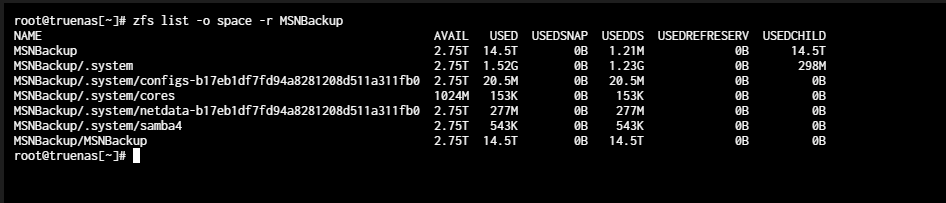
a better output would be df -h
zpool/share 21T 89G 21T 0% /mnt/zpool/share
I have 21 TB total, I’m using only 89 GB.
Do you have data reserved on the dataset in it’s config?
Are there snapshots in the MSPBackup dataset?
No, there is no reserved config.
nope there are no snapshots in the MSNBackup
Is there a way just to start from scrach?
Just double checking you are running garbage collect and scrubbing your pools?
Also just a guess going off your share name that is Samba. Check if you have shadow copies and how much these use up.
No, I am not using any jails or ix-applications. There are no shadow copies either. So what I might do is just scrub the pool and start from scratch.
I’ve found a tool that might point me in the right direction. I got it from [Moved to Roadmap] Add ncdu to TrueNAS SCALE - Feature Requests - TrueNAS Community Forums But it is from Jan 2025 but it can be usefull. I’ll update once I see what is using up all my free space.