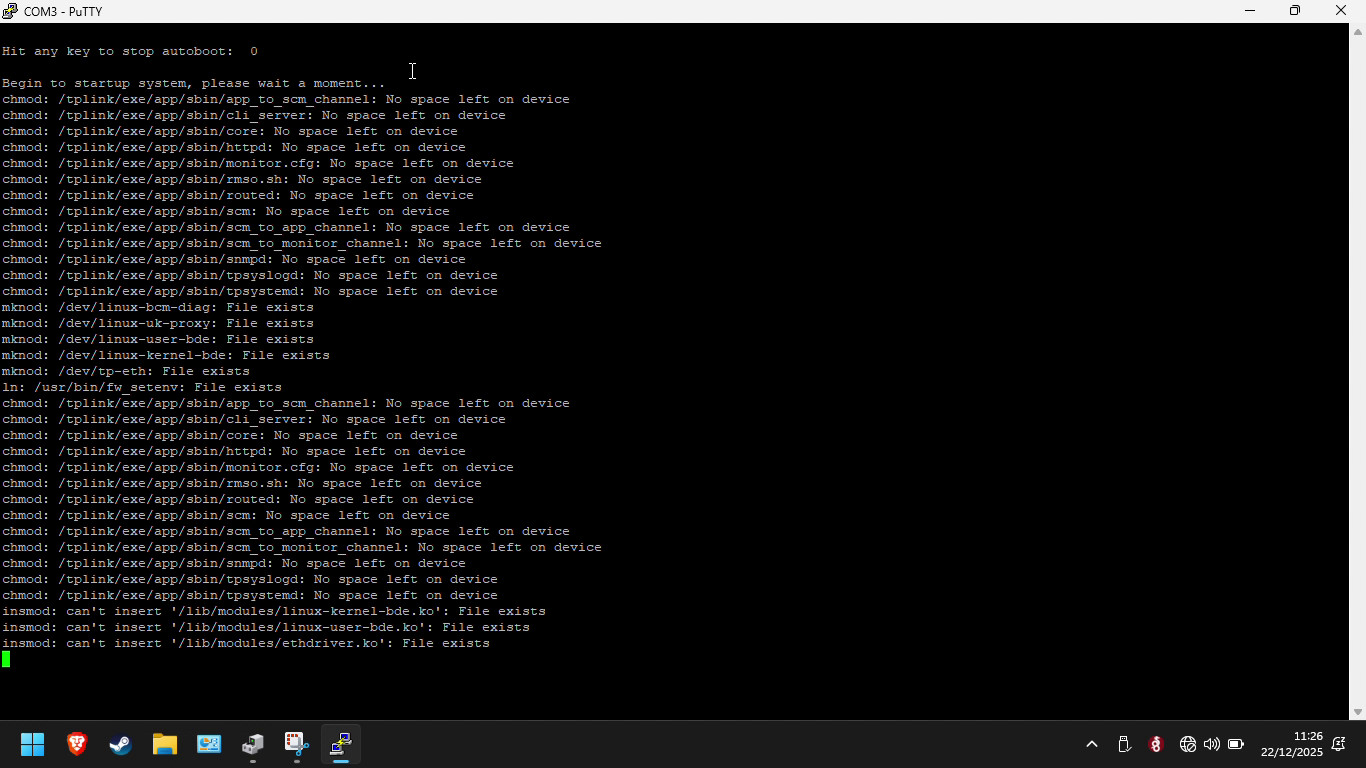
So i have a T2600G-28TS V1 and it is refused to boot after i had to power down the rack, solid pwr light nothing else. This is what i seen on the console port:
Switching over to the backup image got it running, but it puzzles me how this happened. So if this issue rears its ugly head again what are my options?
I presumed it is the fw itself that caused this somehow, and i read that the V1 can run the V2 FW which is a bit newer(1 year). So i did something naughty……. Running fine so far.
I think TP-Link products are all trash. I couldn’t tell you what the root cause of the issue was, but I know for certain that it wasn’t your firewall that caused this.
I recommend buying a better switch and be done with it.
All TP-Link products are garbage. Thats not even debatable. Their firmware is security nightmare, and some decisions they make in their product line are incredibly stupid. For example. They have cheap smart bulbs that support WPA3, but their Tapo line of wireless cameras are WPA2 only.
Anyway, on topic. That switch might have corrupted internal storage that shrinks in space because its dying.
I bought this way back in 2018, my wage back than was roughly 1000€ or maybe not even that much. So beginner me thought “tplink aint the best but the good stuff is out of reach, maybe their not-so-consumer things aint that bad”.
As for the current me, im planning to bounce from my current job and ill need a cushion if things go tits up. So i need this sucker to survive at least the next year…
TP-Link has Omada line which should be their flagship. I didnt had personal experience with it, but Tom can tell you how bad it was. TP-Link devices should only be used if you can flash OpenWRT on it, or as a temporary solution until you get something better.