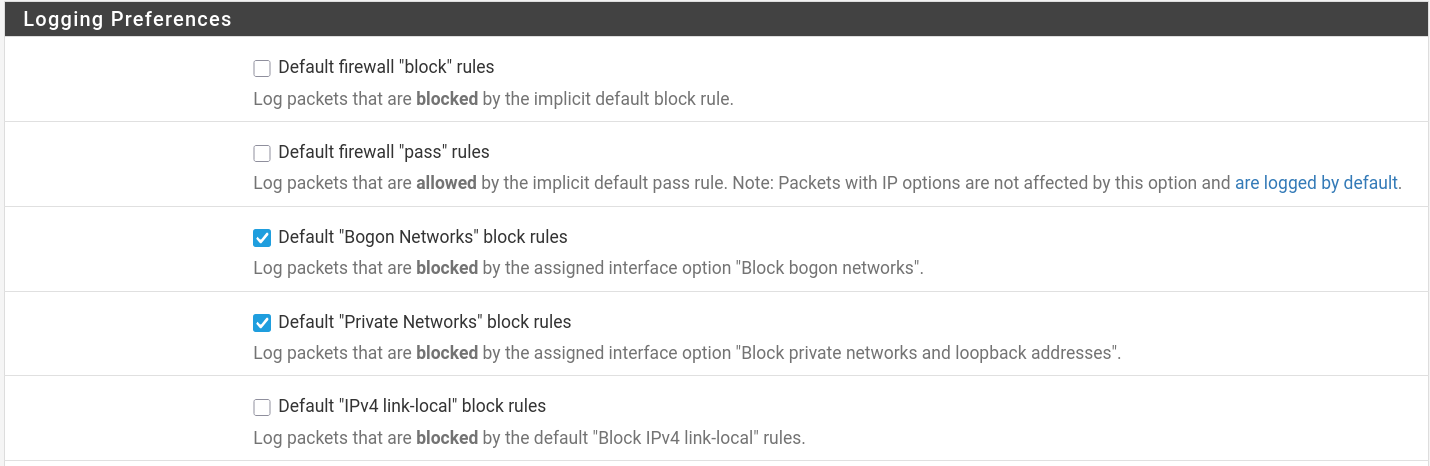
Using pfSense CE 2.8.1
My firewall log seems to be overrun with logging blocks of multicast (SSDP ?) from wireless AP.
Basically I can’t figure out where the logging is coming from.
Logging settings in picture attached.
Here’s the error:
Default Allow any IPV4 - WIRELESS (1594497977)
Source 192.168.47
.100
Destination 224.0.0.1
Protocol IGMP
Rule details
Action: block
Reason: ip-option
Tracker ID: 1594497977
Matched Rule: unavailable
Associated Rules:
@183 pass in quick on igb3 inet from <OPT2__NETWORK:1> to any flags S/SA keep state (if-bound) label “USER_RULE: Default Allow any IPV4 - WIRELESS” label “id:1594497977” ridentifier 1594497977
It seems like you’re experiencing a common issue with multicast traffic from your wireless AP being logged excessively in pfSense.The culprit is likely the IGMP.
IGMP snooping allows the switch to forward only relevant multicast packets, reducing unnecessary traffic on the network. However, if this feature is not properly configured or if there’s an issue with the switch, it can lead to excessive logging of IGMP messages.
1 Like
the Access Point is the one seeming to be doing all the multicast…and the pfSense router which it is attached to is blocking. Not sure where to go from here.
If the AP is broadcasting on it’s subnet, I’m not sure why pfSense cares.
So I am not sure why pfSense is blocking discovery on a subnet and also not sure how to stop the logging.
PfSense cares because of this setting: “IP Do-Not-Fragment compatibility”. When this is unchecked, pfSense drops packets with IP options and logs them with “Reason: ip-option”. IP Options are optional header fields in IPv4 packets used for things like:
Source routing (specifying the path a packet takes)
Record route (tracking the path taken)
Timestamps
Security markings
They’re rarely used in legitimate modern traffic and are often associated with reconnaissance/attacks, so pfSense blocks them by default for security. It seems like Your AP is sending IGMP multicast with IP options set (likely the Router Alert option, which is technically legitimate for IGMP but triggers the block).
You can suppress the logging with a firewall rule to block this traffic or you can simply check this box to allow the traffic.
2 Likes
First, thank you to all who responded.
I genuinely tried to block (without logging) this activity. Everything I tried failed.
@Louie1961 I tried that setting and it did not help.
So I went to the source…the router (Merlin software).
Changed “
| [Enable IGMP Snooping] |
| [Multicast Rate(Mbps)] |
Enabled IGMP Snooping
Multicast rate changed to OFDM 12
That did it…not 1000% sure why…but based on suggestions I read .
No lack of functionality detected.
Hope this helps someone. This “is” a common issue.