SMB IT Architecture: Master Accounts, GoDaddy Defederation & Break-Glass

Hello All,

I’m currently auditing our security posture and would love your insight on industry best practices for laying out core administrative access for a small user base (8 users).

For context, ownership of the company/environment is split between two people (Owner-A and Owner-B), and I am the sole IT Administrator (User-A).

Our Current Layout:

  • Domain: example.com

  • Master Account: One (1) external Gmail account acts as the master recovery and admin login for our M365 tenant and camera systems. Three people currently have the credentials, but only I (User-A) access it frequently for administrative purposes.

  • M365 Environment: Currently federated through GoDaddy.

  • Bitwarden: Owner-A, Owner-B, and I (User-A) all have individual Bitwarden accounts tied to our example.com domain, but we are currently relying on the Master Gmail account as the ultimate backup/recovery strategy.

My Proposed Plan: Dedicate a wiped laptop strictly for administrative work to access this Master Gmail and GoDaddy account, locking it down with three YubiKeys (one for me, and one for each of the two owners). I plan to harden this laptop so it is only used for admin tasks, never daily browsing.

My Questions:

  1. Architecture: Is relying on an external Gmail account + a dedicated admin laptop a flawed approach for a “Master” identity? How do you typically structure top-level admin access for your SMB clients?

  2. GoDaddy Defederation: I want to move our M365 environment from GoDaddy directly to Microsoft without breaking our existing tenant. Do you have experience with this defederation process, and what “gotchas” should I look out for?

  3. Break-Glass MFA: For storing emergency credentials, are hardware keys your absolute standard, or do you utilize a different offline TOTP method?

  4. Resources: Are there any specific guides you highly recommend for mapping out and securing these core services correctly?

Thank you for all for your help and any guidance you can provide to point me in the right direction.
Here is a breakdown of how to address your core identity, defederation, and emergency access strategy based on modern SMB security standards:

1. Architecture: The Master Gmail & Privlidge acccess workstation

Relying on a consumer Gmail address as your master identity creates a single point of failure and a significant security blind spot. Consumer accounts lack proper audit logging, zero-trust conditional access, session controls, and formal Role-Based Access Control (RBAC). Furthermore, sharing those credentials destroys non-repudiation meaning you lose the ability to audit who performed a specific action. Always best to tie things to a email at a domain you own.

  • Dedicated Admin Identities: Eliminate the consumer Gmail account entirely. Instead, issue distinct, cloud-only administrative accounts for tasks requiring elevated privileges (e.g., user-a.admin@example.com), kept separate from everyday productivity accounts (user-a@example.com).
  • Privileged Access Workstations : Hardening a dedicated laptop strictly for admin duties is a great practice! However, enforce MFA individually at the tenant level via hardware FIDO2 (YubiKeys are a good) tied to each named admin account rather than sharing physical credentials across multiple people.

2. GoDaddy to M365 Defederation

Been a long time since I have moved anyone off of GoDaddy but I recall it being a pain. Not sure if that process has changed here in 2026. It was something that my employees did, so I don’t have the specifics. I just know they said it sucked.

3. Break-Glass MFA & Emergency Accounts

Hardware keys stored offline are absolutely the gold standard here. Following Microsoft and CISA guidelines:

  • Cloud-Only Accounts: Create two cloud-only Emergency Access Accounts using your fallback tenant domain (e.g., breakglass1@example.onmicrosoft.com and breakglass2@...). This ensures they remain accessible even during custom domain or DNS outages.
  • Conditional Access Exclusions: Exclude these accounts from standard Conditional Access policies (like mandatory location restrictions) so you don’t accidentally lock yourself out of recovery during a tenant-wide policy failure.
  • Hardware Storage: Secure each account with a dedicated hardware key (again YubiKey are good for this). Keep key #1 with yourself (User-A) and key #2 in a physically secure location (e.g., Owner-A’s office safe).
  • Monitoring: Configure an automated alert in Entra Log Analytics / Azure Monitor that fires an immediate SMS or email whenever either break-glass account logs in.

4. Recommended Reading & Frameworks

If you want official blueprints to reference as you build your documentation, check out:

  1. Microsoft Docs: Manage emergency access accounts in Microsoft Entra ID (Step-by-step setup for break-glass identities).
  2. CISA SCuBA Project: Secure Cloud Business Applications (SCuBA) Technical User Guides (Free M365 secure configuration baselines designed specifically for small-to-midsize setups).
  3. CIS Security Benchmarks: CIS Controls v8 - Implementation Group 1 (IG1) (The ideal cybersecurity benchmark for small teams looking to establish essential hygiene without enterprise bloat).

A few things of note, I am far from being a Microsoft expert and I always had staff that helped so did do a bit of search to find the suggested setup for Azure & Office 365. The one thing I do know is that Microsoft default Office 365 settings are not secure and can be complex to lock down. This is why there are so many offerings from companies to do continuous posture management. Microsoft may talk about “Secure by Design” but they still ship insecure by default.

Thanks so much for the insightful advice, Tom. It’s given me a great foundation to work from.

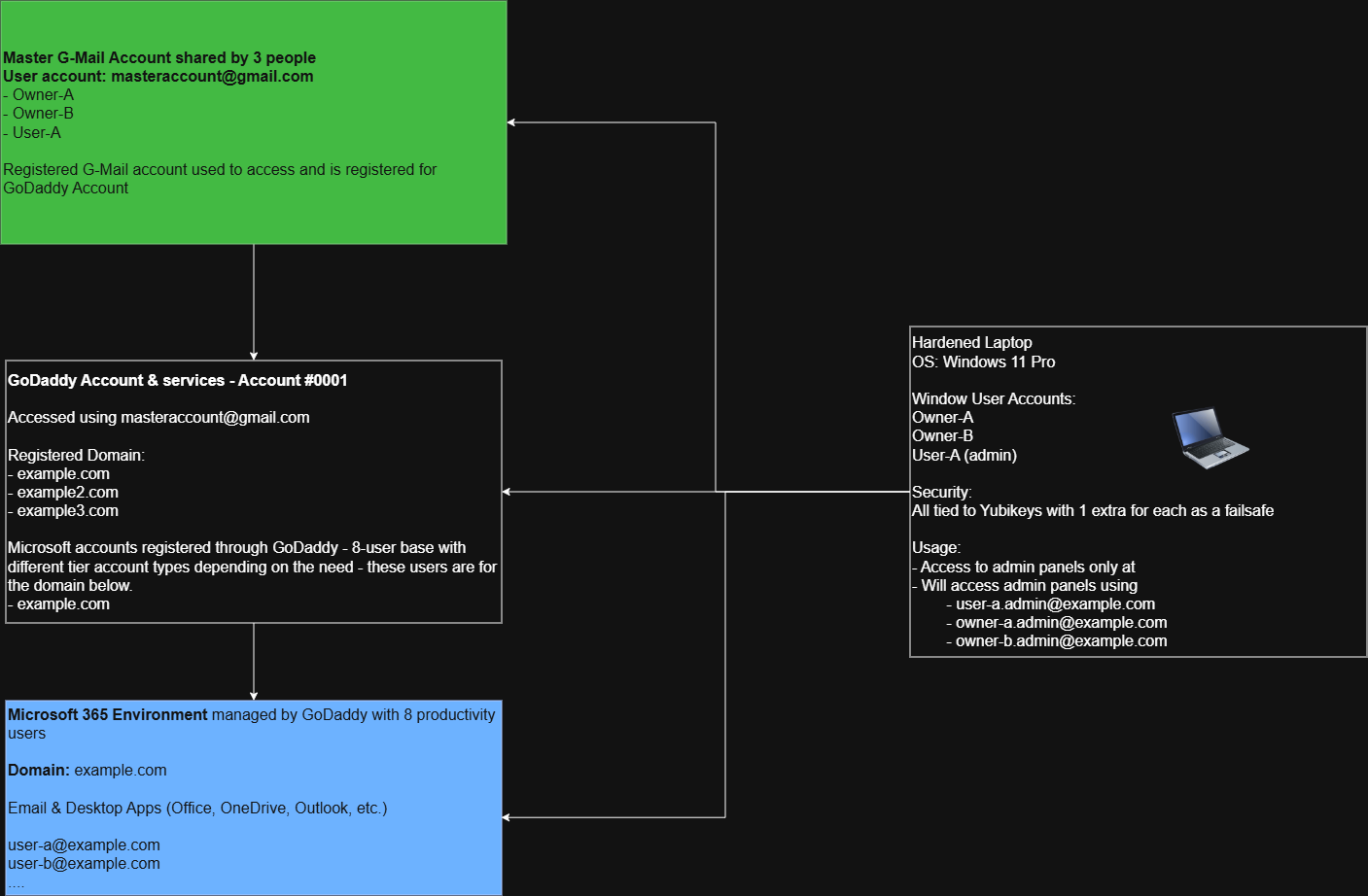
I’ve created a diagram (see below godaddy_ms365_layout.drawio.png) to map out our current flow. I have a few follow-up questions to ensure I implement these changes correctly, especially since GoDaddy is heavily in the mix.

1. Securing and Delegating the GoDaddy Registrar Account

Moving away from the shared Master Gmail makes sense, but I’ve realized a nuance in how GoDaddy is handling our admin access. I don’t actually have to log in via masteraccount@gmail.com to manage the Microsoft side. Instead, when I log in with user-a.admin@example.com and click “Admin” in the Microsoft GUI, it redirects me to a GoDaddy login page. From there, I select the specific admin center I want (Exchange, Teams, SharePoint), and it drops me into that portal.

Because of this tangled SSO redirect, I am considering creating a separate adminaccount@gmail.com strictly to manage the GoDaddy registrar side (domain renewals, GoDaddy-side user creation, etc.) rather than sharing the master account.

  • I plan to use GoDaddy’s “Delegate Access” feature to give Owner-A, Owner-B, and myself separate logins to manage the registrar side instead of sharing one login. Does this sound like the right approach?

  • How do you typically harden the primary GoDaddy account when ownership is split, keeping in mind we have other parked domains (example2.com, example3.com) sitting in that same account? No worries if you aren’t too familiar with GoDaddy; my plan is to eventually move away from them entirely. In that case, what kind of layout would be best (e.g., using Cloudflare as the registrar and Microsoft directly for the tenant)?

2. The Defederation Process

You aren’t kidding about it being a difficult task! I am currently deep-diving into Microsoft’s official documentation: Defederation Process for Microsoft 365 Admins Using GoDaddy. My plan is to stage this carefully and execute the cutover over a weekend to ensure the office experiences the least amount of downtime possible. I will likely spin up a test environment first to safely figure out what hurdles I might hit. Thankfully, our current Microsoft tenant is backed up to a local Synology NAS, which gives me some peace of mind.

3. Break-Glass Account Creation

I plan to set up these accounts and tie them to the extra YubiKeys we have for our hardened Windows 11 Pro admin laptop. Since our licensing and admin portal access is currently tangled up with GoDaddy, I want to ensure I create these in the right place.

  • Am I correct in assuming I should bypass GoDaddy entirely for this and create these cloud-only accounts directly within the Microsoft Entra admin center?

  • To confirm your earlier point, these should strictly use the fallback domain (e.g., breakglass1@example.onmicrosoft.com) rather than our custom domain so they survive any DNS or defederation outages, correct? I wasn’t familiar with the .onmicrosoft.com domain provided by Microsoft since it hadn’t come up in my research yet.

Thanks again for pointing me in the right direction!

As I said earlier, I am not overly familiar with the Azure / Office 365 environments as that has always been something that my other staff took care of. I just know that people seem to hate Go-Daddy so I have always avoided the service.

Totally understand, Tom. Thanks again for taking the time to share your insight and resources, it gave me a great starting point. I’ll dig deeper into the defederation docs and test things out from here. Appreciate the help!