Morning (well it is here)
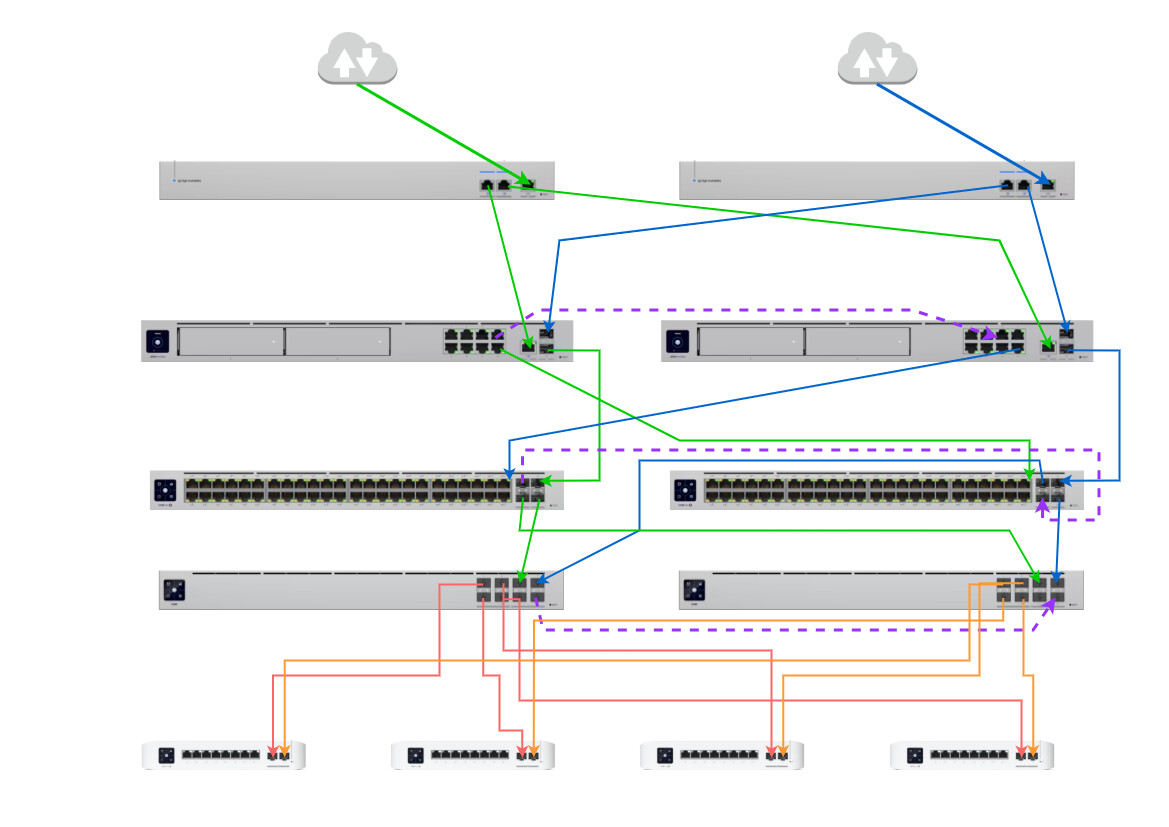
I’d like people to take a look at the diagram above and make sure im not missing something stupid. This is the setup I’ll be putting in to a location that has very specific set of requirements. Some of the requirements are full path redundancy through the network, another is last run to the 4 rooms where the 8 port switches reside is fiber.
So from top to bottom the setup is as follows:
2 x diverse ISP services from different physical exchanges. that are in turn on different power substations in the area. This will feed a pair of WAN switches, that will then connect to a pair of Unifi Dream Machine Pro MAX in shadow mode configuration.
These UDMPMax units will then be connected to two Unifi Pro 48 PoE switches that will feed 30 desks. Each desk will have 2x Cat6 outlets, one going to each switch in the rack.
The 48ProPoE switches are then DAC connected to two Aggregation Switches, that will feed fiber to the 4 room switches, again two connections per room, one from each agg switch..
KEY To Colours:
From the top I have used green for primary unit and Blue for Secondary unit just for my purposes. The purple dotted lines are the inter-connects I believe (unsure) i need to have between switches to ensure redundancy. Red and Orange are fiber
On thing you need to consider is setting the STP priority on your switches or you are going to have a rough time.
I highly recommend the following changes:
- Replace the Aggregation switches with ECS-Aggregation switches set up as an MC-LAG pair
- Place the ECS-Aggregation switches as the first switches after the firewalls
- Every other switch should be connected to the ECS-Aggregation switches directly with port aggregation uplinks, don’t daisy chain through the Pro switch.
This will remove the reliance on STP to resolve the redundant connections and instead use LACP. Faster failover time, and both links will be used all the time.
The ECS Agg switches are out of my price range on this project. Would any of the other Agg switches be suitable?
Would you do this differently?
I seriously recommend that you consider what the ongoing monthly/annual costs related to this are going to be (dual diverse internet circuits) as well as the potential risk to the business that is necessitating such a redundant design. If this is any sort of serious business that can’t handle even the time it would take to move a PC’s cable to a port on another switch, then you should have the budget to do this properly.
Doing it the way you’ve suggested would work but would be terrible in terms of STP. One link flapping (making an intermittent connection) could cause frequent STP reconvergences enabling and disabling the redundant links and causing packet forwarding chaos - and that’s if you set the STP priorities properly.
Cool thank you, I appreciate your input here. The business is definately serious enough, I was more disregarding the ECS Campus equipment as it only runs at 25/10G for its ports. The links and internal speeds dont necesitate this. Its JUST redundancy they require. There will alway be someone able to switch over the cables if required as its going to be manned 24/7/365. The most important parts to keep alive are connected to the AGG switch. The 48 port standard switch just provides connections to the desks. The AGG switch will supply the fiber to the secured areas. These are the most important to stay up.
Sorry .. just realised my diagram is upside down in terms of Agg and Distribution switches
In the shower this morning (I promise I’m not obsessed with you or this issue) I realized another issue with your plan:
Except for the EFG/UXG-Enterprise, you can only have a single connection downstream of a Unifi Gateway to the switches (one per gateway for Shadow Mode).
Unifi Gateways don’t run STP. Worse, on the internal connection between the switch chip (block of 8 RJ45 ports) and the CPU (where are the rest of the ports are directly connected), the BPDU packets that STP relies on actually get dropped. This means that the connected switches have no way of detecting that there is a network loop / redundant connections, and so you’ll have a loop going through both gateways (possibly not the Shadow gateway, I’m not sure whether that still passes Layer 2).
Only the EFG/UXG-Ent support aggregating multiple ports together at this time. I’ve seen some hints that aggregating ports will be supported on the other routers in the future, but again that would require the ECS-Aggregation with MC-LAG to do the connection you suggested, and I doubt you’ll be able to aggregate an SFP+ port and one of the switch chip ports.
Its true that in terms of port counts and speeds the ECS-Aggregation looks overkill here, but its the only switch that supports MC-LAG. A possible alternative if you can wait long enough is the ECS-48S switches, which will support Stacking, meaning you can do port aggregation pairs that are across both switches. Except that would give you only exactly the number of fiber ports you need, which is a bad corner to paint yourself into.
Don’t apologise. I’m a little obsessed with getting the right configuration before spending the cash 
At this point I’m starting to think that having the redundant links and gateways are fine, but having one Agg switch in play with a cold spare on the shelf. It’s a shame I can’t keep a config o load straight too the spare as I don’t think the device replacement works this way
The 48 port switches can remain in STP hell I guess but I might just have that the same. The cold spare mounted ready to go in the rack in case of an emergency
With these types of setups I usually configure the firewalls active-active and setup HSRP at the switch level across the different VLANs to load share across both circuits. I’ll also setup IPSLA to monitor the circuits and flip my VIPs if there are issues. Not sure if your equipment offers anything similar to IPSLA, but you could always script it. IMO, the cleanest solution would include Cisco routers/switches.
1 Like
Yeah, no…. Unifi doesn’t have any of that. The firewalls don’t do Active-Active they are Active-Standby (Palo style where the Standby doesn’t even have links active). Switches have Layer 3 but no VRRP or HSRP (yet - the ECS-Aggregation is based on SONiC and is supposed to get VRRP in a future software release). No IP-SLA beyond some new custom stuff that Unifi added recently that runs at the firewall level.
Unifi is about (relative) simplicity which means if you want certain advanced features you have to do it their way. They don’t offer all the options to support a wide variety of deployment types. But even if you do it their way, which would be using a pair of EFG as the firewalls and a pair of ECS-Aggregation as the distribution layer it still comes in loads cheaper than a Cisco solution with the same performance and level of redundancy.
This is all really helpful guys thanks. I have just priced up a pair of EFG and a pair of ECS Agg switches for this and it’s actually not that bad. The cabling etc I now need to work out as lots of the ports are now 25/10G. But at least then the distribution layer is redundant. The campus switch from what I see doesn’t mention MC-LAG, and the stacking isn’t an option yet.
You have all been super helpful.
1 Like
You could run the firewalls separately and have them both active. Maybe Unifi has centralized management or you just manage them separately, but no HA pairing should be needed. Looking at this layout I would buy two used Cisco switches (for example the Catalyst 4948) and be able to run my recommended setup. Those switches are around $100 each on eBay.
Ok sure, it’s just at that point even if both are running you are using them as Active:Standby based on the default route policy set up in the switches. But it would work. And it would require a level of technical knowledge that, no offense to OP, isn’t shown by the fact that they have come up with their initial design without understanding the STP implications of what they proposed. Sure someone could self-learn the configuration, but that’s asking for trouble down the line with a production network that’s expecting high uptime (also known as a “resume generating event”). This isn’t a homelab desire or low-risk client. Sticking with more foolproof setups is what I’d recommend.
Happy to help! And yeah, the pricing isn’t that bad when you compare it to things like the cost of labor to pull the fiber lines, annual cost of the internet circuit, salaries of people that will rely on this network…. let alone all the much more expensive vendors you could go with for the same setup.