Hey all,
For personal stuff I’d normally just use Tailscale. This one is a business setup, though, and I want to build it with what the UniFi gateway can do natively. I’ll build and test it in my homelab first, before the business deployment. I want to work out the different ways to set it up, lock it down, and confirm nothing else on the network is reachable, mostly for my own peace of mind. Once that works, I can reuse it for similar requests later. The environment is small, so only a few more users would end up on this setup. Before I roll it out, I’d like to confirm the plan makes sense or hear what I’m missing.
Scenario
- User A has Desktop-A at the office. It runs a warehouse inventory app that’s desktop-only for now (a web version is planned).
- User A gets a laptop (Laptop-B) for home with a local Admin account (IT only) and a Standard user account for daily work. M365 (Outlook, OneDrive, Office apps) runs locally on the laptop.
- When they need the inventory app, they connect to the office and RDP into Desktop-A. The app and its data stay on the office LAN; only RDP goes over the VPN.
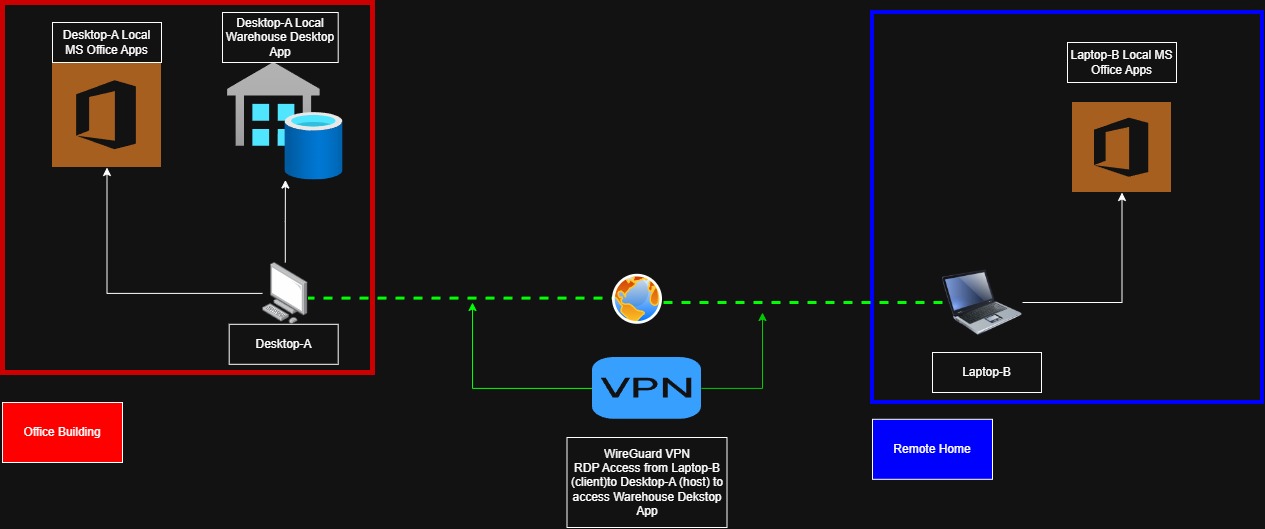
My plan
- UniFi WireGuard server, with one client config per laptop.
- Split tunnel:
AllowedIPs = <Desktop-A IP>/32, so home internet and M365 traffic never go through the office. - DNS: I’d like to keep Quad9 like the gateway uses. Since the tunnel only routes one IP, I’m planning to set
DNS = 9.9.9.9, 149.112.112.112in the client config so lookups don’t depend on the VPN being up. The other option is adding the gateway’s IP to AllowedIPs and using it for DNS, but then any VPN hiccup kills the laptop’s internet. Curious what others do here. - I import and activate the tunnel as Admin and leave it always on, since Standard users can’t toggle WireGuard on Windows by default.
- UniFi firewall (zone-based): the VPN client gets a fixed tunnel IP and can only reach Desktop-A on 3389. Everything else on the LAN is blocked. Remote printing to the office printers may come up later, but I’ll deal with that separately.
- Desktop-A: Windows Pro, DHCP reservation, sleep disabled, RDP with NLA, and the Windows firewall RDP rule scoped to the LAN + VPN subnet.
- A saved
.rdpshortcut on the Standard user’s desktop, so it’s just double-click and log in.
Questions
- Does this setup make sense, or is there a gotcha I’m missing? Mainly the always-on tunnel, DNS handling, and getting the zone-based firewall rules right for VPN clients.
- Would Identity / One-Click VPN or Teleport be a better fit for a non-technical Standard user? I haven’t used either, but I plan to test them for future use cases. Is there anything about them (licensing, routing control, Standard user permissions) that makes one a better fit than WireGuard here?
Thanks!