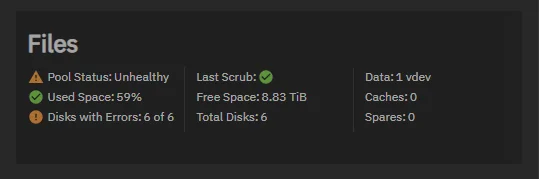
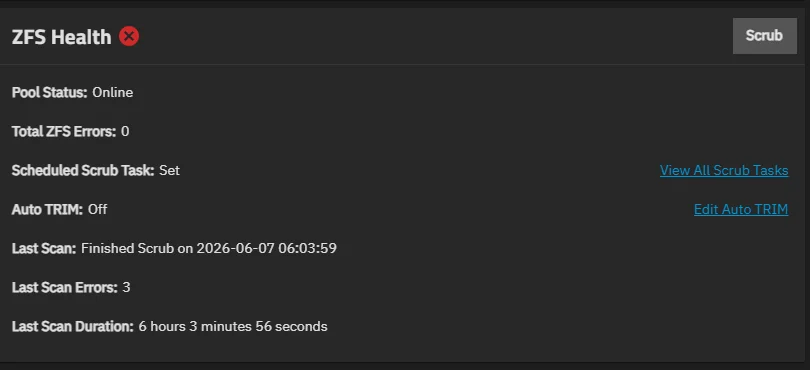
Spoke with tom on his last livestream and was adivsed to post here(@LTS_Tom):
I’m wondering if anyone can help me with my pool errors, I had this pool running for 12 months fine. 3 drives were brand new, 3 were second hand.
Its a raidz2 pool with 6tb drives - 6 wide. I had the drives plugged in via a sata controller as I have only recently got into selfhosting and hadn’t heard of HBA’s, all was fine them 1 disk reported and error. checked online and was told to reseat all cables, after I reseated all cables an booted backup all 6 reported with errors. The errors are checksum errors not read or write errors. replaced the sata controller with a LSI HBA still have all 6 drives having errors. Please see the photos attached:
I’ve tried to scrub this multiple times, zpool cleared then scrubbed again and bam back to the same problem. After a scrub it reports error still but doesn’t list any files? its has 2.47k errors but this is only going up from each scrub as I don’t want to mess around too much a kill the pool off,
The pool is still online and working fine, I have literally changed everything that I think could be the answer (all things the drives are connected to power/data from sata controller to HBA. bought new daisy chain sata connectors an made sure that only 3 daisy’s are connected to each sata power plug. Please can anyone point me in the right direction or help me out with this problem before I feel I have to destroy my pool and start again, I know backups are a big thing but the current climate I cant afford a back up right now or since I’ve gotten into selfhosting. I also appreciate that now isn’t the best time to be getting deep into selfhosting, things I’ve done:
HBA: LSI 9300-16i (Fan Direct on to prevent over heating)
Checked ram on memtest86 and the sticks are fine.
Changed power daisy connectors
Changed sata cables
Changed from sata controller to HBA
Obviously rebooted and reseated cables
Tried different ram when testing ram on memtest
My worry is im going to have to destroy the pool to fix this  As I’ve been told the errors will be from the sata controller and that’s why they are a big no no
 I guess you live and learn from your mistakes. Anyone know how I could fix these errors?
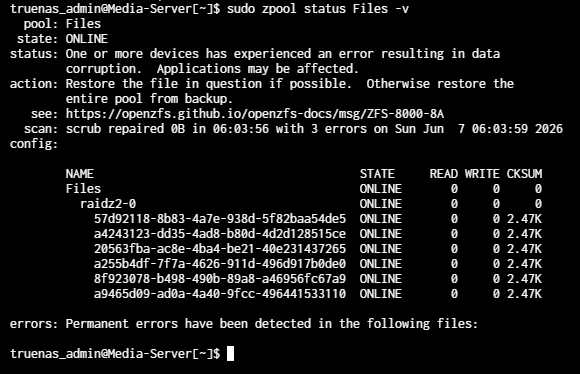
i have zpool cleared and scrubbed again this morning as the checksum count has been rising every time the pool gets scrubbed, the checksum errors were 2.47k now 44. I got to 42% before all 6 drives have errors again all drives always have the exact same amount of checksum errors.