Proxmox vs XCP-ng 2026 Comparison

I last did a Proxmox vs XCP-ng comparison back in 2022, and a lot has changed since then. Both platforms have matured and added features, and more importantly, they have clarified what problems they are trying to solve.
This updated comparison isn’t about declaring a winner. It’s about understanding different architectural approaches: how each platform handles management, storage, backups, and disaster recovery in real-world environments.

Proxmox VE runs on a full Debian base but relies on Proxmox-curated repositories for core platform components, including Ceph, which is integrated, version-pinned, and supported as part of the hyper-converged stack.
XCP-ng takes an appliance-style approach with a minimal host OS, updates controlled by Vates, and higher-level management centered around Xen Orchestra rather than the host itself.

My XCP-ng Setup Training Guide How to Set Up XCP-ng Right the First Time – Best Practices and Configuration Tips - Computer Hardware & Server Infrastructure Builds - Lawrence Systems Forums


Legend
:white_check_mark: Supported / Native
:cross_mark: Not supported
:yellow_circle: Supported with limitations, external components, or important caveats


Proxmox VE vs XCP-ng — Core Platform Comparison

Feature / Capability Proxmox VE XCP-ng
Hypervisor KVM (QEMU) Xen
Host OS Debian-based Custom minimal Linux
Free & Open Source :white_check_mark: :white_check_mark:
Paid Subscription :yellow_circle: Optional (support + repos) :yellow_circle: Optional (support)
SLA Support Agreements :yellow_circle: Yes, but limited directly from Proxmox :white_check_mark: Yes, including up to 1HR Response Time
Management Model Integrated per-cluster platform XO Lite (beta) or XO central manager
Built-in Web UI :white_check_mark: (per host) :yellow_circle: XO Lite (limited / beta here in Jan 2026)
Datacenter Manager (multi-cluster) :white_check_mark: Datacenter (not built in) :white_check_mark: (Xen Orchestra)
API Coverage :white_check_mark: :white_check_mark:
CLI Management :white_check_mark: :white_check_mark:
Clustering :white_check_mark: :white_check_mark:
Native Ceph Integration :white_check_mark: :cross_mark:
Ceph Lifecycle Management :white_check_mark: :cross_mark:
Hyper-converged Storage :white_check_mark: Ceph (native) :white_check_mark: XOSTOR (DRBD)
ZFS Integration :white_check_mark: Native & UI integration :yellow_circle: Host-level / CLI only
Shared Storage Support :yellow_circle: Ceph, iSCSI, NFS :yellow_circle: iSCSI, NFS
Local Storage Support :white_check_mark: :white_check_mark:
Snapshots :yellow_circle: Storage-backend dependent :white_check_mark:
Live Migration :white_check_mark: :white_check_mark:
HA (node failure) :white_check_mark: :white_check_mark:
Software Defined Networking :white_check_mark: :white_check_mark:
VLAN / VXLAN :white_check_mark: :white_check_mark:
RBAC / Permissions :white_check_mark: :white_check_mark: via (XO)
Containers :white_check_mark: LXC (native) :cross_mark:
VM Templates :white_check_mark: :white_check_mark:
PCIe / GPU Passthrough :white_check_mark: :white_check_mark:
SR-IOV :white_check_mark: :white_check_mark:
USB Passthrough :white_check_mark: :white_check_mark:
Automation / IaC :yellow_circle: API + Terraform :yellow_circle: API + XO tools + Terraform

Backup and DR Options

XCP-ng treats backups as a disaster recovery workflow, with strong emphasis on automation, restore validation, and replication.
Proxmox treats backups as verifiable, deduplicated data objects, prioritizing integrity, efficiency, and isolation via Proxmox Backup Server.

Backup / DR Feature Proxmox VE XCP-ng
Backup Management UI :white_check_mark: Built-in (limited without PBS) :white_check_mark: Xen Orchestra
Backup Target :yellow_circle: Proxmox Backup Server or local storage :yellow_circle: Local, SMB, NFS, S3, Azure, Azurite
Incremental Backups :yellow_circle: Yes (via PBS, dedup-based) :white_check_mark:
Deduplication :yellow_circle: Yes (PBS only) :cross_mark:
Cross-VM Deduplication :yellow_circle: Yes (PBS) :cross_mark:
Compression :white_check_mark: :white_check_mark:
Encryption :yellow_circle: Yes (client-side with PBS) :white_check_mark:
Automated Restore Testing :cross_mark: :white_check_mark:
File-Level Restore :white_check_mark: :white_check_mark:
VM-Level Restore :white_check_mark: :white_check_mark:
Backup Scheduling :white_check_mark: :white_check_mark:
Replication of All Backups :yellow_circle: PBS → PBS :white_check_mark: Several Options
Continuous Replication :cross_mark: :yellow_circle: Yes (XO CR)
Warm Standby VM :yellow_circle: Manual / workflow-based :white_check_mark:

This was one of the best videos you have done recently, and that was already a very high bar!

I think you should plan to do one of these every couple of years, at least. I would also love to see one on firewalls, NAS, and overlay networks, too.

2 Likes

I don’t really dive deep enough into other firewalls besides pfsens and UniFi, but I will be doing this for NAS systems soon as there is a LOT to talk about there.

I will add one additional entry to the Backup/DR section in that Proxmox can also backup LXCs as well whereas xcp-ng, because it doesn’t have any direct or native support for LXCs, and therefore; backups for LXCs on xcp-ng is not applicable.

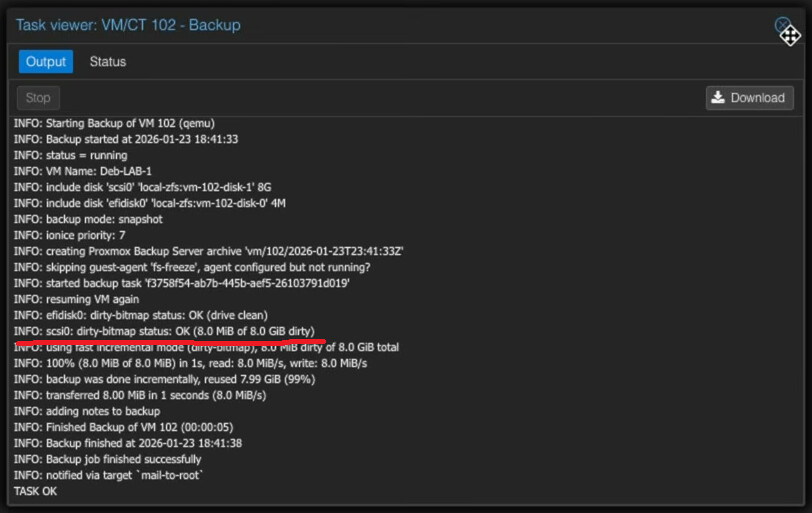
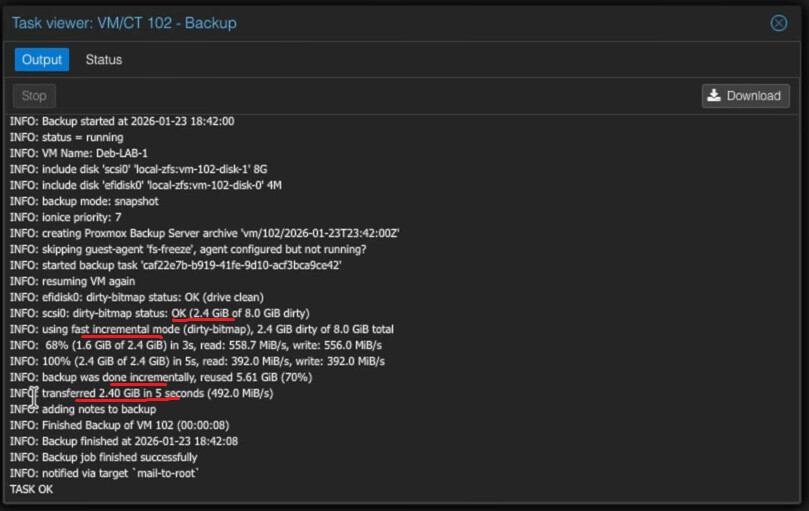
Also, I have seen that when I run backups, Proxmox/PBS doesn’t always do a full backup. In the logs, it will actually say that there’s a dirty bitmap and then only perform the incremental backup before the deduplication.

You can see this in action if you run the backup job at the host or VM/LXC level in rapid succession, and the logs, IIRC, should show that.

edit
This is a screenshot that I took from your video which shows this:

Here is another screenshot from your video which shows that Proxmox/PBS uses basically like a snapshotting method of backup/incremental backup:

edit #3
One more thing that I also just thought of as well:
Proxmox supports virtio-fs whereas as far as I can tell, xcp-ng doesn’t.

This can be useful in some homelab and also maybe some SME environments where if you’re not leasing out the compute time (cloud system), and people need access to the same pool/source of data, over the network, virtio-fs allows you to essentially bypass the entire network stack which should, in theory, give you faster access to the shared data that already resides on the network.

It takes a little bit to set it up, and so far, I’ve only been able to mount a single virtio-fs mountpoint in Windows, but it can be even faster than going through the virtio-nic, especially if the VMs are running on the same system where the data is stored.

If the data is stored on separate systems (i.e. NFS/SMB/iSCSI network storage backends), then this doesn’t really apply.

But, if you are using Ceph, for example, then you can have distributed, network storage, and it would be mounted in Proxmox, and then you can use the virtio-fs to treat the network storage as if it was local storage, and then the traffic between the VM ←→ network storage actually doesn’t need to go through the virtio-nic of said VM.

So you can have an all flash Ceph cluster for the VM storage and then you have a slower HDD Ceph cluster, accessed over virtio-fs for bulk data storage.

Ceph takes care of the internode communication/synchronisation.

virtio-fs gives you access to the data without going through even a virtual NIC. (The virtio-nic shows up in MacOS, Linux, and Windows 10+ as a 10 Gbps NIC. I haven’t found the speed limit for virtio-fs yet, but in theory, it should be as fast as the slowest storage device meaning that you could exceed 10 Gbps speeds, provided that your Ceph network/distributed storage backend can keep up.)

As I stated in the video, Proxmox does a full backup unless you are using the PBS server.

I thought XCP supported Kubernetes containers through the paid XO in the HUB section? I know I’ve seen posts about Kubernetes on the forum, but haven’t bothered chasing it down because I don’t really need it in production.

I’ve been reading up on Harvester HCI, I know you aren’t really interested in this product, but it seems to be a decent choice for some people. Anything container heavy seems like a good way forward with both VM and container integrated into the same command/control plain. Waiting for new gold, sorry, new SATA SSD for my lab hosts to try and spin up a cluster. Going to be in unsupported mode because of the lack of processor cores, but everything says I can do it with performance penalties. One of the books I’m going through focuses on Enterprise configuration best practices, and it’s really good. I haven’t started the other book on actually using Harvester yet. And a third on Rancher for the container part. All three books were cheap on Kindle and all three written in the last half/quarter of 2025 so should be fairly current. Harvester is a free and open and I think part of Suse Free Forever products. Only downside seems to be HCI first and shared storage second, not sure if you can set it up with only shared storage. I have 1tb nvme in each host in the lab, hoping that’s enough to do some learning (and dual 10gbps connections per host, strongly suggested in the book).

One note, if you want to try Harvester, the latest version now requires UEFI boot, but no TPM and no SecureBoot required (probably not yet but inevitable).