To help choose what setup works for you, we need to first talk about what the requirements for each.
What Ceph actually requires
Ceph is a distributed storage system, which means it is designed from the ground up to spread data across multiple nodes simultaneously. That is a genuine strength at scale, but it comes with real infrastructure requirements that are easy to underestimate.
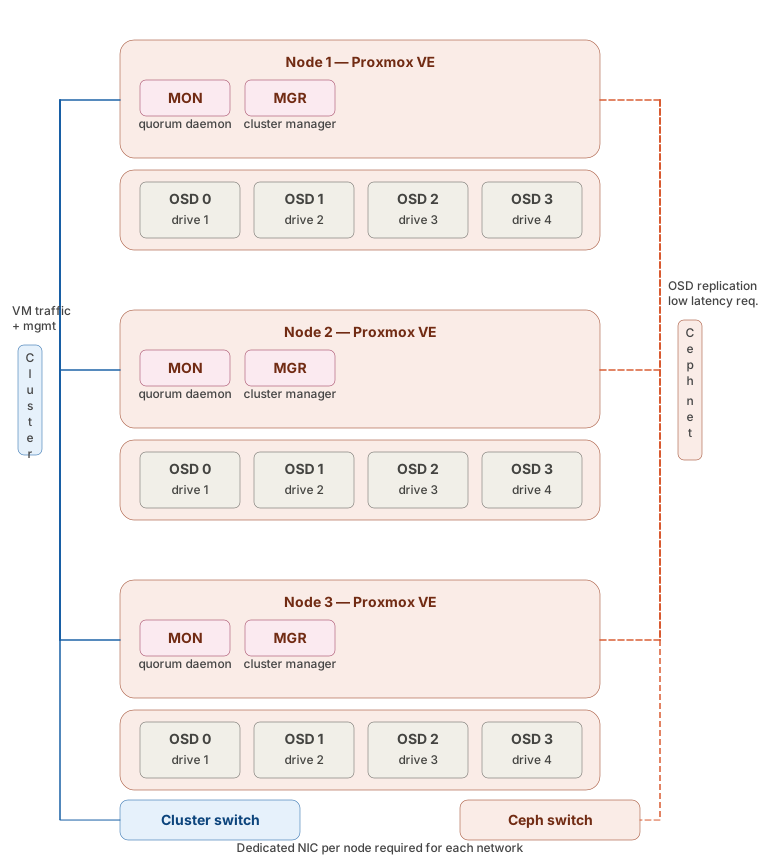
For a Ceph cluster to run correctly you need a minimum of three nodes for proper quorum. With the default replication factor of three, every write has to be confirmed across all three nodes before it is acknowledged. That means your storage performance is directly tied to the latency between nodes. A dedicated low-latency storage network is not optional, it is a requirement. That means dedicated NICs on every node and a separate switch for Ceph traffic. If you are running Ceph on the same network as your VM traffic you are going to have a bad time.
Each node also needs to run multiple daemons. At minimum you are looking at a MON (monitor) daemon for cluster quorum, a MGR (manager) daemon for cluster state, and one OSD (object storage daemon) process per drive. All of these need to be healthy for the cluster to function normally. When a node goes down, the remaining nodes immediately begin rebalancing data, which puts significant load on your network and your remaining drives. If a second node goes down during that recovery window on a three node cluster, you lose quorum and your storage goes offline entirely.
That is not a hypothetical edge case. That is the expected failure mode of a three node Ceph cluster under real conditions.
For further reading check out the Prxomox Ceph Docs
What ZFS gives you instead
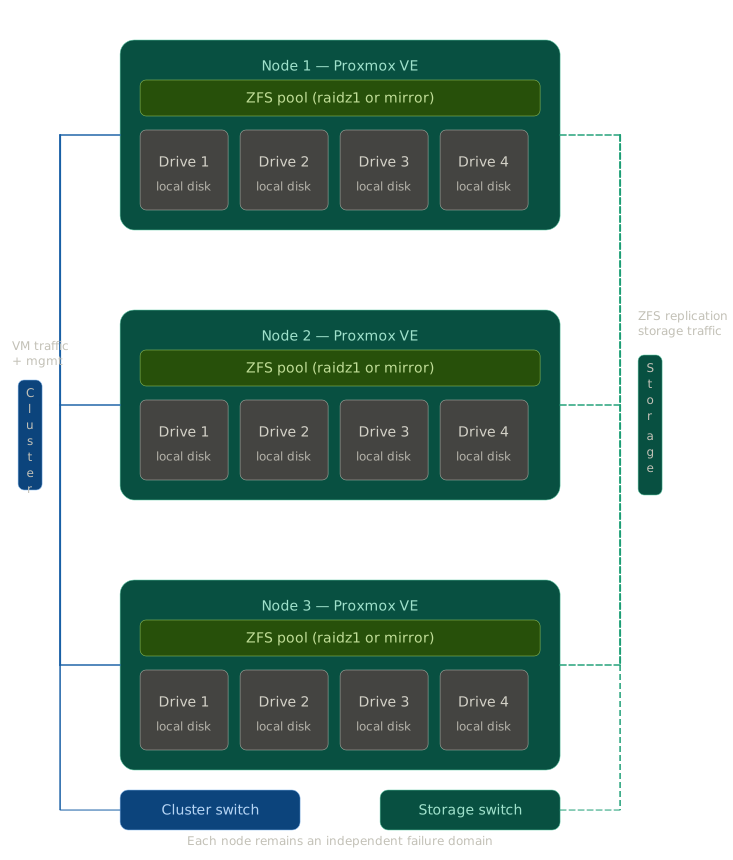
ZFS operates at the individual node level. Each node manages its own pool independently. You get checksumming and automatic data integrity verification, compression, snapshots, and the ability to send incremental snapshots to another node with zfs send. That last part is how you get off-node copies without shared infrastructure: Proxmox has native ZFS replication built into the UI that handles this simply and reliably.
When a ZFS node has a problem, that problem stays on that node. Your other nodes keep running. Recovery is well-documented, the tooling is straightforward, and you do not need deep expertise in a complex distributed system to get yourself back to a healthy state.
The tradeoff is that ZFS is not shared storage. VMs are tied to the node they live on and live migration requires you to move the disk as well, which takes time. For most small cluster setups that is an acceptable tradeoff given what you get in return.
Shared storage as an alternative HA approach
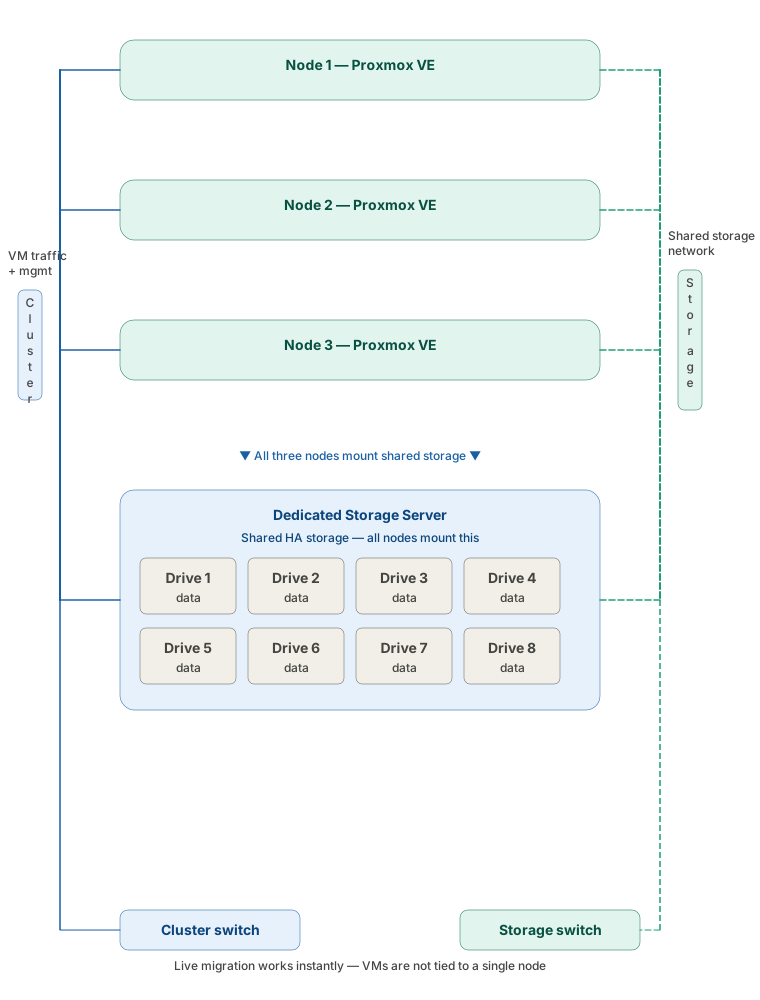
A dedicated storage server gives you a middle ground that neither ZFS local storage nor Ceph offers at small scale. All three nodes mount the same storage, so a VM is not tied to the node it started on. Live migration is nearly instant because the disk does not move, only the running state transfers between nodes. If a compute node goes down, any VM on it can be restarted on another node in seconds.
You are writing to one server over a dedicated storage network rather than coordinating writes across a cluster, so there is no cross-node acknowledgment in the write path. This can give much better write performance.
The big tradeoff is that the storage server is a single point of failure. If it goes down, all three compute nodes lose access to their VMs simultaneously. You can minimize the risks with good hardware with redundancies, on the storage server itself, but you cannot eliminate the dependency. For most small deployments that risk is acceptable and the operational simplicity makes it a strong option, but it needs to be part of your planning going in.
Where Ceph actually makes sense
Ceph becomes the right answer when you have the infrastructure to support it properly. That means enough nodes that you can lose one during a recovery event without risking quorum, a dedicated storage network with proper switching, and someone on your team who understands Ceph well enough to debug a degraded cluster under pressure. As a rough rule I would not consider Ceph until you are at five nodes or more, and even then only if those other conditions are met.
Summary
The decision between ZFS and Ceph for a small Proxmox cluster really comes down to one question: do you need the complexity that Ceph requires, or does it just sound like the right answer because that is what the large deployments use?
For most small deployments the answer is no. Ceph’s write path is genuinely more expensive than people realize. Every write has to be confirmed across all three nodes before it is acknowledged and the network round-trip is in the critical path of every single write operation. ZFS writes locally and it is done. No network round-trip, no cross-cluster acknowledgment, no tuning a distributed journal per OSD. That difference shows up in real workloads.
Ceph does have a legitimate strength on reads. A well-tuned cluster can stripe reads across multiple OSDs and deliver impressive sequential throughput. But “well-tuned” requires the right hardware, a proper dedicated storage network, and the operational knowledge to actually get there. Most small clusters never do.
ZFS gives you predictable, consistent performance without needing to tune a distributed system. The ARC cache means frequently accessed data is fast, checksumming means your data is what you think it is, and zfs send means you have off-node copies without shared infrastructure. When something goes wrong – and eventually something always goes wrong – the failure domain stays on the node where the problem is, and the tools to recover are well-documented and straightforward.
Ceph is excellent software. It is the right answer at scale with the infrastructure to support it. For two or three nodes in a homelab or on-prem for a small client, ZFS is the better choice and I would take it every time.