Pfsense on proxmox slow network speeds

Hi all

As there a quite a few pfsense guys in here and watched a lot of Tom’s content concerning pfsense, I came here seeking for guidance or solutions.
I’m having some issues with a pfsense 2.8.0 installation on proxmox.

for some reason, my iperf results seem to be stuck below 5Gbit/s. These tests have been performed between pfsense (iperf client) and proxmox (iperf server).
As a passionated homelaber and enthousiast, I’m upgrading my internal network to at least 10Gbit/s. As both pfsense, proxmox and 10Gbit networks have been around for a while now, I assume this should be possible?

I have been googling and testing serveral things but I’m out of ideas.

configuration:

  • proxmox installed on an Minisforum MS-A2 with Ryzen 9 9955HX as CPU and 2 intel x710 10Gbit nics.

  • vm:

r/PFSENSE - pfsense on proxmox slow network speeds

The WAN has no IP.

Things I’ve tried:

  • Changed vm cpu to host as I’ve read about this. performance got worse..

  • tried all other nic types. VirtIO gives me the best results

  • as you can see in above screenshot, I tried multiple queues on my nics

  • in pfsense I disabled hardware checksum offload

  • disabled hardware tcp segmentation offload

  • disabled hardware large receive offload

  • added some system tunables:
    net.isr.dispatch deferred
    net.isr.bindthreads 1
    net.isr.maxthreads 4
    net.link.vtnet.0.driver_advanced 1
    net.link.vtnet.0.force_polling 1
    net.link.vtnet.1.driver_advanced 1
    net.link.vtnet.1.force_polling1

  • installed freebsd in another VM with same specs =>results are above 50Gbit/s

  • tried Opnsense in another VM with same specs => results vary on the queue I configure on my nic, but with 4 queues was able to get close to 20Gbit/s

Although I do appreciate everyone trying to help, I’d like to stick to pfsense if possible.
Even though Opnsense and pfsense are very alike, I do feel like pfsense is responding a lot faster to CVE’s and such.

i’ve read numerous posts and articles about people having issues with pfsense 2.6 or 2.7.2, but no one with 2.8 yet.

Thanks in advance for your time and patience! I appreciate any help i can get!

Kind regards!
You might take a look at their docs on installing pfsense in proxmox to see if you missed anything.

Hi Maximus

Thanks for your reply.
I read that guide before, but just as a matter of being sure, I tried again.
I configured my VM and pfsense exactly like prescribed over there.
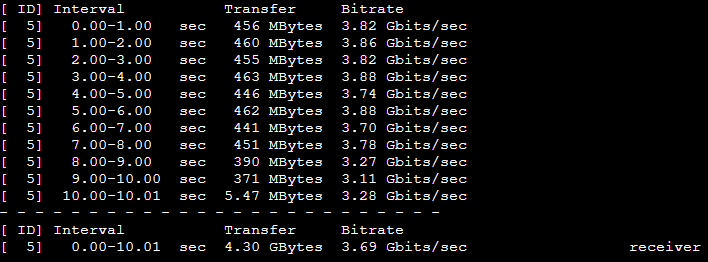
underneath results of my iperf:

As you can see, it got worse. My experience is that choosing x64-86-v2-aes has better results. Although it remains below 5Gbit/s…

I would try running the VM using an UEFI instead of a legacy bios and a q35 machine type to see if that makes a difference. I would also give it less memory and let the host machine retain more of that memory. I found out from experience that iperf run on Proxmox is very impacted by other running VMs. I would turn off all your other VMs temporarily to do iperf testing.

Which version of iperf are you running?

The other thing I would try is doing PCI pass through of the NICs and let pfsense control them directly. Is ceph the only storage you have? I would also try giving pfSense non-ceph storage, just to eliminate all possibilities. Running ZFS (which pfsense does) on top of ceph can’t be efficient.

One more thing. You shouldn’t have your WAN and LAN on the same device (VMBR1)

hi Louie

Thanks for your thoughts!
I did try OVMF and q35 before. But I’ll give that another shot tomorrow (EU based, I have plans for the evening ;))

As I’m using the MS-A2, I have 2x10Gbit and 2x2.5Gbit available on my host.
I made a bond in proxmox between the 2 10Gbit nics and used that bond on vmbr1.
Didn’t try passthrough, but that would eliminate that nic for proxmox itself? Which would be a downgrade in my situation?
There is cluster of multiple MS-A2 devices, with exactly the same specs, hence the ceph storage :slight_smile:

The screenshot attached is a vm with no IP allocated on the WAN interface. I’m only using LAN to test as I want to eliminate as much overhead as possible.
It is a very minimal deployment to test before migrating my production environment.
As this whole cluster is new and I was testing before migrating, this is the only machine running in the cluster right now.
Furthermore I have 128Gigs of ram available. I started testing with 8 allocated to pfsense. to rule RAM out, I upgraded to 16…

I also migrated the VM to local storage, but that didn’t bring any performance boost either.

and last but not least of your suggestion; iperf is version 3.0.5 on both ends..

Greets!

To get back to you about uefi, q35 and OVMF, sadly no improvement either.

I tried running ifconfig vtnet1 -rxcsum -txcsum -tso -lro from the shell as well. also to no avail…

For what it’s worth, your speeds match what I see when I run pfsense on bare metal. If I use iperf3 with one TCP connection I’m seeing 3-4Gbits/sec. If I want to run iperf and get faster speeds, I can use the -P option.

For context, my router has an Intel N305 and Mellanox SFP+ NICs. (it’s a GoWin 1U server)

Here’s what I see when I run iperf3 on my primary desktop (it has 10GBase-T)

❯ iperf3 -c $PFSENSE_ROUTER -P 1
Connecting to host REDACTED, port 5201
[  7] local 2001:db8::2 port 59393 connected to 2001:db8::1 port 5201
[ ID] Interval           Transfer     Bitrate
[  7]   0.00-1.00   sec   460 MBytes  3.85 Gbits/sec                  
[  7]   1.00-2.00   sec   459 MBytes  3.86 Gbits/sec                  
[  7]   2.00-3.00   sec   406 MBytes  3.41 Gbits/sec                  
[  7]   3.00-4.00   sec   371 MBytes  3.11 Gbits/sec                  
[  7]   4.00-5.00   sec   374 MBytes  3.13 Gbits/sec                  
[  7]   5.00-6.00   sec   380 MBytes  3.20 Gbits/sec                  
[  7]   6.00-7.01   sec   375 MBytes  3.13 Gbits/sec                  
[  7]   7.01-8.00   sec   376 MBytes  3.17 Gbits/sec                  
[  7]   8.00-9.01   sec   372 MBytes  3.10 Gbits/sec                  
[  7]   9.01-10.01  sec   372 MBytes  3.12 Gbits/sec                  
- - - - - - - - - - - - - - - - - - - - - - - - -
[ ID] Interval           Transfer     Bitrate
[  7]   0.00-10.01  sec  3.85 GBytes  3.31 Gbits/sec                  sender
[  7]   0.00-10.01  sec  3.85 GBytes  3.31 Gbits/sec                  receiver

iperf Done.

Here’s what happens when I connect from my MS-01 proxmox LXC using -P 8

iperf3 -c $PFSENSE_ROUTER -P 8
Connecting to host REDACTED, port 5201
[ ID] Interval           Transfer     Bitrate         Retr  Cwnd
[  5]   0.00-1.00   sec   134 MBytes  1.13 Gbits/sec    0    432 KBytes       
[  7]   0.00-1.00   sec   103 MBytes   867 Mbits/sec    0    470 KBytes       
[  9]   0.00-1.00   sec  96.6 MBytes   810 Mbits/sec   39    343 KBytes       
[ 11]   0.00-1.00   sec   278 MBytes  2.33 Gbits/sec   13    551 KBytes       
[ 13]   0.00-1.00   sec   151 MBytes  1.27 Gbits/sec    0    562 KBytes       
[ 15]   0.00-1.00   sec   148 MBytes  1.24 Gbits/sec    0    494 KBytes       
[ 17]   0.00-1.00   sec   130 MBytes  1.09 Gbits/sec   39    402 KBytes       
[ 19]   0.00-1.00   sec  83.6 MBytes   701 Mbits/sec    0    431 KBytes       
[SUM]   0.00-1.00   sec  1.10 GBytes  9.44 Gbits/sec   91    
...
[SUM]   0.00-10.00  sec  10.8 GBytes  9.24 Gbits/sec  9203             sender
[SUM]   0.00-10.00  sec  10.7 GBytes  9.22 Gbits/sec                  receiver

Please note, when I connect my desktop to the MS-01 proxmox LXC I see 10Gbps (as expected):

[ ID] Interval           Transfer     Bitrate
[  5]   0.00-10.00  sec  10.8 GBytes  9.28 Gbits/sec                  sender
[  5]   0.00-10.01  sec  10.8 GBytes  9.28 Gbits/sec                  receiver

Hi Cheese-cake

If you have a ms-01 with proxmox, running a pfsense that is able to reach those rates, i’m very curious how you configured it!

When i use -P 4 (from the shell because i don’t think there is an option in the gui) my pfsense starts giving a couple results at the same rate. However after 3 blocks cpu goes to 100% and it gets stuck forever.
At least if i use host as cpu instead of x86-64-v2-aes. With x86-bla-bla it is stable but it still gives me 4-5Gbit.

So somehow i feel like the multiqueue isn’t working properly at the nics?

So as an experiment I started a pfsense VM on the MS-01 and ran iperf3 a few times. I’m getting similar results to you @baggeraar .

Test 1: My desktop is the iperf3 client. The pfsense VM on the MS-01 is the iperf3 server:

❯ iperf3 -c $PFSENSE_MS-01
Connecting to host 192.168.30.1, port 5201
[  5] local 192.168.30.10 port 55867 connected to 192.168.30.1 port 5201
[ ID] Interval           Transfer     Bitrate
[  5]   0.00-1.01   sec   511 MBytes  4.27 Gbits/sec                  
[  5]   1.01-2.00   sec   510 MBytes  4.29 Gbits/sec                  
[  5]   2.00-3.00   sec   513 MBytes  4.31 Gbits/sec                  
[  5]   3.00-4.01   sec   506 MBytes  4.22 Gbits/sec                  
[  5]   4.01-5.00   sec   514 MBytes  4.32 Gbits/sec                  
[  5]   5.00-6.00   sec   514 MBytes  4.30 Gbits/sec                  
[  5]   6.00-7.01   sec   528 MBytes  4.43 Gbits/sec                  
[  5]   7.01-8.00   sec   500 MBytes  4.20 Gbits/sec                  
[  5]   8.00-9.00   sec   514 MBytes  4.32 Gbits/sec                  
[  5]   9.00-10.01  sec   505 MBytes  4.22 Gbits/sec                  
- - - - - - - - - - - - - - - - - - - - - - - - -
[ ID] Interval           Transfer     Bitrate
[  5]   0.00-10.01  sec  5.00 GBytes  4.29 Gbits/sec                  sender
[  5]   0.00-10.01  sec  4.99 GBytes  4.29 Gbits/sec                  receiver

iperf Done.

Test 2: My desktop is iperf3 client. The pfsense VM is the iperf3 server. I ran the client with -P 8. This seems to make things worse:

❯ iperf3 -c 192.168.30.1 -P 8
Connecting to host 192.168.30.1, port 5201
[  5] local 192.168.30.10 port 56159 connected to 192.168.30.1 port 5201
[  7] local 192.168.30.10 port 56160 connected to 192.168.30.1 port 5201
[  9] local 192.168.30.10 port 56161 connected to 192.168.30.1 port 5201
[ 11] local 192.168.30.10 port 56162 connected to 192.168.30.1 port 5201
[ 13] local 192.168.30.10 port 56163 connected to 192.168.30.1 port 5201
[ 15] local 192.168.30.10 port 56164 connected to 192.168.30.1 port 5201
[ 17] local 192.168.30.10 port 56165 connected to 192.168.30.1 port 5201
[ 19] local 192.168.30.10 port 56166 connected to 192.168.30.1 port 5201
...
[SUM]   0.00-10.00  sec  4.50 GBytes  3.87 Gbits/sec                  sender
[SUM]   0.00-10.00  sec  4.49 GBytes  3.86 Gbits/sec                  receiver

Test 3: The pfsense VM is iperf3 client. My desktop is the iperf3 server. I used the pfsense GUI to run the iperf3 client and I kept the default settings as much as possible.

Connecting to host 192.168.30.10, port 5201
[  5] local 192.168.30.1 port 59220 connected to 192.168.30.10 port 5201
[ ID] Interval           Transfer     Bitrate         Retr  Cwnd
[  5]   0.00-1.00   sec  1.06 GBytes  9.11 Gbits/sec    0   3.98 MBytes       
[  5]   1.00-2.05   sec  1.13 GBytes  9.31 Gbits/sec    0   3.98 MBytes       
[  5]   2.05-3.03   sec  1.06 GBytes  9.21 Gbits/sec    0   4.00 MBytes       
[  5]   3.03-4.06   sec  1.11 GBytes  9.34 Gbits/sec    0   4.00 MBytes       
[  5]   4.06-5.03   sec  1.03 GBytes  9.07 Gbits/sec    0   4.00 MBytes       
[  5]   5.03-6.05   sec  1.07 GBytes  9.05 Gbits/sec    0   4.00 MBytes       
[  5]   6.05-7.03   sec  1.05 GBytes  9.24 Gbits/sec    0   4.00 MBytes       
[  5]   7.03-8.00   sec  1.05 GBytes  9.24 Gbits/sec    0   4.00 MBytes       
[  5]   8.00-9.01   sec  1.07 GBytes  9.14 Gbits/sec    0   4.00 MBytes       
[  5]   9.01-10.01  sec  1.06 GBytes  9.09 Gbits/sec    0   4.00 MBytes       
- - - - - - - - - - - - - - - - - - - - - - - - -
[ ID] Interval           Transfer     Bitrate         Retr
[  5]   0.00-10.01  sec  10.7 GBytes  9.18 Gbits/sec    0            sender
[  5]   0.00-10.01  sec  10.7 GBytes  9.18 Gbits/sec                  receiver

These results are pretty good. But please note: 9.18 Gbits/sec is a little less than the 9.40 GBits/sec you might expect. However, my desktop and the MS-01 were just using the switches on my home LAN. These switches are not idle. So it’s possible that the bandwidth would be higher if my LAN wasn’t carrying extra traffic

Some notes about the VM:

  • pfsense 2.8.0
  • Memory 8GB
  • 4 cores (CPU type = host) (MS-01 w/ Intel 12900H)
  • BIOS = OVMF (UEFI)
  • Machine = q35
  • WAN Network Interface = Intel X710 SR-IOV
  • LAN Network Interface = Intel X710 SR-IOV

@baggeraar I missed that you were running iperf from the pfSense machine itself. That is notorious for giving low reading. You should be running iperf between two external machines who’s traffic is running through pfSense. That’s the only measurement that has any validity. I have a bare metal pfSense machine based on a intel X520 card with dual SFP+ ports, and an Asrock Rack IMB-V2000M motherboard (Ryzen V2718 with 8 cores/16 threads), PLENTY of horsepower. Every test I did from pfSense was around 6-7gbps. But if I tested between two connected machines on the same VLAN, I would get 9.4 gbps, without any issue. I could even get ~8.9-9.1 gbps when traversing VLANs. If you have your networking set up optimally, machines on the same VLAN should never get to the pfsense box, the traffic should stay within the switch (much faster that way). The stress for pfSense will be inter VLAN routing. Don’t even bother looking at the results from the pfSense web UI. They are meaningless and useless. Always test between two other machines connected to pfSense.

@baggeraar
I ran some more tests with that pfsense VM and I think these are the most interesting results!

In these tests I have the same pfsense VM running on the MS-01 (see my previous post):

  • The pfsense VM has a LAN interface
  • The pfsense VM has a OPT1 interface
  • I’m going to route iperf3 traffic through the pfsense VM. So the pfsense VM will need to forward traffic between the LAN and the OPT1 networks. (NOTE I am technically traversing VLANs here. LAN = VLAN 30. OPT1 = VLAN X. The VM has access to two SR-IOV NICs but they are from the same physical Intel X710)

In these tests, my desktop is connected to the LAN network (with 10GBase-T). I have a second proxmox host with 10GbE on the OPT1 network. The OPT1 host is running a Debian LXC with iperf3.

Routing Test 1
In this test my desktop is the iperf3 client on the LAN network. The Debian LXC on the OPT1 network is the iperf3 server. I’m using a single TCP stream.

> iperf3 -c $OPT1_HOST --bind-dev $LAN
Connecting to host 192.168.X.X, port 5201
[  5] local 192.168.30.10 port 63611 connected to 192.168.X.X port 5201
[ ID] Interval           Transfer     Bitrate
[  5]   0.00-1.01   sec   920 MBytes  7.68 Gbits/sec                  
[  5]   1.01-2.00   sec   918 MBytes  7.72 Gbits/sec                  
[  5]   2.00-3.01   sec   916 MBytes  7.66 Gbits/sec                  
[  5]   3.01-4.00   sec   930 MBytes  7.82 Gbits/sec                  
[  5]   4.00-5.00   sec   903 MBytes  7.57 Gbits/sec                  
[  5]   5.00-6.00   sec   847 MBytes  7.11 Gbits/sec                  
[  5]   6.00-7.01   sec   846 MBytes  7.08 Gbits/sec                  
[  5]   7.01-8.01   sec   848 MBytes  7.12 Gbits/sec                  
[  5]   8.01-9.00   sec   850 MBytes  7.14 Gbits/sec                  
[  5]   9.00-10.01  sec   842 MBytes  7.06 Gbits/sec                  
- - - - - - - - - - - - - - - - - - - - - - - - -
[ ID] Interval           Transfer     Bitrate
[  5]   0.00-10.01  sec  8.61 GBytes  7.40 Gbits/sec                  sender
[  5]   0.00-10.01  sec  8.61 GBytes  7.39 Gbits/sec                  receiver

These results are much faster than when pfsense was the iperf3 server and my desktop was the iperf3 client. Looks like pfsense can handle 7.4Gbits/sec when I have a single TCP stream! Please Note: The bottle neck is the pfsense VM that’s forwarding the traffic. When my desktop and the Debian LXC are on the same network I’m seeing 9.41 Gbit/sec.

Routing Test 2
In this test my desktop is the iperf3 client. The server is on the OPT1 network. The pfsense VM must forward the traffic between these networks. I used the -P 8 flags during this test (to create 8 TCP connections). Here are the results:

> iperf3 -c $OPT1_HOST --bind-dev $LAN -P 8
Connecting to host 192.168.X.X, port 5201
[  5] local 192.168.30.10 port 49936 connected to 192.168.X.X port 5201
[  7] local 192.168.30.10 port 49937 connected to 192.168.X.X port 5201
[  9] local 192.168.30.10 port 49938 connected to 192.168.X.X port 5201
[ 11] local 192.168.30.10 port 49939 connected to 192.168.X.X port 5201
[ 13] local 192.168.30.10 port 49940 connected to 192.168.X.X port 5201
[ 15] local 192.168.30.10 port 49941 connected to 192.168.X.X port 5201
[ 17] local 192.168.30.10 port 49942 connected to 192.168.X.X port 5201
[ 19] local 192.168.30.10 port 49943 connected to 192.168.X.X port 5201
...
[SUM]   0.00-10.00  sec  10.8 GBytes  9.30 Gbits/sec                  sender
[SUM]   0.00-10.01  sec  10.8 GBytes  9.29 Gbits/sec                  receiver

So it’s clear that the pfsense VM can route at 9.3 GBits/sec! (Note: this is Inter-VLAN routing)

@baggeraar It’s possible that your pfsense VM is like mine. It can route much faster than it can run an iperf3 server.

Just to summarize. When the Pfsense VM is the iperf3 server I get these speeds:

[ ID] Interval           Transfer     Bitrate
[  5]   0.00-10.01  sec  5.00 GBytes  4.29 Gbits/sec                  sender
[  5]   0.00-10.01  sec  4.99 GBytes  4.29 Gbits/sec                  receiver

When I’m just forwarding traffic through this pfsense VM, I can basically get wire speed:

[SUM]   0.00-10.00  sec  10.8 GBytes  9.30 Gbits/sec                  sender
[SUM]   0.00-10.01  sec  10.8 GBytes  9.29 Gbits/sec                  receiver

@Louie1961 I didn’t realize speeds were slower when traversing VLANs! I was doing that in my tests. Thank you for pointing that out. I updated my post with this detail.