Hello everybody,
I would like to install a centralized password manager and use it on the company I work.
I was looking at Passbolt CE and use it on premise (docker) but after I get all up and running I got a very big issue.
It doesn’t support accounts without a valid email address! and since I have many “offline” accounts like the ones I am using the the management, it is impossible for these to access because each time I need to confirm a link sent via mail.
The only free and opensource alternative - I think - is Vaultwarden.
I am using it at home but I am not sure I can use it at work bacause it uses the Bitwarden browser extension.
…I know, there is the risk that “tomorrow” Bitwarden could change something on the browser extensions and so I will lose the password access from it, or that the Vaultwarden community could leave the project, etc. etc.
but now, can I use the extension freely?
I mean, do you guys know if in business environment there are some limitations for the use of the browser extension without the Bitwarden backend? or could I get some legal issues?
One option you didn’t mention is to look at is Bitwarden itself since you already know and like it (via Vaultwarden). Bitwarden is self-hostable: Self-host Bitwarden | Bitwarden.
Is this a tool for an entire team, or just you? If just you, have you looked at this thing?
I may give one a try so I have a portable password manager, and the FIDO2 might not hurt either. It has decent reviews for the USB A version, pretty poor reviews for the combo C and A version. I think the A version with an A to C cable might be the way I go. Going to think about it a bit more and maybe add to an order.
[edit] there is also Zerokey that might be worth looking into, but again for individuals
I am choosing the “free to use” or maintained by the community mainly because I am against all SaaS thing (for many reasons) and because, for now, this sw will be used only by me.
@xMAXIMUSx
I looked teampass but as I understood the browser extension needs a commercial license, if so I will exclude it.
@Greg_E
As said this tool will be used - at the beginning by me - since I have a lot of password related to the vm, services, etc.
Then, if it works I will create an account for each user so they can store their passwords in a more secure way than the browser password manager.
Actually I am using a Yubico + an md file (I know, I know) on a pair of usb keys (the first one is always with me and the second one is on the security locker of the company).
I would like to replace my usb key with something - at least on paper - more secure and easy to access.
All data must stay inside of the company, no cloud.
I work in a manufacturing company with less then 30 employs (only half of them has access to the services/computers).
We don’t have “super secret data”, but this doesn’t mean that I could attach a sheet with the password on a wall an sleep well, if you know what I mean.
@tvcvt & @LTS_Tom
I know bitwarden has an on premise version but I am not sure if it is only for “home” use or even if for business.
Also I am not totally - how to say - confident with their business model (it reminds me Plex that requires their approval to work and I am not always sure about the data collected or if all the data stays locally ..but this is another story of me untrusting this type of model, to me “if it is free is free”, not “it is free …but”).
Anyway if the docker version (lite or not) is free to use even for business I will look at it.
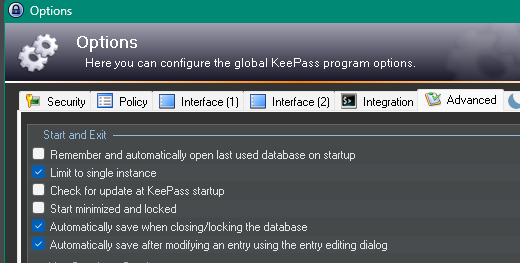
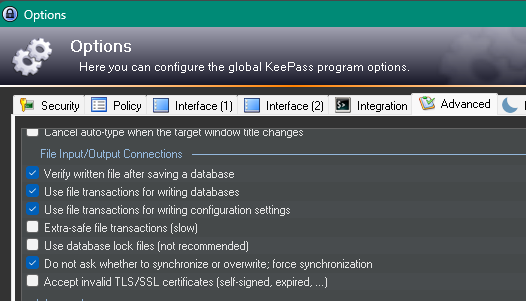
We use KeePass. The full installer (not portable) is used on each client so it gets registered as an installed application and routinely patched by our endpoint management system. We have the database (.kdbx) files on a network share with ACLs protecting the files and personnel control by selective sharing the master password. The way we configure KeePass we’ve never had issues with multiple users accessing and overwriting each other. To make the config consistent across clients, just configure one machine then copy KeePass.config.xml to %appdata%\KeePass which could be handled by logon script. Here are the important options to make it work well for multi-user:
I’ll give my small contribution! Until 2022 I used Teampass, but I ended up abandoning the solution due to the lack of a mobile application and because it went many years without any updates. I was afraid of security flaws and looked for other options.
In the meantime, I tested several solutions and almost switched to Bitwarden, but the lack of a free password sharing option between collaborators held me back.
After that, I discovered Vaultwarden, which is a reimplementation of Bitwarden but made in Rust and works very well, being fully compatible with browser extensions, Android, iOS, Desktop, etc., which made me adopt it.
Today I have 5 instances of Vaultwarden, all running on top of a docker-compose, and I don’t regret it.
Give the solution a chance and I believe you will like it too.
Maybe I missed something in the thread about the reasoning here, but IMHO password managers are one of the very very small handful of things you should absolutely NOT try to self host/host on-prem. These are too critical for a small team to manage them IMO.
@Brian_S KeePass is only local and difficult to maintain (I can’t manage the backups etc) it is good for a single user or home but not for a business env.
@tacioandrade yes Vautwarden is good but I am not sure I can use the BW client in business if I don’t use their backend or their cloud services.
I have checked in their terms of services but my English is not so good
The lite version as well as the normal are free to use only for home not for business.
@planedrop
I don’t agree with that. These kind of information are critical and must been stored in the most secure place possible.
Relying a third-party company is like trusting someone else with your personal or financial data.
Zero trust is not just a slogan, means exactly this: don’t trust anyone.
Think - for exmple - about the last breaches of LastPass, Norton, etc in these years.
And those are only the ones that made “noise”, but who knows how many others happen without being reported because they affect only few accounts?
I’ve never been hacked and I have a password manager, so would you trust me? I personally not..
Also, as a programmer, I personally hate the saas (software as a service) mostly because it cuts all dev creativity and if you - as a customer - stop paying you have nothing then some files you can’t access.
but this is another story
My friend, after some research I didn’t find anything preventing the use of Bitwarden for Android or Windows connecting to a Vaultwarden for a corporate environment.
In fact, the free version of Bitwarden can be used in a corporate environment without problems; only the password sharing functionality between people will only work with a paid subscription.
However, the clients are all GPLv3 and free.
If you want to confirm this, I recommend going to the Bitwarden forum and asking about it there to maintain peace of mind and implement the solution more securely if you deem it valid.
This is a fundamental misunderstanding of how the encryption for these systems work, Bitwarden can get breached without it having any impact on users as long as your password is at least semi decent.
Most password managers are designed this way, it’s why for almost all users, when LastPass was breached, it didn’t matter at all. They made some mistakes, like not forcing people to up to higher iterations of PBKDF2, but Bitwarden is more transparent about all of that so you can check yourself or even change to Argon2.
LastPass’s breach would not have mattered if they hadn’t made this specific mistake, but since they aren’t as transparent and open, it was hard to ever audit that or have confidence in it, this is not the case with Bitwarden and is why I recommended them over LastPass for ages even before the breach.
Hosting it yourself means you actually think you’ll do a better job of securing the data than a very large security team, this is highly unlikely, even as someone who manages servers with regulatory requirements for businesses, I won’t host a password manager myself. Not to mention the catastrophe it would be if you messed something up and no longer could get your passwords.
On the SaaS note, I generally agree, but certain things do make sense to be subscriptions and IMO password managers are one of those. If you take proper backups, you can still get everything even if the service goes completely down or you stop paying. Generally though I think the SaaS model is garbage so I’m with you there.
@boomshankerx1 and @tacioandrade
thank you both,
Since - for now - installing and testing a password manager is my idea (and not yet approved by the bosses), I wanted to make sure I wouldn’t run into any problems.
If the client is under the AGPL, I’m fine.
It was only a fear, to don’t a step in some gray or illegal zone.
I will go with vaultwarden + bitwarden client
@planedrop
You are right the data sent is encrypted etc, but I am still feel uncomfortable saving data there, I prefer self host solution (even if there is a subscription) I will pay it but the data must stay on my disks.
Also we don’t have a great connection so if internet goes down the users can still access to the local services (nextcloud, crm, etc)
The docker vm will have some “layers” to access and the gui will behind traefik with certs and not exposed to internet.
Can I ask you why you don’t trust a self hosted password manager?
If your internet goes down, most password managers, including Bitwarden, will cache all your local credentials so you can still get into everything without issue.
There also isn’t anything to trust about storing data with them, if you understand how the encryption works, there is literally not a risk.
As for not trusting self hosted, it’s not so much that I don’t trust it, it’s that I don’t trust myself to have absolutely perfect 100% uptime and my password manager is my most important and critical resource, I need it to be up all the time, I need it to have a big security team behind it paying attention to it, I need it to be updated as soon as new updates are available, etc…
I’ll self host almost anything, but password managers and e-mail are 2 that I won’t.
I like Vaultwarden with the Bitwarden client (or as Tom pointed out Bitwarden lite). To me the fact that the password vault is stored local on the client, and only replicates to the server is a win. My server can be down and my wife’s bitwarden client on her phone or her laptop keeps working. And administering it is dead simple.
I also like the fact that if I ever drop dead, my wife has a very easy transition to the Bitwarden cloud. She doesn’t have to know anything about my server, docker, etc. to migrate. Its just a setting in the client, and since the data is local, it will just replicate to the cloud once she has a cloud account.
Now, what they may mean for the cyber security teams is a bit outside my lane. Bitwarden is not the same as something like Authelia.
I highly recommend Vaultwarden. I have been using it for years in Docker hosted on a VPS outside my network. The VPS is highly available and its under my control. The password sharing works with no licenses needed. Upgrading is a breeze as long as you do incremental updates using their release cadence. Ensure backup the database in case of failure that way standing up on a new docker instance is a breeze. I never had to do that but belt and suspenders is the way to go. I also have a WAF in front of it, use DUO and/or yubikey for MFA (always ensure you have more than one MFA enabled) and always use MFA just in case your master gets compromised. Its fully compatible with Bitwarden browser extension, desktop app, Android and iPhone apps. I agree from a personal and/or org requirements the keys to the kingdom should be under your total control not some black box Saas solution.