TL;DR: What is the best redundancy configuration in my setup? Just LACP between my XCP-ng hosts and my Truenas?
Hello, I originally planned to setup my cluster with iSCSI, but after reading through XCP-ng’s documentation and watching @LTS_Tom‘s videos it seems like the better choice is to use NFS.
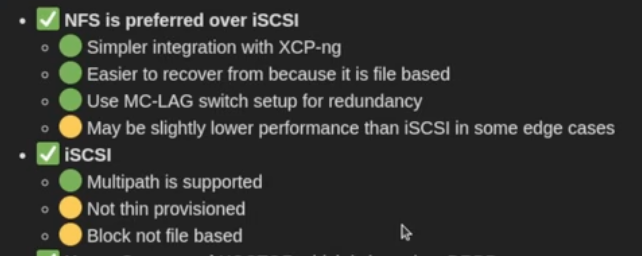
I have two XCP-ng hosts that are directly connected to a TrueNAS server through 25 GB/s links. I saw in lawrence’s video on youtube, “XCP-ng Server Setup Guide: Best Practices for Storage, Networking, and Backups” a screen clip included here:
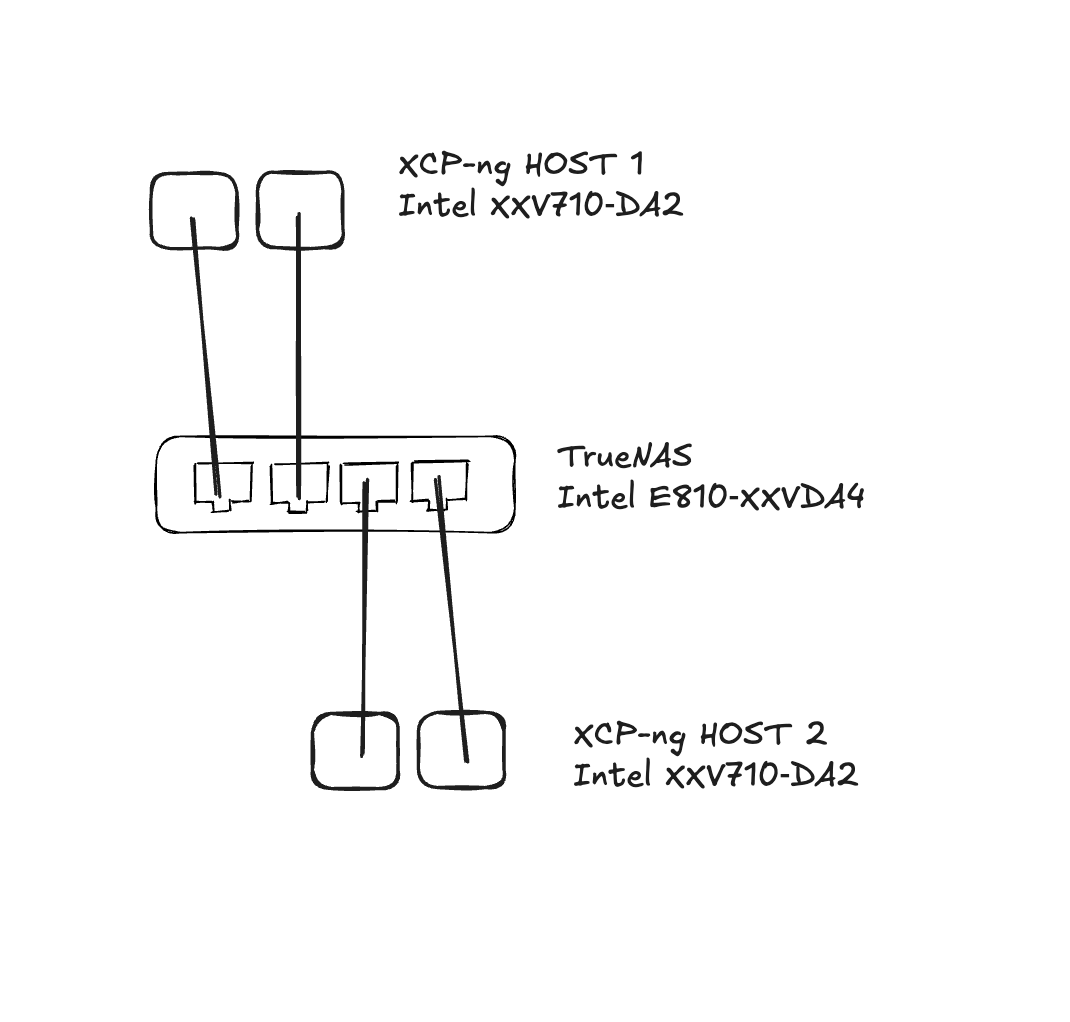
I see the term “MC-LAG” which i’m unfamiliar with, but found online this is just a switch redundancy thing. I’ve also included my below configuration which is switchless everything is direct connected through dual links back to my SAN. I was hoping to use multipathing for more link speed, but oh well. The headaches of using blockstorage seem to outweight the benefits of using mutipathing with iSCSI.
Anyway, I can’t seem to find much documentation on configuring LACP inside XCP-ng. Do I just need to join my resource pool and then I can configure LACP between both of my hosts and TrueNAS in XOA or is this something that has to happen in CML with xe?
thanks!
This post covers both:
I think your setup is fine with your connectivity as long as it works. Changing it would only introduce additional costs with most likely no real benefits.
1 Like
Okay, I should just setup LACP between both my links? Also, should i do the LACP prior to joining my two servers in a resource pool?
If you can I would setup LACP on unused links so you can maintain mgmt access when doing your setup. It’s common to use mgmt ports for resource pool configs so depending on whether you do that or not it wouldn’t matter if you setup the resource pools ahead of the LACP config.
Ah, okay! Thanks. My storage pool is completely independent.
So, um. It didn’t quite work. I’m wondering if my configuration is possible with NFS. It’s all direct connected. I’m hoping I’ll be able to accomplish shared SR’s between hosts with my original plan using iSCSI and multipathing. (Goodbye thin provision  )
)
Here is my configuration:
The issue is that only one of my hosts can connect to the SR. Is it possible to assign SR’s more than one IP? Would I be able to just put everything on the same subnet? That doesn’t feel correct to me.
If you are directly connected I’d expect you to have two separate storage targets configured since only one host can reach it. For example Host 1 will be configured for 172.25.25.2 and Host 2 will be configured for 172.25.25.0. If the /31 don’t connect, maybe try using /30s. Is that what you tried?
If I had two seperate storage targets wouldn’t that make the clustering and migration of VMs not work?
TrueNAS won’t let me overlap interface assignments with subnets.
You bring up a good point. When I saw your original post, I was thinking you were concerned with network redundancy, but if you need host level failover then you’ll likely need to add a switch so both hosts can talk to the same storage target and each other.
I really don’t want to add an expensive/loud SFP28 switch  . I’m thinking that I’m stuck with the thick provisioned route w/ iSCSI and multipathing to get the hostlevel failover and VM migration. I’m going to try and work on that soon.
What are the consequences of having thick provisioned storage? What should i be thinking about so i can get the easiest backup and restore?
I’ve always used thick provisioning on the storage side to guarantee there was space and never over subscribe. This of course is at an enterprise and not for my home lab, although I still follow the same practice. I will thin provision VMs, but that is easy enough to v-motion a VM to a different data store.
What are you using on the storage side? I was reading about “Thin on SAN / Thick on Hypervisor". Do you have any opinions about that? I’m not sure of the advantages of doing it this way. I’ll be the only admin so not worried about multiple users.
This is my understanding. If I used thick provisioning on TrueNAS, the 50% capacity reserved for XCP-ng snapshots would be permanently allocated on my physical flash disks, even when empty. By using Sparse ZVOLs, that 50% reserve doesn’t consume physical space on TrueNAS until a snapshot actually occurs. This keeps the physical ZFS pool utilization lower, which is better for ZFS performance and fragmentation management.
I first provision these ZVOLs inside TrueNAS as thin provisioned. My primary storage monitoring needs to happen inside XOA. When I’m provisioning my SR inside XCP-ng I need to give it exactly 80% of what is available in my VDEV storage. (This vdev will only contain my SR).
I need to monitor inside XOA that this SR never exceeds 50% of that 80% (40%) threshold on that VDEV. Then inside TrueNAS just make sure that this dataset never brings the data storage above that 80% threshold. This allows the room for snapshots.
I don’t see any issues with that, especially since you’ll be the only one administrating it.
1 Like
I wanted to give an update. I have successfully configured multipathing with my direct-connect setup. However, I have discovered a specific workaround is needed when adding a new Storage Repository (SR).
Initially, a new SR only connects through the single IP path of the host that first discovers it. To enable full multipathing across the cluster, the process is as follows: first, I swap the IP address from the interface on my first host that the SR was assigned to with the IP address of an interface on my other host, which temporarily drops an existing connection. Next, I add the new SR on the second host, which now has the updated path information, establishing all four total paths to TrueNAS. Finally, I reboot both hosts. After they restart, the new SR is correctly negotiated and fully available across all paths.
Separately, this setup required a custom configuration in /etc/multipath/custom.conf to disable ALUA. This was necessary because the community edition of TrueNAS does not support ALUA for multipathing.
devices {
    device {
        vendor                       "TrueNAS"
        product                      "iSCSI Disk"
        hardware_handler             "0"
        retain_attached_hw_handler   yes
        prio                         "const"
        path_grouping_policy         "multibus"
        path_selector                "round-robin 0"
        no_path_retry                60
        failback                     immediate
    }
}
Awesome! And it’s nice you followed up with your discovery so others can learn from it.
1 Like
Yeah, no problem. I use a lot of open source products so I try to give back as much as I can. I also appreciate all of @LTS_Tom’s videos!
Here is the link to the xcp-ng forum where I found the solution and it’s discussed in more detail:
2 Likes