Minisforum MS-A2 - Replacing Old Win Server 2019?

So, been a while since I’ve posted anything, but I’m doing some major IT renovation work for a client.

Just to set the background, the client is technically family as the business is owned by my to be mother-in-law and managed by my to be sister-in-law. They’re a small business that provide in-home care (non medical) and day programmes. I’ve taken over the IT management for them, which was neglected for several years as their previous (very good) tech retired due to age.

So far we’ve replaced their entire network with a new UniFi stack, setup a Synology NAS for system backups and Office 365 back, which all then get backed up to Backblaze B2.

The next project is to retire their on-prem servers where possible. The first removal will be their AD server, which runs on Windows Server 2019 on a pretty decent machine (Xeon Silver 4208, 64gb RAM) and have everyone authenticate via their 365 accounts.

However, we have one on-prem machine that we can’t see an affordable cloud migration route with, as it runs propriety accounting software the business relies on. That’s running on Windows Server 2012 R2 (yes, I know) on a Xeon E5-2620 with 64gb RAM and runs both the software itself and SQL Server for the DB component of this.

It’s Accounting CS by Thomson Reuters, and before anyone asks, we’re forced to stay with it due to it being one of the few tools that can handle Ohio’s complex tax codes (so my MIL tells me) - Thomson do offer a ‘Virtual Office CS’ solution, but it’s overpriced and is literally just a Citrix instance in their hosting.

Looking at usage of the system resources over the last few months via NinjaOne, we’re barely seeing the CPU or RAM being taxed here. So… here’s my radical idea.

  • Replace the 2012 server with a Minisforum MS-A2 loaded up with 96gb RAM
  • One x m.2 nVME drive for the hypervisor (debating XCP NG or Proxmox)
  • 2 x m.2 nVME drivers in ZFS Raid Z1 for the actual VMs
  • One VM running Windows 11 to run Accounting CS itself (it’s supported on non server Windows).
  • A Linux (Ubuntu) VM running SQL Server 2022 with the database - that database being backed up to the Synology NAS.

My reasoning on this is:

  • It has 10gb SFP+ and the rack it’ll be in has a UniFi Pro Max 16 PoE switch that has a spare SFP+ port available.
  • Low power draw would save them money and noise - the old servers were under a desk in their conference room with a desk fan to keep them cooled.
  • It’s an affordable system when compared with a 1 / 2U build out.
  • Moving away from Windows Server saves on licensing costs.
  • Having VMs means we can back those VMs up to the Synology for relatively quick recovery - whilst Accounting CS is vitally important to the business it’s not mission critical for day to day ops and we could spin up a backup instance very quickly on other hardware.

I know this sort of mini PC is really aimed at home-lab, but I can’t see a good reason to not consider this for genuinely small business (less than 20 people would have access to the Accounting CS software, and usually no more than 2-3 at any given time).

I’m happy to hear feedback, I will be transparent and say this is new to me, but I have the trust of the business manager (my SIL) and we work closely together to test any new systems we build out.

Thank you for your time!
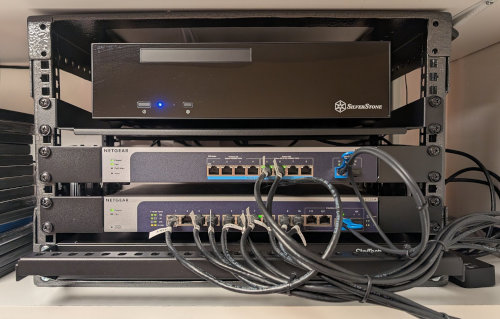
This might be a bit tricky. I think it comes down to risk tolerance. I’m all about reliability even if it is a small office and you don’t want to shoot yourself in the foot buying something that might turn into a nightmare to manage all the time because something isn’t working properly.

That said, I’ve have heard a lot of noise about the MS-A1 and 2 with some weird quirks (just search around). That is enough for me to stay away and probably find cheaper used enterprise gear. Again I think it comes to risk tolerance. Maybe it won’t be so bad if you have a full stack with 3 hosts and a shared storage backend so you have fault tolerance.

Me personally, that makes me a little nervous. I’m not saying don’t do it. Im sure there be those who will disagree with me and say do it!

2 Likes

I think that’s where my mind has been going too. I see lots of home labbers say how good it is on ProxMox for example.

Having redundnancy will be new for them too, as right now things are really on thin ice and it’s such a delicate setup I’m scared to even mess with their SQL config to get things tidied up.

They know we need to get off 2012 R2 ASAP.

Here’s a question, would the retired AD server be a potential replacement if we could rack it?

It would be good if you believe the hardware is still good and the VM’s you put on it won’t take up the full 64GB of RAM. You could give yourself a buffer and add more if you have empty ram slots or upgrade the kit to a higher capacity. Basically sizing the workload properly.

Another thing to consider is future proofing. How long are you wanting this hardware to last? What if they need more VM’s down the road? Are you wanting any warranties? Some things to think about.

Me too. I strongly considered one of the Minisforum for my home network, but there is just way too many questionable reviews, and problems out there with Minisforum. You get bad reviews with any brand, but this seemed like a lot. To me it seemed like one of those where there’s smoke, there’s fire. I ended up building a mini-ITX machine that was very similar to what I was going to what I was looking at anyways. Sure it’s a little bigger, but I don’t have to worry about it. It actually really didn’t cost me much different either.


Supermicro had some pretty compact builds as well that you can customize as well. However I had some concerns about noise levels with those, especially since this is just for my home. Might be worth you looking at though for a business. I’d was feeling more comfortable about possibly ordering a supermicro machine than minisforum based on what I was reading.

The solution is probably Supermicro, I would not risk something more important than a lab on the A1 or A2. Maybe that’s just me, but when reliability is needed, Supermicro, HP, Dell, maybe Lenovo. You can buy a lot of stuff directly from the Supermicro store and the sales people have always been good to me.

Contrarian view here: I have 2 Minisforum MS-01 machines running in production Proxmox environments. They’re running a Windows Server with 10 RDP clients & a couple of Windows 10/11 workstations, so not massive workloads but in use 24/7. One is using all the NICs with the SFP+ ports talking to 10G switches, the other is just using the 2.5G NICs. I’m using 2 x m.2 nVME drives in ZFS Raid Z1. Both machines have been absolutely rock-solid since installation. I have a standby Proxmox box at each site that I can revert to if there’s a problem but I haven’t needed to so far .

Assuming you’re running them in a cluster with failover, that’s a whole different story — in that case, you can offset some of the redundancy and reliability issues a PC entails compared to an enterprise-grade server.

But using a single mini PC as a server for business-critical applications is not a good idea. What if there’s a hardware failure? Sure, a power supply might be easy to replace, but what if the motherboard dies and you’re waiting 10 weeks — or forever :wink: — for a replacement unit? What do you do then?

@jsbilsbrough If you’re going to order two of them — even if you just keep one in the closet as a spare to swap in when the first one breaks — then maybe yes. Otherwise: NO! :wink:

I appreciate everyone’s insight here.

One thing that I should mention, which in fairness I found out today, is that the app and database can be run locally on a standard Windows PC, and they often do that (for remote working where internet is an issue).

I would certainly consider ordering two, given I’ve just seen the actual licensing costs of this app. The client has just reminded me that the data is business critical, but the app itself being online is not as essential.

I do want to look at a cluster, or at least a way to run the VMs on other hardware if needed.

By ordering two, I was primarily thinking of keeping the second one as a spare in case of hardware failure. Ideally, if unit 1 dies, you could then just move the SSD over to unit 2, boot it up, and be back in business. Without a spare, you would have to order a replacement, and there is no guarantee that it would be in stock or that the same model would still be available. In that case, you would either have to wait or buy a different model. And even if it is in stock, it will still take longer than just pulling a spare out of the closet! :wink:

I went back to look at pricing for Supermicro, seems things are much more expensive now.

That said, mission critical data and consumer hardware doesn’t feel right. I think you are on your own at this point, do what you think is best for your customer.

Whichever hardware you choose, I strongly recommend Xcp-ng for your hypervisor. Proxmox is great but it is an app that sits on top of Debian linux that is has no control over. If Debian changes something it could cause issues with Proxmox. Xcp-ng is a native OS so it is not relying on another company. You can setup multiple hosts for redundancy and it has built in backup routines that I use to dump to local Synology and also to Wasabi for immutable storage. (most any S3 storage will work)

Debian is “literally” the Linux distribution best known for stability, and they don’t change anything during a release cycle.

Of course it’s relying on a distro — it’s CentOS/Red Hat based. And whether it’s actually an advantage that XCP-ng has turned this into their own custom distro is at least debatable. We’ll see if they’re really up for the task in the long run :wink:

For me, upgrading Proxmox together with the underlying Debian every two years (about half a year after a new Debian/PVE release came out — not immediately, so not jumping on 9/13 right now) has always been pretty painless.

And let’s not forget: Proxmox has been around since 2005, and it uses KVM, which is integrated directly into the Linux kernel. In that sense, you could argue it’s more of a Type-1 hypervisor than Xen in XCP-ng — assuming those definitions even still make sense these days. :wink:

There are a lot of different ways to run hypervisors, choice enough for everyone that we don’t really need to argue about them. The most important thing for a very small facility is ease of use for the people working on the system. For me that’s XCP-ng, but I’ve also never used Proxmox.

For places that have a large number of containers running, Harvester HCI might make sense, backed by a big distro so it should be pretty good, but probably a lot more complex to make it work. Some of that might be wrong, I haven’t installed it yet, but it’s on my list.

Nutanix may have some value, I haven’t studied up on it enough yet.

If you are already paying for a Microsoft A3, A5, E3, E5 license, then switching to Hyper-V might make sense. Even for small places that only have 1 server, buying a Datacenter license and using the included VMs might be worth doing.

For some places, VMware still makes sense, but it is also getting fairly complex. VCF9 requires NSX to be installed, even if you aren’t using it. I’m guessing that in version 10 they will drop distributed switches and port groups in favor of the more powerful NSX (just my guess).