So I was attempting to setup IPV6 on my UDM Pro with internet from Starlink. I did some googling and found the basic setup and got an IP from Starlink and everything appears ok. I then setup a network for IPV6 and setup a vm on that network for testing. Everything appeared to be well but then the oddities hit. Some internet traffic was working where other weren’t. I started doing the basic ping test on google.com and it worked fine. Then I tried other sties and was getting the error network not available. I then tried pinging IP’s directly thinking maybe I had a DNS issue but that didn’t get me anywhere. So really I’m not sure what to think at this point. Anyone else have a similar issue? Normally I’d just stick with Ipv4 as I understand it better but I would like to have a couple things that I host available publicly which is harder on Starlink CGNAT. I do have other options using things like cloudflare tunnels or Netbird etc but have had some issues with this in the past when hosting game servers or trying to get remote gaming setup but that was more for fun than anything important.
Starlink IPv6 on a UDM Pro is workable but it does have some quirks that’ll drive you crazy until you understand what’s happening under the hood.
The selective connectivity you’re describing is worth checking a couple of things before going too deep down the rabbit hole.
DNS — Make sure your DNS servers are actually reachable over IPv6 and returning AAAA records properly. A partially working IPv6 DNS setup will give you exactly the kind of inconsistent site-to-site behavior you’re seeing — some destinations resolve fine, others just fail silently.
Firewall rules — UDM Pro’s default IPv6 firewall rules are more restrictive out of the box than you might expect. Make sure you have an allow rule for established/related traffic on the IPv6 WAN IN direction, otherwise return traffic gets dropped asymmetrically and you’ll see exactly the kind of inconsistent behavior you’re describing.
Starlink itself — Some of the selective connectivity weirdness with Starlink IPv6 is just Starlink. Their IPv6 implementation isn’t always consistent and certain destinations behave differently depending on how their routing is handled on the Starlink side. Not much you can do about that one other than be aware of it.
IPv6 and VLANs — Worth knowing that residential Starlink only delegates a /64, which supports a single network. If you need IPv6 across multiple VLANs you’ll need to look at SLA combined with NAT66 to make that work — it’s doable but adds complexity.
On your hosting use case — IPv6 direct exposure is genuinely the right path for Starlink CGNAT. Cloudflare Tunnels work well for HTTP/S but game servers need raw UDP/TCP, which is exactly where tunnel overhead hurts you. Tailscale is another way to host if you are willing to setup a VPS as a hosting provider like Digital Ocean. Get the DNS and firewall rules sorted first and you should be in good shape. It took me a couple of months with Starlink before I had it all sorted out for my networking use cases.
Good info thanks Ron. So been poking around more and am still not finding anything. This may be a sever lack of experience on my part for IPv6. After manually configuring IPv6 address for DNS and IPv4 instead of auto I did some more testing and once again found that my vm was only able to ping www.google.com. On a whim I tried pinging cloudflare and that work to my surprise but other sites would not. It’s kinda making me think that DNS is only resolving IPv6 addresses on this vlan and if a site doesn’t have IPv6 it’s not working which would kinda fit what I’m seeing. Not sure what to do with that info yet. I may just not have something set up right. I really am only wanting 1 network or vlan on IPv6 that’ll live in my DMZ for the things I am going to expose publicly. Firewall rules look ok as all the basic rules are set for both IPv4 and 6 least if I’m reading things correctly anyway.
Just a question are all your other nodes on this DMZ VLAN able to get to sites and services and the VM is the only node that seems to only connect to google.com? To test DNS viability look up the Dig command if your VM is running linux Dig can check A records AAAA records (ipv6) and other information from the source DNS server.
dig google.com A google.com AAAA

; <<>> DiG 9.16.50-Debian <<>> google.com A google.com AAAA
;; global options: +cmd
;; Got answer:
;; ->>HEADER<<- opcode: QUERY, status: NOERROR, id: 55979
;; flags: qr rd ra; QUERY: 1, ANSWER: 1, AUTHORITY: 0, ADDITIONAL: 1

;; OPT PSEUDOSECTION:
; EDNS: version: 0, flags:; udp: 1232
;; QUESTION SECTION:
;google.com.                    IN      A

;; ANSWER SECTION:
google.com.             1062    IN      A       142.250.217.110

;; Query time: 0 msec
;; SERVER: 127.0.0.1#53(127.0.0.1)
;; WHEN: Thu Apr 30 06:30:50 CDT 2026
;; MSG SIZE  rcvd: 55

;; Got answer:
;; ->>HEADER<<- opcode: QUERY, status: NOERROR, id: 1651
;; flags: qr rd ra; QUERY: 1, ANSWER: 1, AUTHORITY: 0, ADDITIONAL: 1

;; OPT PSEUDOSECTION:
; EDNS: version: 0, flags:; udp: 1232
;; QUESTION SECTION:
;google.com.                    IN      AAAA

;; ANSWER SECTION:
google.com.             2400    IN      AAAA    2607:f8b0:4009:80d::200e

;; Query time: 46 msec
;; SERVER: 127.0.0.1#53(127.0.0.1)
;; WHEN: Thu Apr 30 06:30:50 CDT 2026
;; MSG SIZE  rcvd: 67
Yes dig is able to pull both IPv4 and IPv6 addresses. In my DMZ zone I have this IPv6 vlan and another vlan that is IPv4. The IPv4 network has full internet access no issues. I only have this one VM on the IPv6 vlan it’s the only one I setup for testing thus far. I had totally spaced checking with dig lol my brain must only be at about 50% this week. Installed traceroute on the vm and interestingly enough it looks like there isn’t a route for IPv4 traffic on the IPv6 vlan. At least doing traceroute gets the same error as ping network is unreachable.
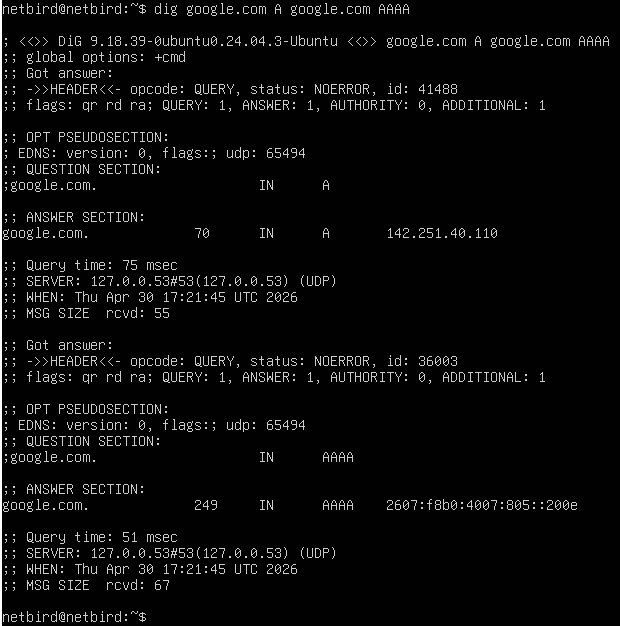

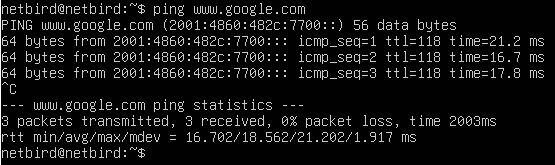
Hmm kinda wondering if I didn’t shoot myself in the foot. When I setup this vlan I disabled IPv4 DHCP on it thinking I was only going to use it for IPv6. Wonder if it needs both enabled to work properly.
Also I had IPv4 disabled on the VM. I setup DHCP v4 on that vlan and enabled it on the VM and now I can ping both IPv4 and IPv6 addresses. My initial assumption was I really only needed either or setup but perhaps I was wrong and need both at all times?
Good to see you found the root cause. My next would have been to do a “ip address” command to see if the interfaces you have were assigned a routable address. I know that many times if you add a interface to the Linux or Windows and by default they go for DHCP configured unless you select the static or advanced configuration during install. If the interface doesn’t receive a “offer” from a DHCP server it then Automatic Private IP Addressing (APIPA) address in IPv4, or a link‑local IPv6 address in IPv6.
Yep for sure. Thanks again for you help. Now I’m wondering if my fix is a fix or a work around lol. Seems kludgy to need to have both IPv4 and IPv6 assigned to the same interface for full functionality but that may just be the way it is for Unifi for now at least.
Yes you will have to live with both configured. 20+ years in with the IPv6 rollout and still there are sites that are only IPv4 and as long as IPv4 is supported dual stacks or tunneling IPv4 over IPv6 are the only solutions.
Check out https://www.youtube.com/@apalrdsadventures he has been trying to do IPv6 only forever and gets into the weeds on how everything should work and how things really work
Ah gotcha. Had it in my head that you could just use the one but dual stack it is. Yeah I’ve watched some of his videos its actually what got me started down this path as an option. Thanks again for the help and info I appreciate it.
Just realized of course that if I host on IPv6 I would have to connect to the server using IPv6 which most places and people do not have so really kinda ruins the thought of hosting on IPv6. Probably a way to proxy the traffic to get around that but that kinda defeats the purpose. Gotta love technology.
I host my time servers only on IPv6 because I don’t want the rip off traffic that China does when putting IoT devices out in the market with hard coded time servers they were flooding my time server. For my other services such as Weather I am doing IPv4 only to keep it simple. Everyone in the world has IPv4 support.
That makes a whole lot of sense. Even though things didn’t go the way I hoped I’ve learned quite a bit about IPv6 so that’s been good. Thank you for you help and being a sounding board. Helps more than most folks realize.
Did Chinese IoT devices hard code your time servers into their devices?
Yes they did, instead of targeting the pool from a region in the region the device was to be sold they just picked an IP address out of the pool which was one of my IPv4 time servers.