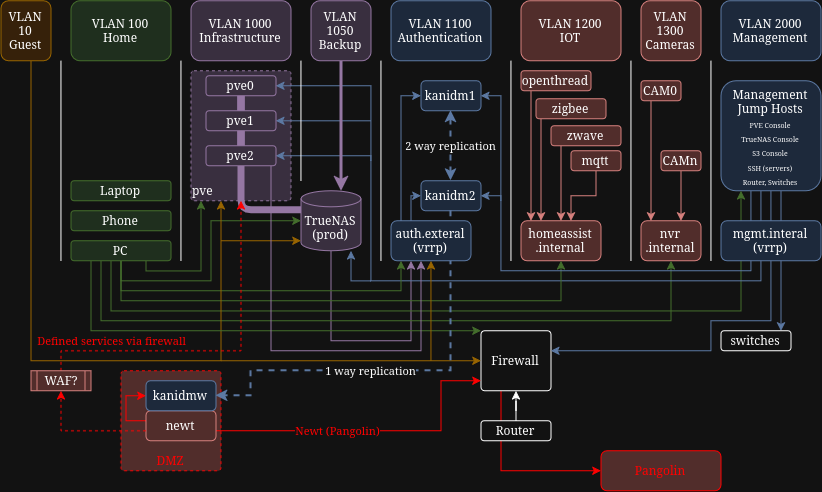
I know this looks insane but I was imagining what an ideal home services setup could look like. Probably better than some businesses you guys have seen.
I’m missing 2 things that I know of:
The “jump host” to the management servers (they are the only machines allow to access administration consoles and SSH), I was thinking of something like KASM, would that work or is there a better fit?
Not sure how to address access to self hosted services from the WWW. I’m thinking Pangolin on a VPS and then what? A Web Application Firewall? Is that overkill and I should/could trust Pangolin and Newt to behave? Or just have all the externally available services be in the “DMZ/internet zone” alongside newt?
Anyway, total overkill for a home setup (maybe ), but seeing as I’m not a network or security expert, I’m sure there could be some awesome insights that I can learn from.
I don’t understand the bottom of your diagram, specifically the orientation of the firewall, router, and switches.
I think you have some redundancy in here. I don’t think you need a VLAN for infrastructure and a VLAN for management interfaces. To me those are the same thing. Where I would design in the isolation is at the VM/LXC level. Some VMs and LXCs will be appropriate for your Home VLAN and some will be appropriate for your DMZ VLAN. In my setup I have some VMs and other workloads that are exposed to the internet, like my wordpress websites. Those should be in a locked down, DMZ like VLAN. Things like home assistant which are not exposed to the web at all, are OK for my home VLAN.
I also think you may have way too much inter-VLAN routing. You don’t show any storage or NAS devices on here. I would keep those in a dedicate, non routed storage network at L2.
I run the following VLANs: Home which is for my wife and my computers only. This one is privileged and can access all the other VLANs. Guest which is for my kids and guests. Access to the internet only. Server VLAN holds my external facing services like wordpress, and is internet facing only, IOT and TV VLANs are self explanatory and internet facing only. Management is where I keep the management GUIs for things like Proxmox, TrueNAS, motherboard KVMs, etc. My storage VLAN connects Proxmox to my Synology and TrueNAS boxes, as well as for persistent docker volumes to the NFS shares. This one exists only in my switch and not in my pfSense box.
I use Kasm for sandboxed browsing which is also why Kasm is on it’s own network because unless you create extra rules in Kasm it will have access to that local network. I have not used it but warpagte looks interesting. Christian Lempa likes Teleport he has a video on it (I think it’s sponsored by Teleport)
Besides my web site and my forums I don’t open up anything other than VPN access to my systems. If you want lock down Pangolin Crowdsec is a good choice CrowdSec | Pangolin Docs
Your setup is a lot more elaborate than my home setup. However, my setup differs in a few areas that might be worth considering.
separate you “production” servers from each other, or setup individual fw rules on each pve system. I typically go with the separate vlans because I like my filters all in one place and I don’t mind routing my local traffic (not network storage). All of this just makes it harder to move laterally before detection. Also, use a log server.
not sure if you do this, but avoid a router on a stick design. A stick is good enough, but if you want ideal try avoiding it.
use 802.1x with radius for wifi auth. This lets you put users on different vlans per one ssid. Or add another ssid for iot devices that can’t do this.
as for the mgmt questions, I just use SSH (or wireguard) in a container as a jump box. The SSH attack surface is as small as it gets. You can tunnel HTTP traffic to any of the mgmt interfaces if you need it. In my workstation I create simple bash alias for this kind of thing.
I should say many of these suggestions I no longer do at home anymore. These are just my ideas for the “ideal” setup.
I don’t really want to run more than the 3 PVE servers that I already have, I am currently using VLANs to separate the concerns. I do have a small n150 box that I might use for the services exposed to Pangolin.
I currently have a dedicated APU2 (ancient AMD GX-412TC SOC) and bought a Mono Gateway that I have yet to bring online.
This is the reason I’m looking at kanidm, it can do OIDC/OAuth2, LDAP and RADIUS authentication. It also does SSH key distribution, so a bit of a Swiss army knife for SoHo authentication.
That is a great idea, I didn’t think of using ssh port forwarding for the HTTP based consoles.
The only service I want to open is the authentication server(s), as I want consistent user management for remote and local access. The other thing being pangolin of course, this will then allow the family to access jellyfin, etc. as published “private” services. My connect gets full VPN LAN access though, just in case I’m travelling and have to access the LAN.
I had never heard of warpgate, that looks like a really interesting option.
I’ve not run KASM before, I think the time has come to tinker with that too.
All my devices are on the same switch. I assign static IPs to all devices that are on the storage VLAN. So my Proxmox node can reach my storage, no issues. I use the docker NFS driver in my docker compose files, and my docker host VM has two NICs, one of which is on my dedicated storage VLAN. I use pfSense as my firewall/router. I define my VLANs there, except for the storage VLAN which is only defined in the switch.
 ), but seeing as I’m not a network or security expert, I’m sure there could be some awesome insights that I can learn from.