Home Network for Renovation

Hi all - after typing all this out, as I’m a new user I am limited to the number of links/images I post so will have to exclude some.

I’m wondering whether you clever people can advise me. I do eventually get to the point :face_with_peeking_eye: and this post has expanded from my intended query so sorry about that.

Whilst typing this and looking into things I’m realising I’m a bit out of my depth. :thinking:

I’m doing a renovation and I want the house to be as connected as possible and not reliant on WiFi.

This is a multi-part query as I’ll also go into WiFi too.

I’m essentially doing a new build on the ground floor and my electrician is going to start the wiring soon.

Based on the plans I’ve drawn up, I’ve determined how many ethernet ports I need per room (a few areas with free ports for future use) - 20 in total.

I’ve also determined that I need a 24 port Gigabit Switch and am looking at this one:

https://www.screwfix.com/p/tp-link-tl-sg1024d-24-port-desktop-rackmount-network-switch-black/239rn

I’ll be having CAT 6 as CAT 6A is going to be unnecessary I feel.

In my current house (that we rent so can’t make changes to) I have 3x Eero devices (1 plugged into the router).

I’ve never had an issue with Eero so am going to stick with them.

I had intended to use these in the new house (they’ll need to be plugged into the mains) but am leaning more towards PoE ones fixed to the ceilings and/or walls.

Now, when mentioning this to my builder and electrician they said that these are only used in hospitals, offices etc.

I initially accepted this but this isn’t the case.

So, they don’t know it yet but I’m going to be doing it.

As the electrician hasn’t filled me with confidence, I’m looking into all this myself and will either tell him what to do or I’ll get someone in.

My question is this: Have I understood the setup for my house networking hub?
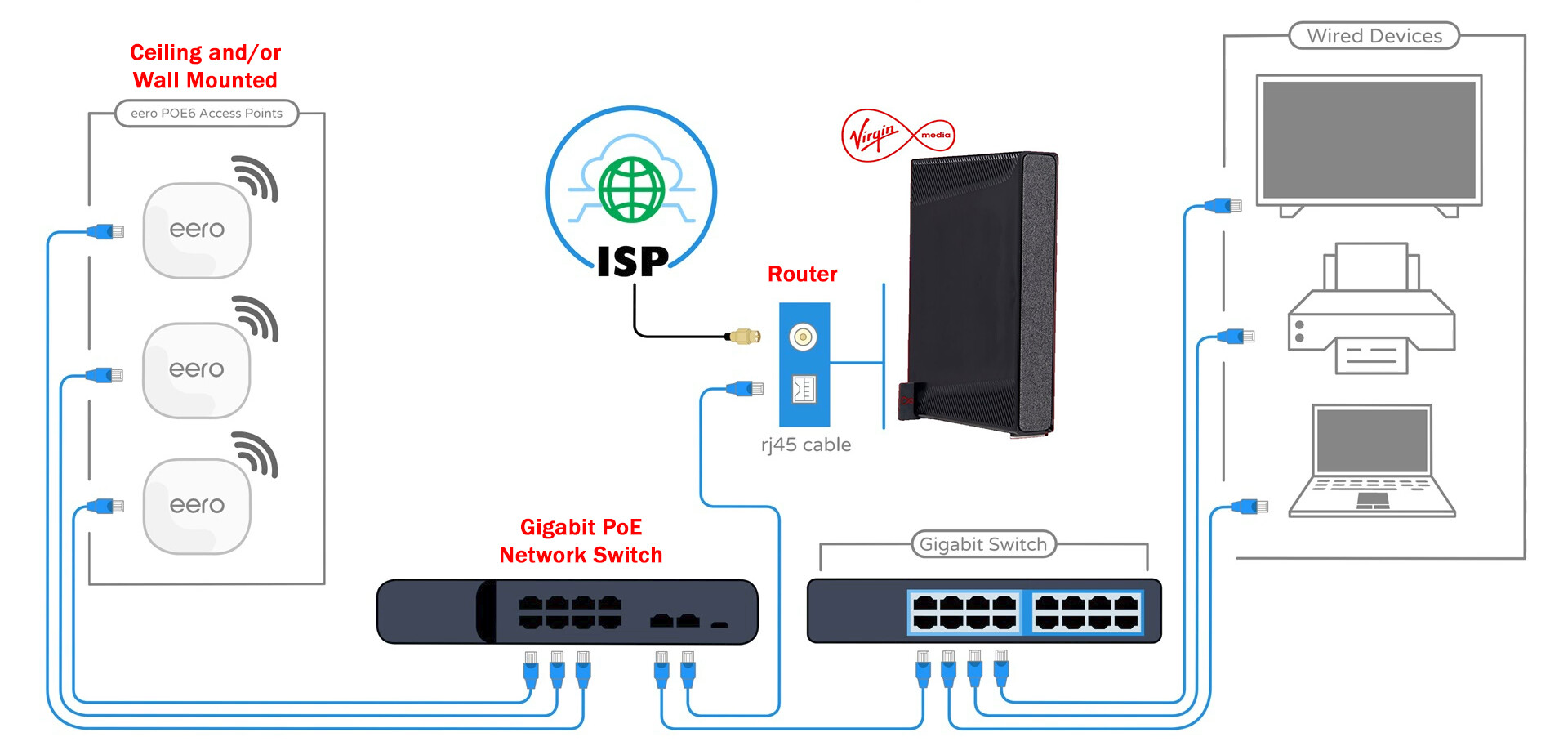
The PoE switch I’m looking at is:

https://www.screwfix.com/p/labgear-60052pi-s-4-port-4-2-port-poe-10-100-1000mbps-switch-unmanaged-gigabit-poe-network-switch-black/712YE?tc=CB1

Rack:

How hot is something like this likely to get?

It’ll be going under the stairs.

I was looking at this enclosed one but now it seems way too big.

It’s on Amazon

MT-VIKI 6U Wall Mount Server Cabinet Network Rack Vented Enclosure, 0.8mm thick, 17.7’’ Deep (450mm), for 19’’ IT Equipment, Included 1pcs 10’’ Depth Rack Shelf

I was going to show it in the space but I can’t put any more images on so will have to add them on a separate post

So maybe a framed one is more customisable - I don’t want anything too big.

I don’t think I need one taller than 6U but my Virgin Media router does need to be kept upright (apparently) and is 25cm tall

I was going to go into other things like patch panels and the fact they also seem to be wider than both the 24 port switch and the PoE switch but I think I’ve even bored myself with this post so god knows what you lot are feeling like.

I hope I haven’t bamboozled you all too much.

Thanks
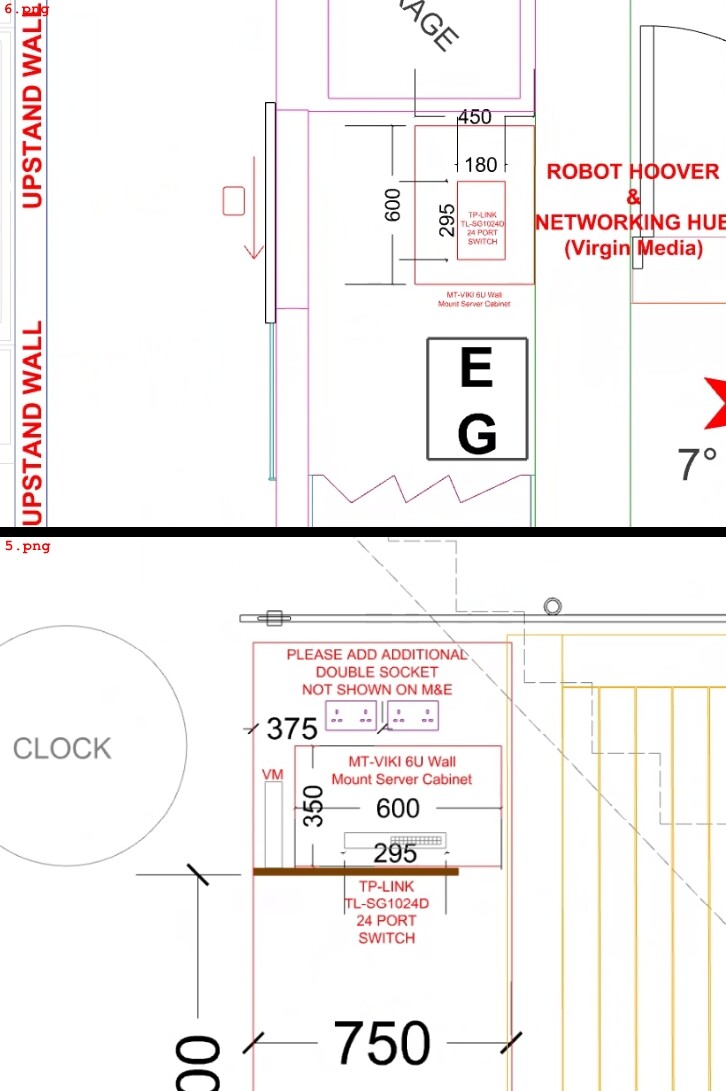
Here’s that server cabinet under the stairs

It’s hard to say how hot those odd off brand PoE switches get, but you should have some ventilation with any switch you choose.

Hi, thanks for the reply.

See…. that’s the kind of stuff I need to hear/be told….. ‘odd off-brand’ doesn’t seem great to me.

I’m ignorant to all this so am just learning stuff from youtube and chatGPT :face_with_raised_eyebrow:

With regards to my diagram on my initial post - does this seem correct? I need to figure out if I’ve understood this or whether I need to reassess things.

Thanks again

If I was building this out I would look at running a single 48 port switch with 24 of those being POE. There are plenty of used switches on eBay such as the WS-C2960S-48LPD-L which are less than $100.

This data sheet will give you a breakdown of the options.

Sounds like you are from the UK, so am I, I’ve also wired up my house. Here are a few tips I’d suggest:

  1. Buy off Amazon, it’s probably the cheapest but in recent years the prices have really gone up, nearly 100% compared to what I paid.

  2. Buy VLAN aware switches, it will cost more but it will give you more options which are not available on unmanaged switches.

  3. I use Netgear switches, on some of their models you will get a lifetime warranty, when the fan broke they replaced the whole unit. Maybe something to consider. It will be easier if you stick to the same brand of switch, once you start playing around with VLANS.

  4. What I did was place these sockets kwmobile Cat6a RJ45 Wall Plate Set - Set of 4x Keystone Jack and 2x 2 Port Ethernet Wall Plate, RJ45 Connector Jacks, Shielded Keystone Jacks : Amazon.co.uk: Computers & Accessories in each room then connected them to a switch. Sounds more expensive but perhaps gives more options. Between your main switch and the switch in your room, you can have two runs and connect them over a LAGG when using VLANS (maybe that might work on unmanaged not sure), that way you have some contingency were a cable to fail. Either way, putting two runs of cable to every socket will be much easier now then later for sure.

  5. I wasn’t able to terminate ethernet jacks consistently for love or money, I had so many failures. You might be better, however, I would get punchdown jacks at your sockets and at your cabinet / patch panel. You just need a tool to complete the job and it will work 100% of the time.

  6. I would add more runs in the house then you think you need, think of it as a power socket, can’t have too many ! You might want them for IP cameras and the like.

  7. Ensure your AP is also VLAN aware, depending on your house you may only need one.

  8. Have some clue about the power you need over POE switches, you have POE / POE+ / POE++. Sometimes it might be cheaper to buy a main switch and have a smaller POE switch connected to it, depending on your needs. The fans on switches might be loud, just do a search for this online so you are not surprised by what you select !

My main tip would be to run as much cable as you can afford, as it’s likely to be the biggest ballache if you have to do it later, don’t forget the garden and loft !

^ this. Plus use ducts for cable runs that have tricky routing & leave a couple of strong string pulls to allow additional cables to be pulled through in future. If you really want a well-supported network infrastructure, give the Ubiquiti equipment some serious consideration. It makes management & expansion a whole lot easier.