Regarding the functionality of HAProxy in version 2.8.0 of PFsense, I am currently investigating the possibility of a malfunction.
Over the past two weeks, I have been attempting to configure HAProxy for proper reflection.
I have meticulously followed the instructions provided in Tom’s YouTube tutorials.
Despite these efforts, the system is not forwarding traffic as expected.
Initially, I believed I had achieved a successful configuration, only to discover that HAProxy was, in fact, disabled, and traffic was being directed to my server via PFsense NAT functionality.
This raises a secondary question: Does the use of Cloudflare’s proxy service potentially impact HAProxy’s operation?
I have previously utilized HAProxy with moderate success; however, its current behavior is inconsistent.
Furthermore, I recall a statement from Tom’s video suggesting that HAProxy negates the need for firewall configuration. Could I have misinterpreted this information?
I think we’ll need more information about what behavior you’re seeing. I’m not sure what you mean about no firewall configuration, but if you’re hosting public sites, you definitely need to allow traffic to tcp/80 and tcp/443 via the WAN interface (unless they’ve changed something recently).
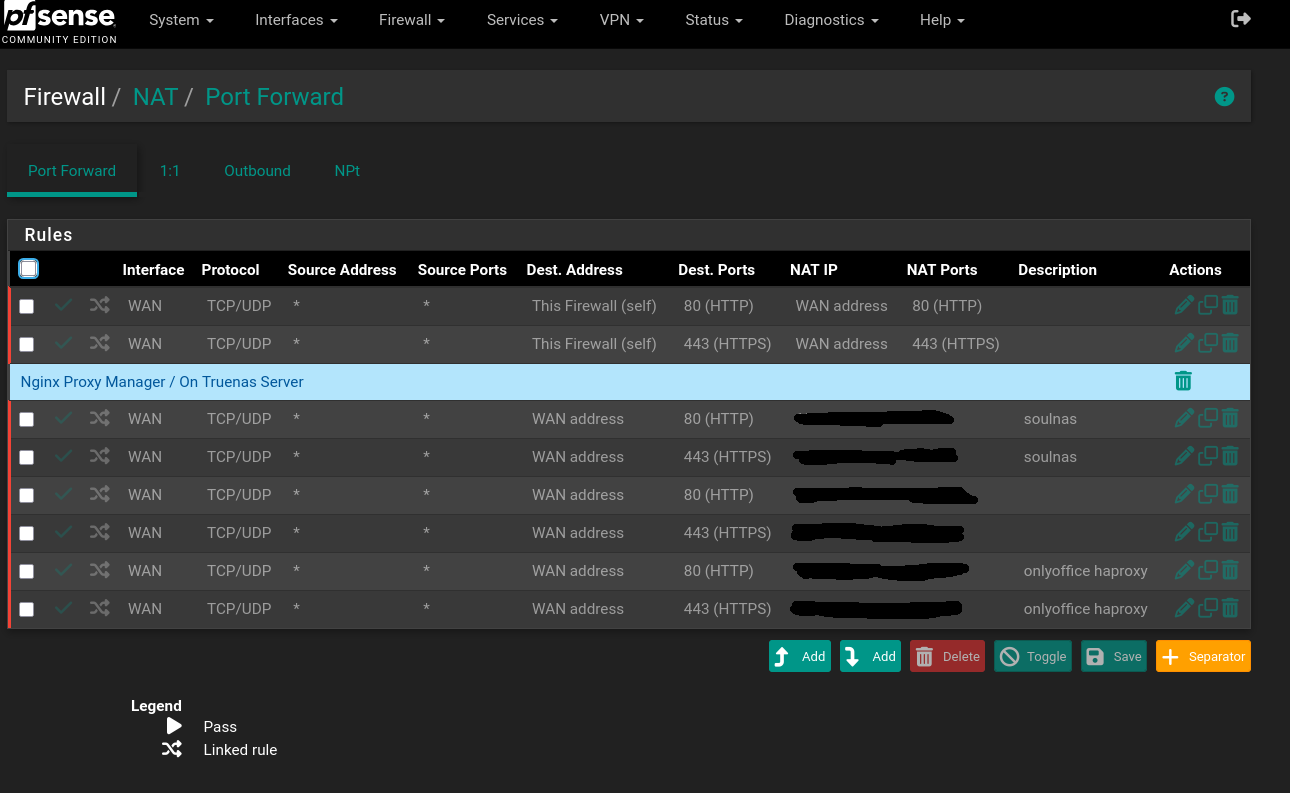
My preference is always to have HAProxy listen on a different address from the firewall. I would create a virtual IP (under Interfaces > Assignments), set HAProxy to listen on that IP, and then create a NAT rule forwarding the needed ports on the WAN interface to your new HAProxy IP. If you’re using the Cloudflare proxy (via their DNS panel and not Cloudflare tunnels), then you can even limit the firewall rules to only the Cloudflare IPs. If you’re using Cloudflare tunnels, you don’t need any HAProxy setup at all, so maybe that’s where some of the confusion is.
Let me be clear, i think i had it setup properly before but i could have been totally off, if you have some pointers or as you have mentioned the virtual ip scenario to share i will gladly upgrade my understanding to produce a better setup as i am very new to haproxy
You situation is a little different from mine (I use HAProxy on a server separate from pfSense these days, so I don’t have a model to check against), but I’ve got a couple ideas for you. Here are a couple places I’d start looking.
If you’re binding HAProxy to all interfaces on pfSense (which is the default), I don’t think you need a NAT rule. Let’s say you have a service, nc.example.com. Clients query DNS and get back your IP and HAProxy deals with the traffic. There’s no separate network address to translate the traffic to (which is what NAT does). Instead, a simple rule on the needed interfaces would do the trick. What I’ll usually do in this instance is use a floating rule with the “quick” setting checked and choose all the interfaces I’m after with a destination of “This Firewall.”
(If you try the virtual IP method, you’d need a NAT rule pointing tcp/80 and tcp/443 to the virtual IP.)
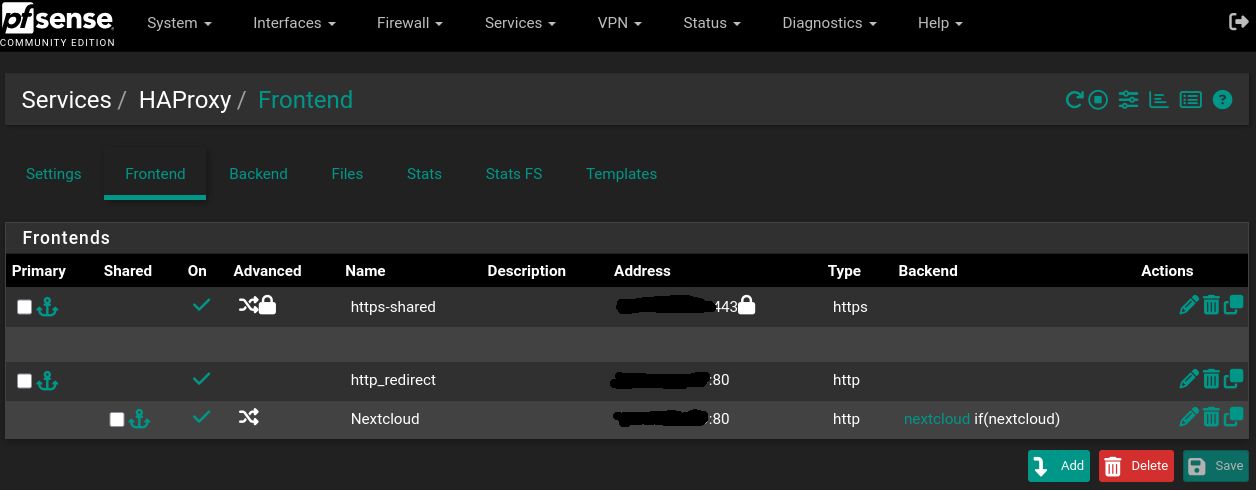
I’m not sure if it matters, but why the two front ends on port 80? I don’t recall Tom’s videos suggesting that and on my own installation I have a single front end for :443 and another for :80, which just redirects to port 443. Instead, the individual services are part of the HTTPS frontend with ACLs directing them to the appropriate backends.
Since HAProxy is using ports 80 and 443 on the same address as pfSense’s web UI, have you switched the web UI to a separate port? Only one service can listen on a port.
(This is the reason I like the virtual IP method.)
The last thing to look at is DNS. It sounds like you might already have this figured, but just in case: if you have your service nc.example.com and you want to access it both from the WAN and from the LAN, you’ll want to have DNS entries in two different places. You’ll need your domain’s DNS server to advertise the WAN address (I think you said you’re on Cloudflare), and you’ll want your pfSense DNS server to resolve that domain to the LAN address of HAProxy.
In case it helps for reference, here’s my HAProxy configs for my own Nextcloud server. It’s the raw config, but might be good enough for extrapolation:
# Front Ends
frontend HTTP
	bind			0.0.0.0:80 name 0.0.0.0:80
	mode			http
	log			global
	option			httplog
	option			http-keep-alive
	option			forwardfor
	acl https ssl_fc
	http-request set-header		X-Forwarded-Proto http if !https
	http-request set-header		X-Forwarded-Proto https if https
	timeout client		30000
	acl			example	var(txn.txnhost) -m reg -i  [A-Za-z0-9\.]+\.example\.com
	http-request set-var(txn.txnhost) hdr(host)
	http-request redirect code 301 location https://%[hdr(host)]%[path]  if  ktvcr


frontend HTTPS
	bind			0.0.0.0:443 name 0.0.0.0:443   ssl crt-list /etc/haproxy/HTTPS.crt_list
	mode			http
	log			global
	option			httplog
	option			http-keep-alive
	option			forwardfor
	acl https ssl_fc
	http-request set-header		X-Forwarded-Proto http if !https
	http-request set-header		X-Forwarded-Proto https if https
	timeout client		30000

	acl			aclcrt_HTTPS	var(txn.txnhost) -m reg -i ^([^\.]*)\.example\.com(:([0-9]){1,5})?$
	http-request set-var(txn.txnhost) hdr(host)

	# Nextcloud
	acl			house-nextcloud	var(txn.txnhost) -m str -i cloud.example.com
	acl			aclcrt_HTTPS	var(txn.txnhost) -m reg -i ^cloud\.example\.com(:([0-9]){1,5})?$
	use_backend house-nextcloud_ipvANY  if  house-nextcloud aclcrt_HTTPS


# Backend

backend house-nextcloud_ipvANY
	id 1016
	mode	http
	log	global
	timeout connect	30000
	timeout server	30000
	retries	3
	load-server-state-from-file	global
	server	nextcloud 192.168.1.62:11000 id 100 check
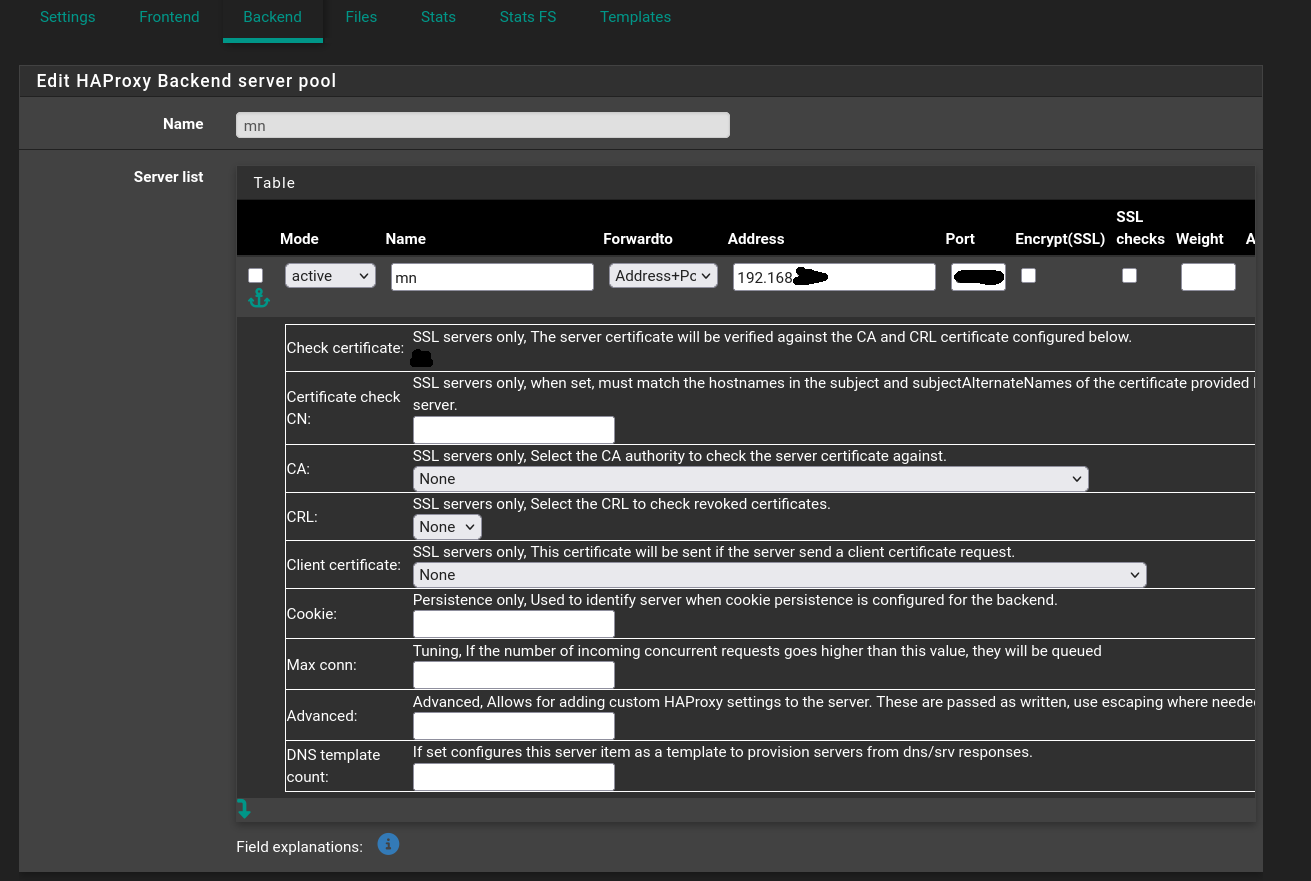
It looks like your issue is with the Nextcloud backend. You’ve got the host set to 0.0.0.0 instead of the Nextcloud IP address. That’s the equivalent of black-holing the traffic. See if updating that backend gets you sorted.
Have things changed dramatically in your set up since the initial question? If so, would you let us know how? And why change the nextcloud backend IP, but not the others? Is that a public address?
Here are the things that would be useful to know:
What are the IP addresses of the nodes involves? Even redacted versions would help see the relationships (i.e. pfsense is at x.x.0.1, haproxy is at x.x.0.3, nextcloud is at x.x.2.33, etc.)
What firewall/NAT rules are currently in play?
Is Nextcloud on the same network as HAProxy?
Are both Nginx Proxy Manager and HAProxy trying to proxy connections on the same IP address?
I wa unsuccessful with HAProxy, opting for the attached solution of Cloudflare with TrueNAS SCALE dirctly, which allows Nextcloud to function effectively via the TrueNAS Nextcloud app.
I still plan to explore a direct HAProxy integration with a second Nextcloud instance, but the current method provides a secure and comprehensive solution.
Of course if i manage to strike gold i will update.