Looking for some help.
I have a Synology 2-bay NAS.
A family member dropped it during a move and didn’t say anything till I booted it up and started getting errors.
When I went in I noticed there were issues with drive 1 (dont ask for the exact wording on the error from this point, I was panicking).
I shut it down to check things out. Drive 1 had come out, so I clicked it back in. When I went back in there was still an error but this time I was calm enough to notice the Allocation Status of the drive was Crashed and the Health Status was Healthy.
I ran a quick test on the drive and it returned a Healthy status. Right now I am 60% of the way through an extended test. When I clikc on the information icon it recommends removing the drive from the pool and power cycling the NAS to add it back in.
Interested in peoples input on next steps.
Other than a noticeable lag logging in. It seems to be running fine. Synology Photos is still backing up my phone.
Update
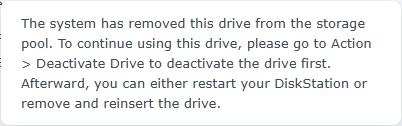
This is the information included with the crashed status
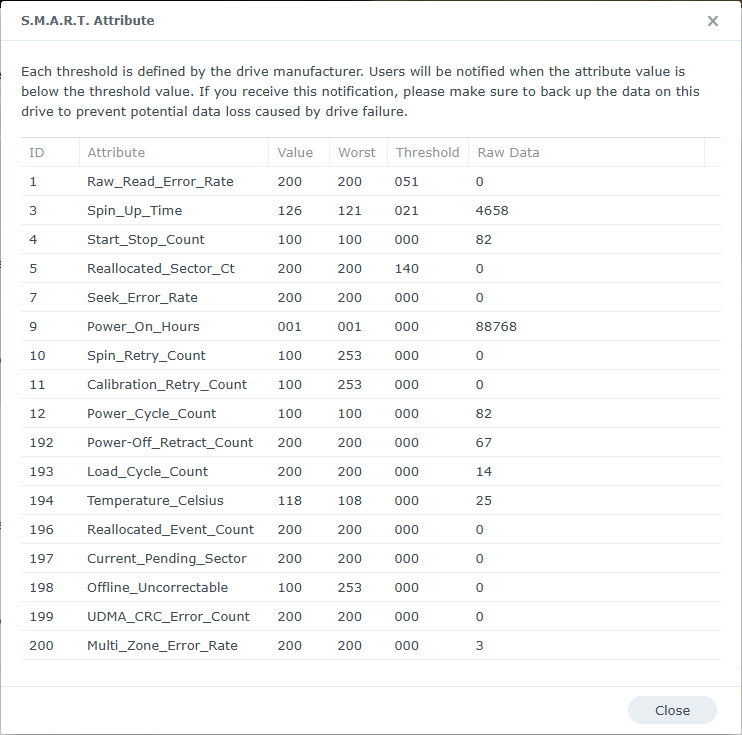
The extended test finished and reported Healthy
Here are the results of the test.
Assuming the system was off when it was dropped and the drive appears to be working then you are probably fine which is good because replacement drives are so expensive here in 2026.
Thanks @LTS_Tom
The cost of the drive is why I am asking.
If the NAS was on how much does your answer change.
If it was spinning and read/write, then it is not a good thing at all. I don’t know if the enterprise drives have drop sensors to quickly park the heads.
If the NAS was on and writing or reading data there is a greater chance it could have hit the platter. Drive heads park when off to avoid this when stopped.
Thanks,
So my saving grace may be the only time I have tasks set to run are over night when cell phones are on their chargers.
It sits idol most of the time. No VMs, no surveillance station. Just a file storage and photo backup.
If you ask me, any kind of impact is never good. Hard drives are very high precision devices. While they might survive a fall. You are running a high risk of the drive failing.
With that said. I know of and instance where a company was moving their servers across the parking lot so they put all their drives in a shopping cart. Just from the vibrations alone cause most drives across multiple servers their raid array and data was gone.