Thanks for letting us know about this project but you didn’t explain your demo architecture clearly.
Did you set up that first Dockhand instance on the SAME HOST your existing containers were running on and then access it remotely from a desktop? Do the authors really expect us to access Dockhand over plain http?
I see nowhere to set up certs or authentication keys. Incus makes it trivial to set up incus-ui.crt and incus-ui.pfx for easy, secure authentication. Seems to me the only secure way to use the free version of Dockhand is on your desktop, so you’re not sending cleartext credentials over the network.
I don’t want to speak for Tom, but yes, he installed on a system running docker. Presumably he had other containers running there. Tom explained that he uses Nginx Proxy Manager as his reverse proxy of choice and Nginx has a very useful tool/function built in to get Let’s Encrypt certs. Go to 4:51 in the video to see where he sets up a user and authentication.
If you like Incus better, then just use Incus. But I do think your criticisms are unfounded.
3 Likes
I did mentioned in the video that the first host I setup was the same as Dockhand was running on which is why I mentioned the Docker socket connection and I did mentions I am using Nginx Proxy Manager as my reverse proxy that handles the certificates.
2 Likes
Which host runs the nginx proxy?
Tom runs all of his containers on a single VM as far as I am aware.
Technically I have two, one lab & one production. Nginx Proxy manager runs on the same system as Dockhand.
1 Like
I just installed Dockhand running behind NPM and it’s great so far. I’ve got it hooked up to Discord webhook too for notifications like I have with WhatUpDocker, but it give many more types of notifications.
WUD is good but a bit primitive, and Portainer a bit heavy feeling, so I think Dockhand is going to be my replacement for both of those.
I like the built in vuln scanning tool too. Thanks for letting us know about this project.
1 Like
the more acronyms the better
I think it’s pretty obvious that NPM here refers for Nginx Proxy Manager.
Nginx Proxy Manager is often called NPM but expanding out acronyms can help clear things up. I do have a video on that topic.
Dockhand still needs a lot of development.
I setup Dockhand with a host and a remote – just as Tom did in his video. After running for 5 days, it crashed twice and once, it even used up all the storage on the host! Yes, the storage my SSD. After rebooting the storage was released (likely temp folder). After rebooting, Dockhand didn’t restart. I was happy with that because I don’t need to run it until it gets more mature. The remote docker host didn’t experience the same storage issues as the main host.
For now, I am going to keep running Portainer. I will keep an eye on this project because i think it offers features that I wish Poratiner had.
1 Like
For now, I am going to keep running Portainer
+1. Honestly I see no reason to move from Portainer for my situation/environment. It has a very light footprint on my environment. Uses a small amount of CPU and less than 100MB of RAM.
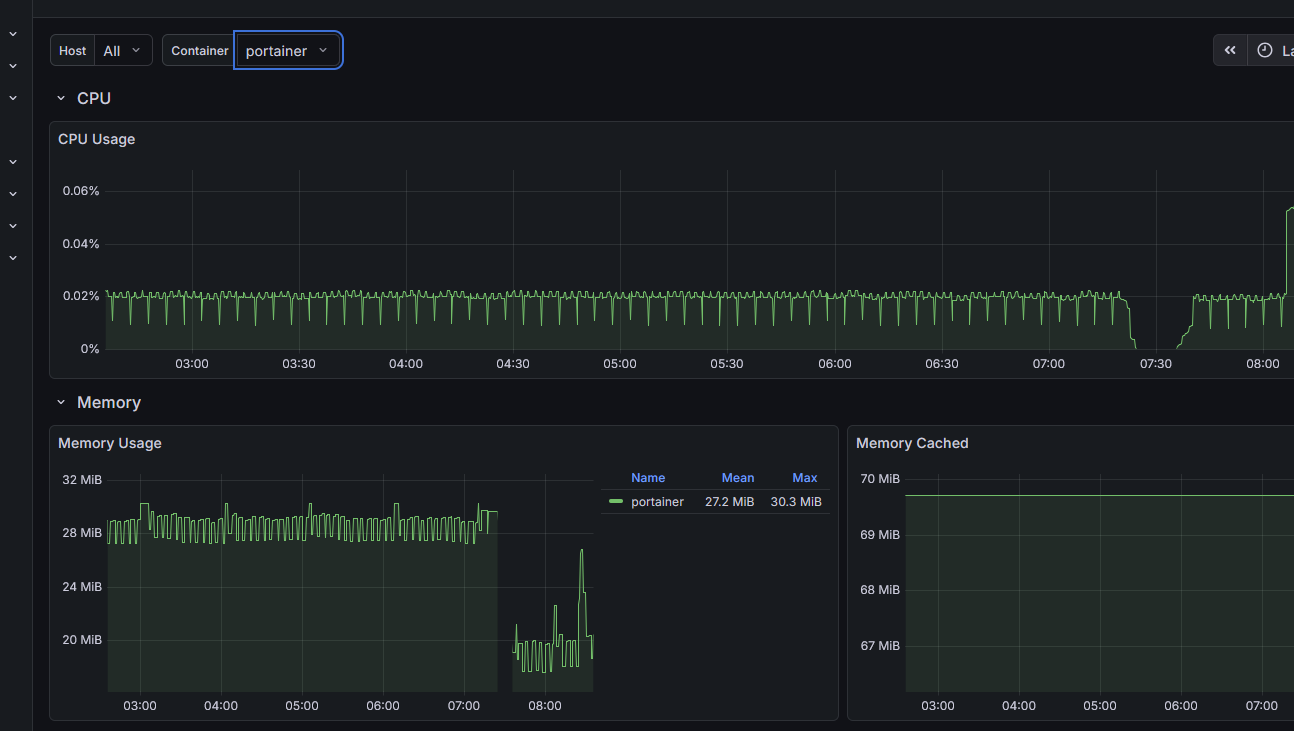
interesting my experience is totally opposite, running connected to almost a dozen docker hosts, some direct, some edge connections (over tailscale) and its rock solid so far
docker/container management is a breeze now, I have apprise notifications setup (to my gotify container)
i’m going to devote my time to this project because it feels it will still be around a few years from now
ps running beszel on the same server as dockhand with the beszel client also installed on all my docker hosts with notificatinos to gotify… i now have immediate phone notifications of any infrastructure problems as they happen
Question for you all. I installed dockhand (from trueNAS catelogue) and don’t know how to configure it to use my 3 datasets.
- app-stacks
- app-config
- app-storage
I set the storage to the parent Dataset but it created it’s own folder (stacks). The problem is if these are all in one dataset then I can have different backup approaches for these based on growth and update frequency). Tried defining additional storage (mount path: /app/stacks) and then set an enviroment variable STACKS_DIR = /app/stacks but no luck.
Anyone with advice?
My plan B is to cover the app to a custom app and hope these environment variables don’t get ignored there. But worried this will have issues in the future with app updates etc. So hoping to no have to resort to plan B.