Yeah, maybe I should do a video to help people better understand how VLAN’s work with hypervisors.
I………..think im starting to understand..
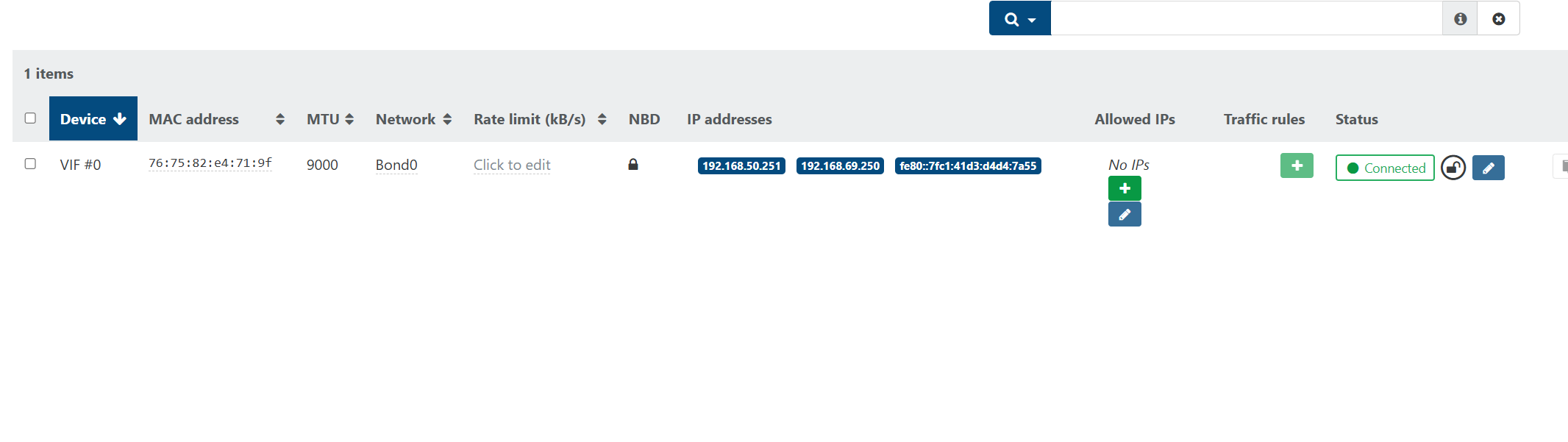
So i am running a Bonded interface from my hypervisior to my Unifi switch. You are saying to make the VM part of the Bonded network as below?
When i do that the VM now picks up another network on that interface (native vlan network (192.168.69.0). The problem is this debian system now has competing default routes now..
Or do i set the Bond0 interface to be a member of All vlans…is that even possible?

I just have the one interface pulling one IP on the main, no VLAN, interface that comes into the host.
Do you have any extra configs in /etc/network/interfaces.d or any extra lines in /etc/network/interfaces? Have you restarted the VM?
Here is the output of my interfaces file.
s:/etc/network# cat interfaces
# This file describes the network interfaces available on your system
# and how to activate them. For more information, see interfaces(5).

# The loopback network interface
auto lo
iface lo inet loopback

# Primary NIC enX0
auto enX0
allow-hotplug enX0
iface enX0 inet static
    address 192.168.50.251
    netmask 255.255.255.0
    gateway 192.168.50.254
    dns-nameservers 192.168.50.254
When i switch the VIF network to Bond0 , i lose SSH access to the VM.
Alrighty……….I got it i got it….
Now the ARP scan seems to be working.
I attached the VM to the Bond0 network which will give it access to all vlans. The VM has to do the tagging of the VLANs now.
# Loopback
auto lo
iface lo inet loopback

# Physical trunk port (no IP, just carrier)
auto enX0
allow-hotplug enX0
iface enX0 inet manual

# VLAN 50
auto enX0.50
iface enX0.50 inet static
    address 192.168.50.251
    netmask 255.255.255.0
    gateway 192.168.50.254
    dns-nameservers 192.168.50.254
I think you need to understand how trunk and VLAN tags work. Hopefully this makes more sense.
Imagine a highway with lanes
-
Think of a switch port as a highway.
-
VLANs are like different lanes on that highway. Cars in lane 10 can only talk to other cars in lane 10, lane 20 cars only talk to lane 20, and so on.
-
This way, traffic stays organized and doesn’t crash into each other.
What’s a trunk?
-
A trunk is a special type of road that can carry many lanes (VLANs) at once.
-
But to keep things clear, the cars put on labels (tags) that say “I belong to lane 10” or “I belong to lane 20.”
The native VLAN
-
There’s one lane that doesn’t need a label — this is called the native VLAN (in my example, VLAN 1).
-
If a car has no label, the switch assumes it belongs to the native VLAN.
VLAN tags
-
When your computer (or server) connects, it can “tag” its traffic so the switch knows which VLAN it belongs to.
-
Example: if you tell your computer “use VLAN 10,” then it adds a label (tag 10) to all its traffic so the switch knows “this belongs in lane 10.”
What caught me was, I thought that XCPNG would strip, not forward, the VLAN on the main interface.
Now, we know it just forwards everything.
1 Like
me thinks i was a bit harsh on NetAlertX because i couldnt get the ARP scan to work on different VLANs but once you pass that hurdle….This tool is actually pretty damn cool. Easy to use and gives some pretty good enrichment of data out the box. Im glad i didnt give up on this.