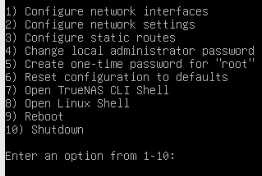
TrueNAS CE 25.04.2.1
pfsense 2.8.0-RELEASE (amd64)
Cisco SF300 and SG300 switches
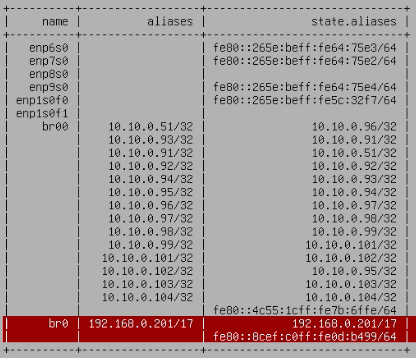
A while back I created a 192.168.0.1/16 bridge interface on TN to match my pfsense LAN1 192.168.0.1/16 address space. The /16 was just part of fiddling around with stuff. Now I want to do things properly with VLANs and whatnot.
I cannot delete the TN 192.1680.200/16 bridge interface br0. I can shrink it to a /17 and change the IP address (say from 192.1680.200 to 192.1680.201) but when I delete br0 and test the changes, lose access to the TN UI until the test period of 60 seconds is over.
On TN I have VMs and Docker containers (both through its own catalog and through Docker Compose).
On pfsense I set up LAN2 as a 10.10.0.1/24 network on a different switch. I moved everything on TN to LAN2 (firewall rules enable all traffic everywhere for now). The TN UI is on 10.10.0.51.
I downloaded the TN config database and searched through all tables using a SQL tool and the only reference to br0 or 192.168.0.200/17 is the bridge interface definition itself. Nowhere else.
As a test I tried moved br0 from enp6s0 to enp7s0 and that worked. Although I cannot see anything using br0 in the TN config DB, when I unplug enp7s0 from the switch, I lose access to the UI.
Also, if this is relevant, the TN UI loses its connection to the TN server very frequently now, where as it did not before I shifted everything over from the 192.168.0.1/16 network to 10.10.0.1/24.
Something odd is going on and I have exhausted my limited network knowledge and this issue is driving me MAD. Please help!
Hello Tom. Yes, I did through the console and with the same result: after applying the change, access to to the UI is lost and the change rolls back after 60 seconds and UI access is restored.
I can’t even find any logs with any information at all relating to this attempted network change. The console shows nothing and I have looked in /var/log but I cannot find anything relevant.
I might be gearing up for the thermonuclear option: a fresh install of TN with a restore of a modified config DB from which references to the bridge interface have been manually removed.
I did attempt to remove br0 through the console and with the same result: after applying the change, access to to the UI is lost and the change rolls back after 60 seconds and then UI access is restored.
I did not try to remove any of the other interfaces or bridges.
I managed to remove br0, but only by the high-risk thermonuclear option.
I downloaded the TN config DB and manually edited that to remove br0 and its references but the upload failed due an authentication token error - usual useless TN error message.
So then I uploaded the modified freenas-v1.db file to /data/ as freenas-v1.db.nobr0 and backed-up the original DB file. Then I swapped the DB files over. Live. And then rebooted the system.
After reboot, the UI was not accessible but in the console I reconfigured one of the interfaces for DHCP and rebooted again and then the system was available again through the UI.
There were quite a few network config things to tidy up, especially with Docker containers but everything’s now working fine. I suspect that it was the Docker subsystem that had a hook into br0 but I saw no way in the UI to change that and by this point TN had got its knickers in such a twist that non-anesthetised surgery was the only option.
If this live DB change had not worked then providing the system booted up, I could have swapped the DB files back again. If the system had not booted then I would have had to figure out a solution for that.
I would not recommend this option to anyone, but I am confident that after having tried everything else for weeks, there was no other choice than this last resort.
I really think you should have posted on their forums or submitted a bug report. You probably hit some sort of edge case that needs attention. Unless you were coloring outside the lines and hitting the CLI making changes.
I posted this on their forums on 23rd June but had zero response. I posted an update on that thread a few days ago and someone did offer some useful advice but nothing helped. Actually, I posted on here after I got no response on the TN forums.
I only ever configure TN through the UI as is intended and supported by iX. I rely heavily on being able to SSH onto the TN server but that’s for file operations and reporting - never config. What I am guilty of is being a network novice (despite many years of other IT experience) but again, any TN network changes were made through the UI.
If this was some TN edge case that needed attention then the TN support team could have got involved back in June - they do read the forums as the CE edition is their way of getting free testing of their product (and we get TN for free!). I didn’t submit a bug report because I attributed this issue to my own inexpertise, not a TN fault; in hindsight I do have my thoughts on the state of TN networking but as a novice it’d probably be unwise to share them here or on the iX forums.
This was not my first response. I had spent whole days reading everything I could find on this issue (even before I posted on the TN forums) and TN networking and I tried everything else. Nothing worked. As a last resort, I fixed the problem through brute force. I assessed the risk and made a backout plan and made the change and it worked.