[OPNSense] Advice on Simple, Base Set of VLAN Firewall Rules to Allow Devices on VLAN to Access WAN and Restrict Storage Network Access?

Hello,

I’m redoing all my OPNSense firewall rules, as I really didn’t understand what I was doing when I started and ended up with rules that were both too simple and too complex, depending on the VLAN.

(Like, I thought all internal traffic that never left a VLAN still needed a firewall rule on that VLAN to allow in-VLAN devices to talk to each other. Turns out that so long as the devices on the same VLAN have a direct path between each other via, e.g., a switch or switches, they never touch the firewall. Oops.)

Context: Feel free to shame me, but I’m still on 25.7. I’ve been putting off migrating entirely because I didn’t want to deal with ISC to DNSmasq migration, but with the PHP imbroglio happening, I’ve clearly waited way too long. I want to try to clean up my firewall rules a bit first.

Here’s something really simple that I’d like to start with: Rule(s) that:

  1. Allow any device on the VLAN to access the WAN; and
  2. Prevent any inter-VLAN traffic.
  3. Prevent any in-VLAN device from talking to OPNSense on the gateway interface (e.g., 192.168.1.1) but still allow critical services to work (DNS, DHCP, etc.).

For (1), I’ve seen something like, Allow (Not) All Private Networks (that is, invert an “allow all private networks” rule) to enable WAN traffic, but I don’t know if that’s actually necessary or not to allow, e.g., a client device to just access the internet.

Thing Two: No-Rule VLANs? @LTS_Tom talks about making storage networks unroutable, and I admit I’m not … entirely sure how to do that in OPNSense. Is it possible (or a good idea?) to define a network with no gateway whose members can still use DHCP and DNS?

In the meantime, I’ve got a Storage VLAN (10 Gbps-only), so I just made sure it has no firewall rules. Is that he correct approach?

All the devices that talk to it live on the storage VLAN, including client devices with multiple virtual NICs (each virtual NIC assigned to a separate VLAN, and the client set up not to allow routing between VLANs). It works, and I’m a single person with a bedroom office with too many computers stuffed in it, so that’s worked for me so far. But I’m not sure it’s what Tom was actually recommending. :upside_down_face:

Any advice for simple, sane rules for that would be appreciated.
1 Like

There is a lot to unpack here.

Yes, if they are in the same network you cannot block within the network.

Tom has a video on firewall rules, but it is for pfsense. you could pretty easily transfer the knowledge in crating the rules in opnsense.

You need to understand the goal of what you are trying to do.

  1. If this storage is for simple SMB shares then routing the traffic is fine. And you still can go the no route path, but not worth it at the cost of complexity IMO.

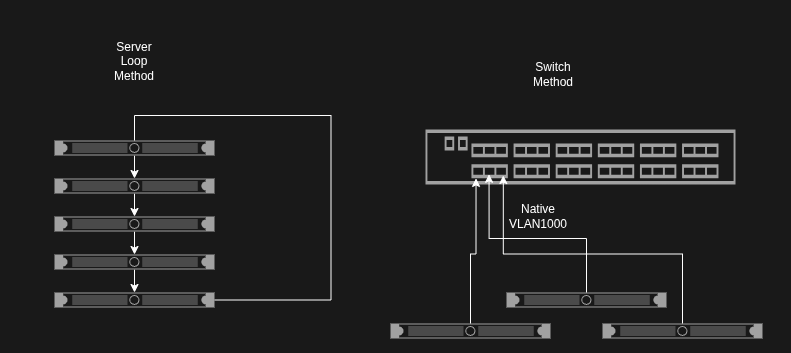
  2. If this is storage for a hypervysor then you would setup a VLAN on your switch to isolate the traffic and then you statically assign an IP address to both sides of the devices (no routing). Or directly connect each device to each other and assign an IP address. The traffic never goes through opnsense at all.

2 Likes

Thanks for the video. I’m going to study that today and come up with some sort of plan to get my firewall rules into better shape before I update OPNSense on Sunday.

Aside from defining the VLAN in OPNSense first and not using a dedicated switch (at first, I didn’t know you could just define VLANs on a switch without involving OPNSense), this is almost what I’ve done so far.

  1. My Proxmox nodes (and Proxmox Backup Server, and Proxmox Datacenter Manager, and Pulse) live on their own 1 Gbps Proxmox cluster/management network
  2. I have a general purpose 10 Gbps high-speed data VLAN that handles links between my NAS, 10 Gbps Mac Studio, Proxmox nodes, and any other devices that can actually talk at this speed.

That’s worked well for me so far, though I realize I’m making my life more difficult as far as firewall rules and metrics/monitoring by not separating out the Proxmox high-speed traffic into its own VLAN. So, that’s actually on my list of projects, but I want to get the firewall situation settled first. I know the latest version of OPNSense changes how the firewall is managed a bit, so I want to come into the upgrade with a good rule set and make sure it works after the upgrade before I start adding more VLANs.

I also want to experiment with using NVME-oF multipath storage with Proxmox and my NAS, so I actually need two Proxmox data VLANs, which is another reason I’ve put this off.

(It’s really hard to justify buying more switches right now given the price of everything and the fact my current hardware is certainly enough, but it would be nice to have at least a dedicated high-speed Proxmox switch at some point. I have a mix of Unifi and QNAP gear and don’t love the price of either of them right now.)

I don’t think you understand what I am saying. VLANs are a logical separation of networks. If you create the VLANs on your router, you are routing the traffic, which is not recommended, even if you do not use firewall rules.

If you create VLAN 1000 on a switch, for example, and set those switch ports to native VLAN 1000, it is the same as if you connected the two devices together. The difference is that you can set more switch ports to native VLAN 1000 and connect more devices together.

If you had dedicated NICs (two extra) on each device instead, you would simply loop the connection through the servers. Your router would not have VLAN 1000 configured at all.

Is your switched managed? What kind of a switch do you have? How many LAN ports do you have on your firewall? If you only have one LAN and one WAN, you will need to setup inter-VLAN routing to be able to router between VLANs. (Unless Opensense does something different)

you need at least one rule on each VLAN interface allowing any to any on the WAN and then a block rule on the LAN tab for any source to any destination on other VLAN subnets edit make sure to keep the automatic allow for DHCP or DNS on the interface otherwise devices can’t get an address

@LTS_Tom This video is awesome. Thanks again for taking the time to put it together.

Work is extra insane this time of year and I’ve had some other stuff pop up, so I’m still slowly working through redoing my firewall rules.

I’d already started assigning my production machine, NAS, Proxmox servers, etc. multiple VLAN interfaces to avoid inter-VLAN routing; it made me feel more confident to see you preferring to do it that way as well. Doing it that way has also saved me a lot of hassle when OPNSense itself has gone down; I can still access every VLAN that my production machine has an interface on thanks to the L2 switches still being able to pass traffic inside those networks. That’s usually been enough to fix things, as I can still get to IP KVMs, SSH interfaces, etc.

After studying the video and starting to work on my ruleset, I had a few questions.

  1. I just now got around to the Production network, and want to check my understanding of what’s happening there.
    1. At first I was confused that, privacy VPN aside, it essentially just allows incoming traffic from anywhere.
    2. I was a bit tired when I was working on it, and that seemed insecure, but then I slept and realized that it’s all the other VLANs that set the security rules. So, I think this is what’s happening–Production can accept traffic from anything, but only the VLANs allowed to talk to Production can send traffic to Production and start a conversation or reply to Production?
  2. Inter-VLAN Routing vs. Adding Devices to Multiple VLANs.
    1. I noticed that you put certain devices on multiple VLANs as necessary to avoid having to write complex firewall rules to allow them to talk, and also to keep the firewall form having to do extra inter-VLAN routing.
    2. Are there ever any situations of note where you’d allow inter-VLAN traffic despite the increased load on the firewall and potential to for that traffic to get cut off if the firewall goes down? Curious if I should be on the lookout for specific scenarios to avoid having regrets later.
  3. Privacy VPN Setup with OPNSense Rules. You mentioned in your video that you’d already done a video on how to set up PIA to be used as a privacy VPN, but I’m not sure which video that is. I searched the channel and there’s more than one privacy VPN video. Which one should I start with?
  4. Wi-Fi and the Multiple VLAN Problem. I have a laptop I’d like to be able to use as a backup to troubleshoot my entire network in the event of trouble with my Production VLAN machine(s)–that is, I’d like to treat it like it’s on the Production VLAN.
    1. But I’ve run into the issue (with my equipment, at least) of a single Wi-Fi network only supporting a single virtual interface. So, I can’t have multiple VLANs on the same SSID. I’m not going to fuss about that, because it’s apparently just how it is.
    2. The only way I can think of to create a WiFi network that can reach across VLANs is to create a WiFi Production VLAN with its own SSID and use firewall rules on other VLANs to allow traffic from WiFI Production in. That would not be ideal for regular use, but in an emergency where I had to get into multiple VLANs from a WiFi device, I could temporarily join that network to fix whatever just broke. That seems acceptable.
    3. Am I missing something, or is that the only way to accomplish this?

I hope that wasn’t too long-winded. Sometimes I don’t explain my questions well, but I might have gone too far in the opposite direction.

Thanks again for all your help (and content). :slight_smile:

I have a video here on Storage Design that covers when its probably not a good idea to use inter-VLAN routing

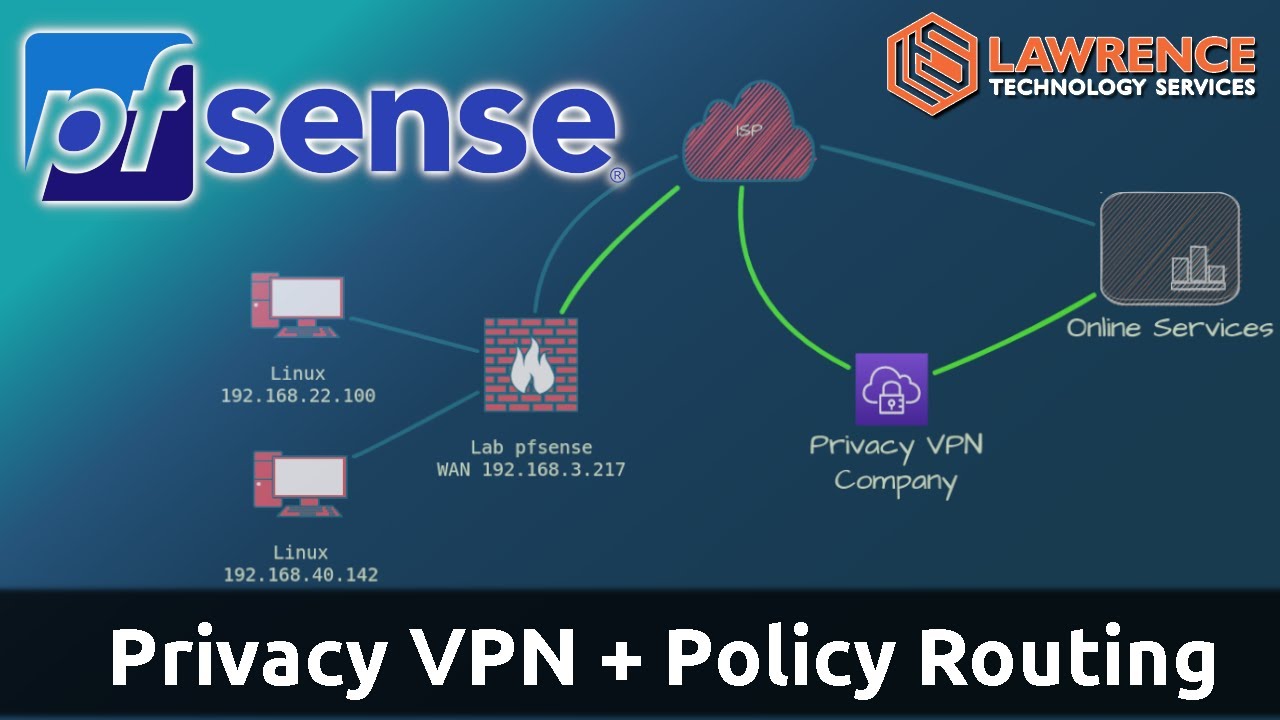
This is the video on how to setup a privacy VPN in pfsense so you can choose what systems will route out that VPN.

And you are correct you can only have one network / VLAN per SSID. But there are more complex setups with the right hardware that support more. This is most commonly called a Private Pre-Shared Key (PPSK), often referred to or marketed as Multi-PSK or Password-Based VLAN Assignment. UniFi has support for it https://help.ui.com/hc/en-us/articles/29887064407319-Using-PPSK-RADIUS-for-Multiple-VLANs-On-an-SSID-in-UniFi-Network

2 Likes

@LTS_Tom thanks for the share on that storage and routing vid. I did not see that you had that one out. I’m fighting pneumonia w/ sepsis… but i’ve got it on my playlist for when i can think better. b/c yeah I’ve never understood the do you vs don’t you route storage, and what are the alternatives. Just a homelabber, but man I wish i knew about some of the tricks of the trade re: networking on how ppl get around this better while maintaining security, i.e. if you don’t want your storage on the same vlan as tons of other stuff vs isolating main storage to it’s own vlan and helping to isolate it. if that sounds weird, prob me just very very sick. and sorry if i’m sounding confusing.