It should be /logdata:/usr/share/graylog/data
On linux use forward slashes, you should not use a backslash () in Linux file paths. Also the type of mount you want in docker is called a bind mount.
It should be /logdata:/usr/share/graylog/data
On linux use forward slashes, you should not use a backslash () in Linux file paths. Also the type of mount you want in docker is called a bind mount.
Did I really make a noob mistake or mistype?
Made sure it was set and now fails with:
graylog mkdir: cannot create directory ‘/usr/share/graylog/data/journal’
That I got fixed by changing the folder to owner 1100 as outlined on a docker community post. ERROR: Unable to access file /usr/share/graylog/data/journal/graylog2-committed-read-offset: Permission denied · Issue #2155 · Graylog2/graylog2-server · GitHub
Still after that I then get the error that it can’t find the /usr/share/graylogdata/config/graylog.conf
volumes:
If this is a mounted share you probably need to make sure you have the proper permissions set.
Yes, the docker compose file that @LTS_Tom has posted does work as a stack in Portainer. I did this to get my Graylog up and running.
I am trying to install Graylog into Truenas 25.04.2.3 using tom’s docker compose YAML, I have done well on fixing all my own mistakes but I got one last issue that’s got my head ramming the wall and wasted hours on this. Please help as I have no clue how to fix this
- "${PWD}/config/graylog/graylog.conf:/usr/share/graylog/config/graylog.conf"
Did I miss a step, is it a permission issue or I’m I a dumb a$$
Here is the /var/log/app_lifecycle.log What’s your thought?
[2025/09/02 19:05:17] (ERROR) app_lifecycle.compose_action():56 - Failed ‘up’ action for ‘graylog’ app: time=“2025-09-02T19:05:05-04:00” level=warning msg=“The \“PWD\” variable is not set. Defaulting to a blank string.”\n Network ix-graylog_graylog Creating\n Network ix-graylog_graylog Created\n Container opensearch Creating\n Container mongodb Creating\n Container opensearch Created\n Container mongodb Created\n Container graylog Creating\n Container graylog Created\n Container opensearch Starting\n Container mongodb Starting\n Container opensearch Started\n Container mongodb Started\n Container graylog Starting\nError response from daemon: error while creating mount source path ‘/config/graylog/graylog.conf’: mkdir /config: read-only file system\n
if it’s a permission, who do i give it too?
${PWD}
This is a shell variable that expands to the current working directory (the folder where you run docker compose up).
For example, if you’re in /home/tom/graylog, then ${PWD} expands to /home/tom/graylog.
I am guessing that does not work in TrueNAS so try replacing that line with and absolute reference something like this:
- "/home/tom/graylog/config/graylog/graylog.conf:/usr/share/graylog/config/graylog.conf"
Thank you so much for your time on this reply, i’ll give that a go and see what happens and let you all know the outcome. However, i must say, that the installation of this great Graylog platform on Truenas Scale would be awesome, (as its never been coved yet), even if you’ve coved Graylog several time already.
Hint Hint
Thanks for the great tutorial!
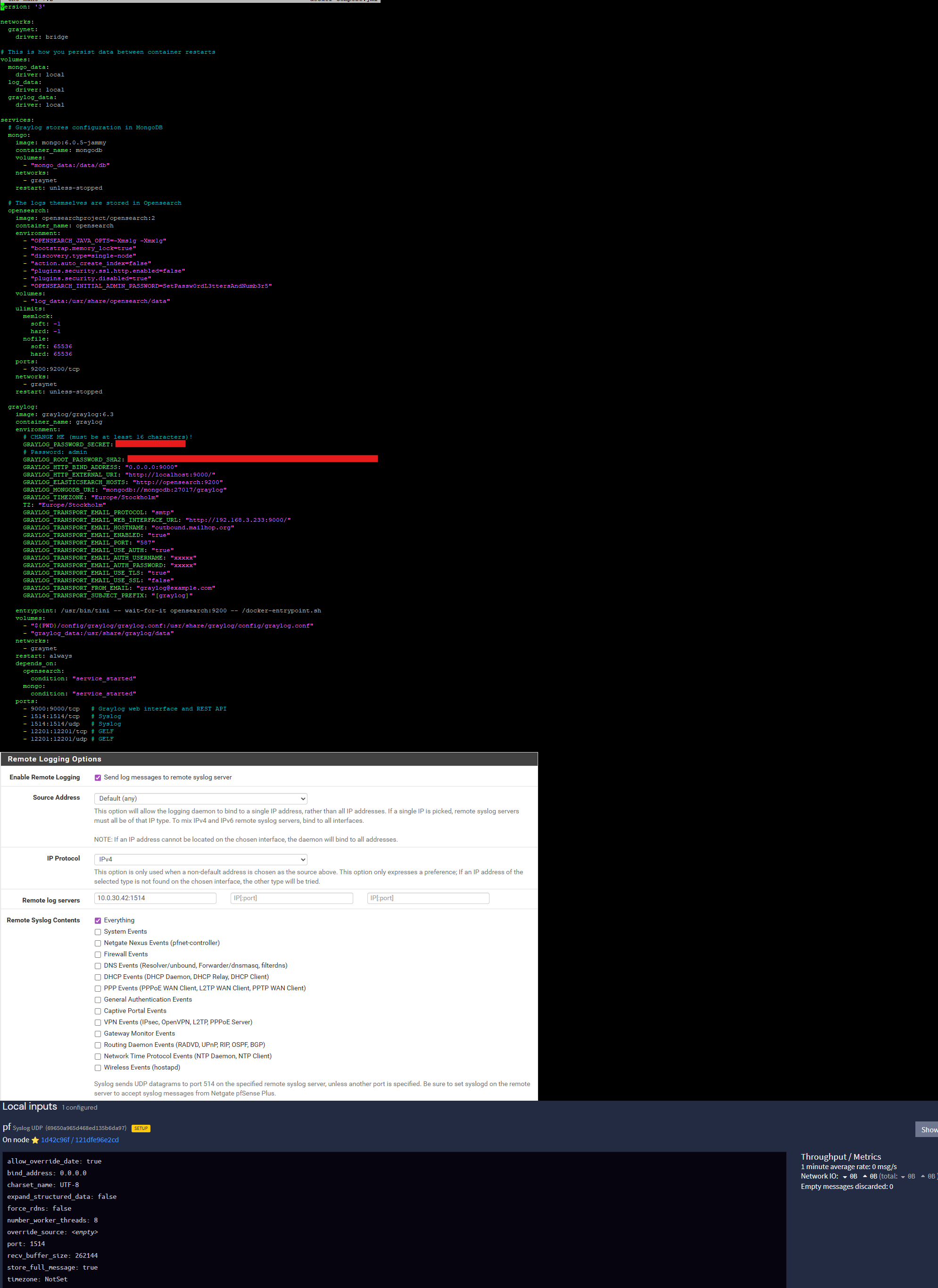
But Im having some issues to get the logs over to graylog. Im successfully sending log traffic from pfSense to my Graylog server, but Graylog does not show the logs in the UI
Traffic reaches the Graylog host and this is confirmed with tcpdump. Traffic is forwarded into the docker container correctly. Graylog is listening on the configured UDP port.
At this point pfsense is sending logs, Graylog is receiving packets but it does not show up in the GUI.
Do you got any ideas where I can troubleshoot to find the issue?
batman@batlab:~/graylog$ sudo tcpdump -ni any port 1514
tcpdump: data link type LINUX_SLL2
tcpdump: verbose output suppressed, use -v[v]… for full protocol decode
listening on any, link-type LINUX_SLL2 (Linux cooked v2), snapshot length 262144 bytes
14:56:52.069814 eno1 In IP 10.0.30.1.514 > 10.0.30.42.1514: SYSLOG syslog.error, length: 55
14:56:52.069851 br-f15df578e99f Out IP 10.0.30.1.514 > 172.18.0.4.1514: SYSLOG syslog.error, length: 55
14:56:52.069857 veth23f4fc7 Out IP 10.0.30.1.514 > 172.18.0.4.1514: SYSLOG syslog.error, length: 55
14:56:52.069923 eno1 In IP 10.0.30.1.514 > 10.0.30.42.1514: SYSLOG local0.info, length: 152
14:56:52.069923 eno1 In IP 10.0.30.1.514 > 10.0.30.42.1514: SYSLOG local0.info, length: 154
Thanks!
Are the metrics on that bottom screenshot showing any data?
I had the same problem. Created the input, checked incoming trafic, all ok. Metrics stay on 0.
Forgot to press the “Setup Input” button.
I am fairly new to linux and docker, but I am so puzzled. Your youtube walk through is very simple, along with these instructions I don’t know what went wrong. I’m using your instructions to set up graylog on a ubuntu 24.04 server (used to use 22.04 but upgraded as a troubleshooting step).
The error I keep encountering is the PWD is blank and the following:
graylog | 2026-03-31 10:15:52,085 ERROR: org.graylog2.bootstrap.CmdLineTool - Startup error:
graylog | org.graylog2.bootstrap.preflight.PreflightCheckException: Invalid password_secret!
graylog | Failed to decrypt values from MongoDB. This means that your password_secret has been changed or there….
I’ve tried with changing the passwords to what I want, but I’ve also reset the git and used all default configuration and they still fail. Am I missing something super obvious?
Thanks in advance for any help.
Are you using the latest compose file from GitHub? graylog/docker-compose.yml at master · lawrencesystems/graylog · GitHub
There have been changes since I made the video and I have updated my GitHub compose file to reflect those. Once 7.1 comes out I will probably be doing another video.
I’m pretty sure I did, but I’ll try again and make sure I pull the newer git. But to confirm, it should work even if you don’t change any settings in the docker compose, right?
As far as I know it should work.
Is this still up to date?